Hytale version
Back to mods 
CurseForge · Hytale mod
TaleOS
Computers in Hytale! Code in Lua, automate your world with turtles, and connect monitors, networks, and storage!
Choose a version Pick your version below, then grab the matching file.
Quick answer
Which TaleOS release should I use?
Latest stable file taleos-0.1.0.jar
Game version 0.7
Mod system Built-in Hytale mod system
taleos-0.1.0.jar targets 0.7. Do not install it as a separate client mod. Enable it on the world host—the local server in singleplayer or the dedicated server in multiplayer. No required dependencies listed for this file.
Where it goes
Where should TaleOS be installed in Hytale?
Do not install it as a separate client mod. Enable it on the world host—the local server in singleplayer or the dedicated server in multiplayer.
Separate client mod Not supported
World host / dedicated server Required
Mod system for this release Built-in Hytale mod system
Required install it here Optional supported, not mandatory Not supported do not install here Source doesn’t say do not assume
Put Hytale mods on the world host or dedicated server. Singleplayer runs a local server too; Hytale does not use separate client mods.
What else does taleos-0.1.0.jar need?
taleos-0.1.0.jar. Change the file and its required mods may change too.
This file does not list any required mods. Do not add a library just because a different file uses it.
This file does not list any required or optional project dependencies. Check the creator notes before changing an existing world.
Before you install it
Add TaleOS without breaking your instance.
Built for taleos-0.1.0.jar. Pick another file and the loader, install side or required mods may change.
- 01
Stick to this file
Use taleos-0.1.0.jar. It targets 0.7; another release may target a different game build or dependency set.
- 02
Bring the mods it needs
This file does not list any required mods. Do not add a library just because a different file uses it.
- 03
Enable it on the world host
Do not install it as a separate client mod. Enable it on the world host—the local server in singleplayer or the dedicated server in multiplayer.
- 04
Pick the file you checked
Use the “Get this file” button beside taleos-0.1.0.jar. It opens that exact file at the source.
About this project
What does TaleOS add?
TaleOS — Computers in Hytale!
WIKI: https://sergioatienzapastor.github.io/TaleOS/wiki/
Code in Lua, automate your world with turtles, and connect monitors, networks, and storage!
TaleOS brings fully programmable computers to Hytale. Build your own programs with the integrated editor, automate tasks with mobile robots, draw on large in-world displays, share files through network-attached storage, and connect your machines with wireless networking.
Everything runs on the server using a sandboxed Lua runtime designed for multiplayer. Players do not need to install anything on their clients.
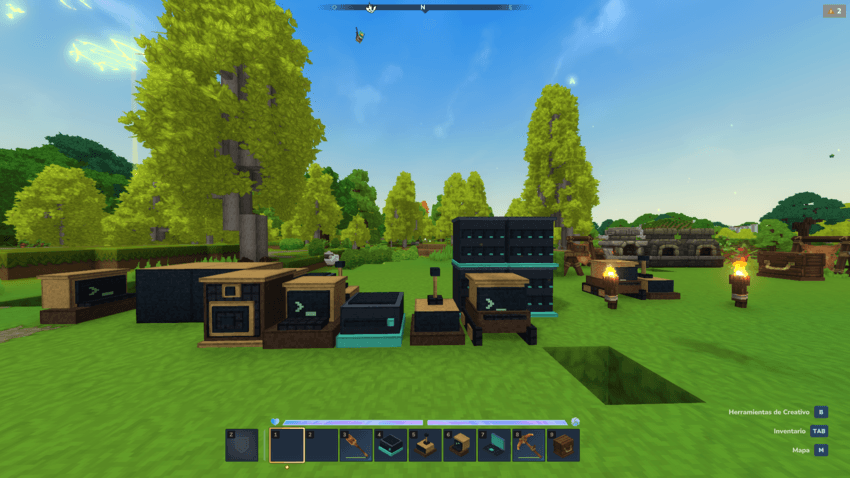
What can you do with TaleOS?
- Write and run real Lua programs inside Hytale.
- Use a terminal with commands, persistent files, directories, and autocompletion.
- Edit code with the built-in visual editor.
- Control turtles that move, dig, build, fight, craft, and manage items.
- Draw colored text and graphics directly on monitors in the world.
- Combine monitors into large displays of up to 8×8 blocks.
- Connect computers with wireless modems, Rednet messages, and GPS.
- Share programs and files using PenDrives, USB drives, and stackable NAS units.
- Carry a pocket computer with its own persistent identity and filesystem.
- Download Lua programs from the web with configurable HTTP security.
- Play positional sounds through speakers.
Computers and TaleOS
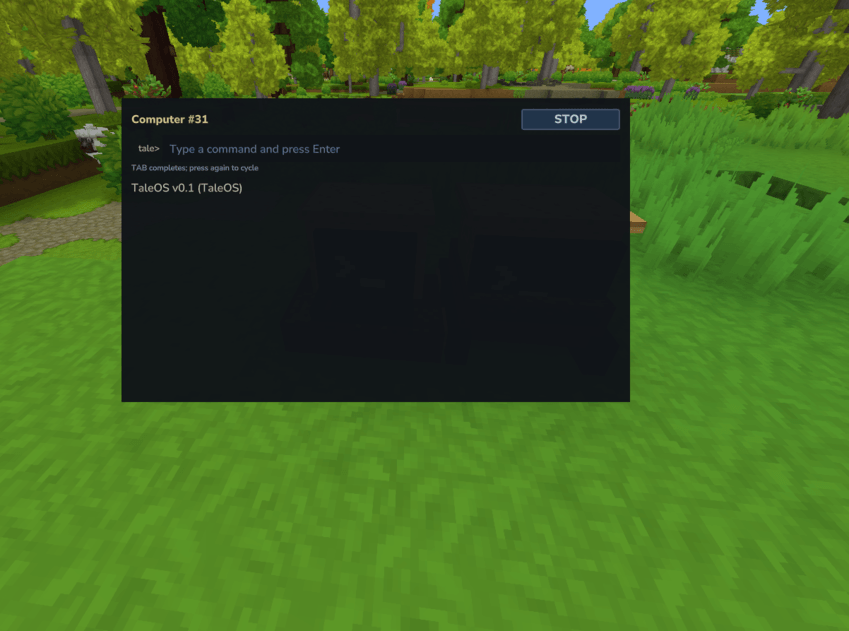
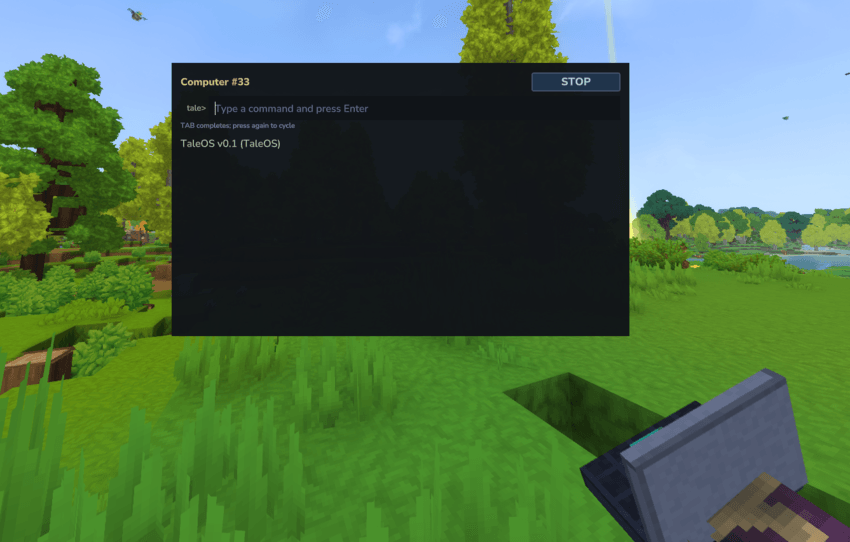
Place a Computer and interact with it to open its terminal. TaleOS provides a familiar command-line environment with programs such as ls, cd, cat, mkdir, rm, echo, lua, edit, wget, reboot, and shutdown.
Every computer has its own persistent identity and filesystem. Programs and files remain available after restarting the server, and each machine has a protected storage quota.
The terminal includes scrolling, cursor control, colors, autocompletion, and access to a 16-color Lua terminal API. Programs can also create clipped terminal windows and redirect their output to monitors.
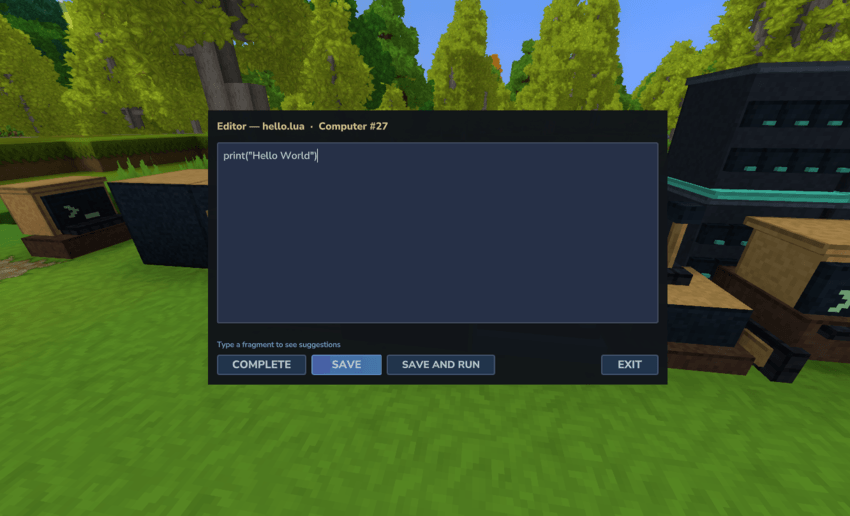
Built-in visual editor
Write programs without leaving the game. The editor supports file saving, execution, navigation, and autocompletion so that developing inside Hytale feels practical and comfortable.
Events, timers, and multitasking
TaleOS includes typed event queues, cancelable timers, cooperative tasks, and parallel.waitForAny / parallel.waitForAll. A startup.lua program can run automatically when a computer boots or reboots.
Lua code runs in a sandbox with instruction budgets and restricted Java access. Infinite loops are stopped without bringing down the server, making TaleOS suitable for multiplayer environments.
Programmable turtles
Turtles are mobile computers with a 16-slot inventory and two upgrade slots. Equip tools, weapons, modems, speakers, or crafting upgrades and automate work in your world.
Their equipped upgrades are visible on the 3D model, tools swing when used, and movement and rotation are animated. A turtle keeps its computer ID, files, inventory, selected slot, and upgrades when it moves or is picked up and placed again.
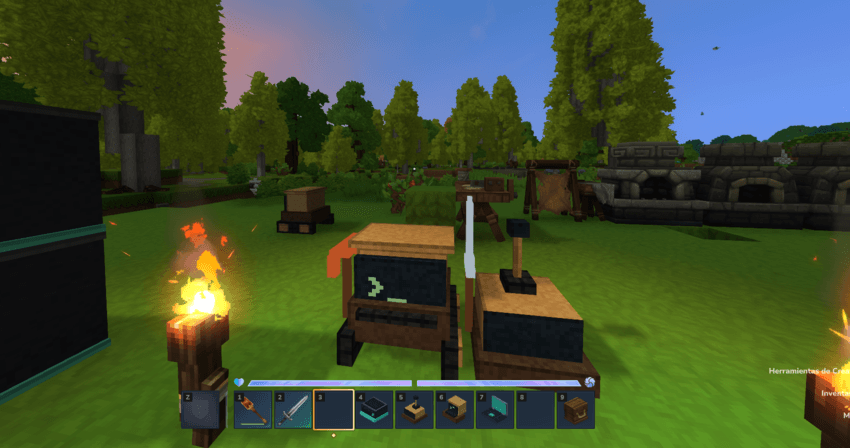
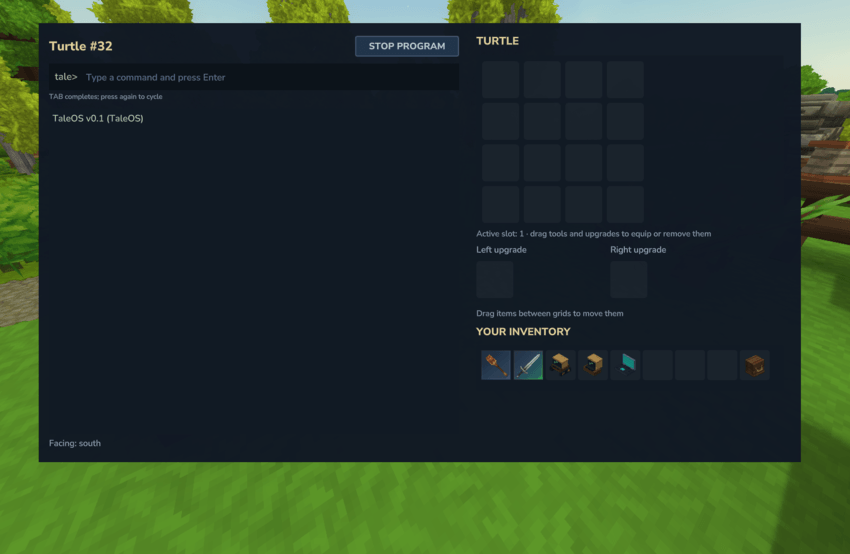
Turtles can:
- Move and turn in every direction.
- Detect and inspect blocks and entities.
- Dig, place blocks, attack, and craft.
- Collect and deposit items in adjacent containers.
- Compare blocks and manage inventory slots.
- Transfer items between slots.
- Equip and unequip left-hand and right-hand upgrades.
- Run programs while moving around the world.
Tools and weapons used by turtles do not lose durability. The ROM also includes useful programs such as go, turn, tunnel, excavate, equip, and unequip.
In-world monitors and large displays
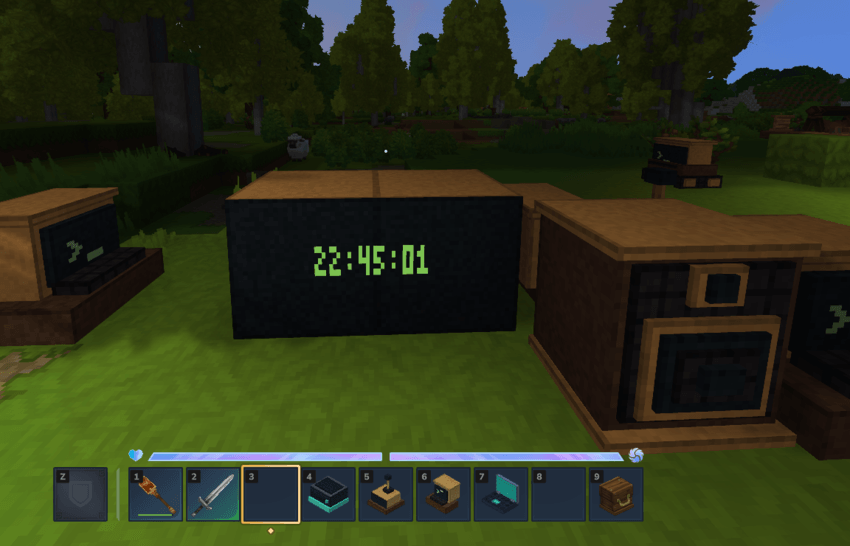
Monitors render text, pixels, and colored graphics directly on the block. There is no separate screen to open: whatever your program draws is visible directly in the world.
Connect compatible monitors to form a shared rectangular canvas of up to 8×8 blocks. Each monitor displays the correct portion of the shared image, and the canvas is preserved when the display is resized or split.
Use monitors for clocks, status boards, maps, animations, control panels, games, or anything else you can program.
Wireless networking and GPS
Place a modem next to a computer or equip one on a turtle to enable wireless communication. Rednet supports channels, protocols, broadcasts, timeouts, and DNS-style lookups.
Messages are bounded and safely copied between machines. Wireless communication respects world boundaries, loaded receivers, and the configured range.
With at least four non-coplanar reference hosts, computers can also use gps.locate to determine their position.
Speakers and peripheral inventories
Speakers can play registered Hytale sound events with configurable volume and pitch. They work as standalone peripherals or equipped on turtles, with positional audio and rate limiting.
Computers can also inspect adjacent item containers through the peripheral API. Turtles can collect or deposit items directly, making storage automation and sorting systems possible.
PenDrives and USB drives
Store programs and files on removable PenDrives. Each drive has its own persistent ID, optional label, and independent storage quota.
Insert a PenDrive into a USB drive to mount its filesystem on a nearby computer. Files can be read, edited, copied, or executed directly from the mounted drive, and safely ejecting the drive removes access to its contents.
Stackable NAS storage
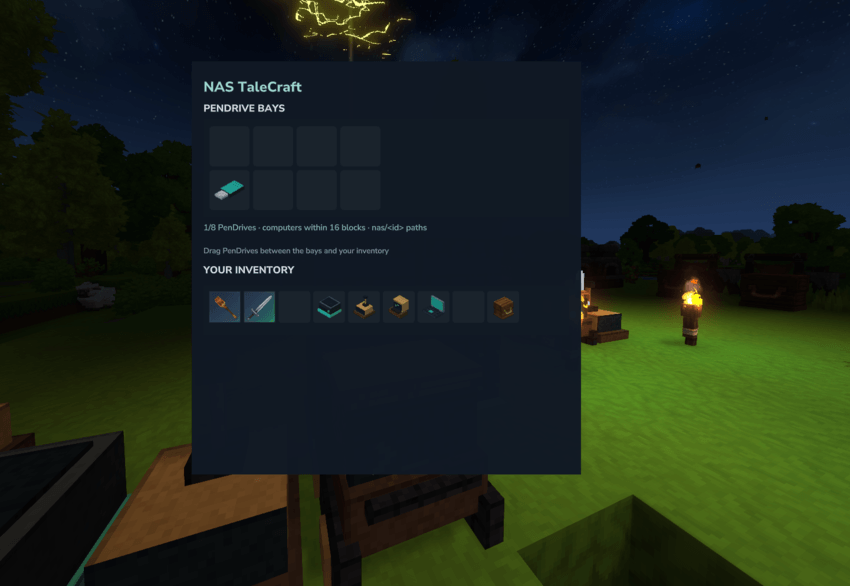
Build a shared storage network with NAS units. Each NAS holds up to eight PenDrives and shares their contents with running computers, turtles, and pocket computers within range.
Connected machines access the media through stable paths such as nas/<id>. Multiple machines can read or execute the same programs, while each physical PenDrive remains a unique medium that cannot be inserted in two places at once.
NAS units can be stacked to create larger shared storage systems.
Pocket computers
Take your programs with you. Pocket computers provide a mobile terminal with a persistent identity and filesystem.
Execution pauses safely when the item is dropped, its holder disconnects, or the holder changes worlds. Nearby NAS media follows the player and is unmounted when the pocket computer suspends.
HTTP downloads
Computers and turtles can download text files asynchronously with http.get or the wget command. This is useful for sharing Lua programs through services such as GitHub Raw.
Downloads are saved but never executed automatically. Server owners can configure request limits, timeouts, redirects, response sizes, bandwidth, and host rules. Private and local network addresses are denied by default.
wget https://raw.githubusercontent.com/user/repository/main/program.lua program.lua
program
Quick start
Open a computer terminal and create your first program:
edit hello.lua
Write:
print("Hello, Hytale!")
Save the file and run:
hello
You can also experiment directly in the Lua REPL:
lua
print(tale.time())
tale.chat("Hello from my computer!")
exit
Installation
- Download the TaleOS JAR.
- Copy it into your server's
Server/mods/directory. - Restart the Hytale server.
- Place a Computer and start programming.
Requirements: Hytale server 0.6.2 and Java 25.
No client installation is required. Models, textures, interfaces, and other assets are delivered by the server.
Multiplayer safety and administration
- Lua programs cannot access Java, arbitrary files, or unrestricted system APIs.
- Instruction budgets stop runaway scripts without crashing the server.
- Filesystems are isolated and subject to storage quotas.
- HTTP requests use configurable security rules and resource limits.
- Wireless messages and sound playback are bounded and rate-limited.
- Each computer writes a transcript for administrative troubleshooting.
- Computers can be tested or controlled through the server-side
/taleOScommand.
Early Access
TaleOS is under active development. The current release already includes computers, turtles, monitors, networking, removable storage, NAS systems, speakers, pocket computers, and HTTP downloads, but more peripherals, APIs, programs, and improvements are planned.
Feedback, bug reports, and ideas are welcome!
IF U WANT HELP ME AND U NEED A SERVER
Unlock a premium, lag-free experience at the best price on the market. Rent your high-quality game servers here and start playing without limits!
If you need a server and you want support me click in the banner and buy a server

Project description from CurseForge.
Pick your setup
TaleOS releases for each Hytale build.
Choose the version and loader you play, then open the matching release.
Check the dependencies, then try the file in a copied instance before changing a world you care about.
Recent files
TaleOS releases and Hytale builds
taleos-0.1.0.jar
28 Oct 2026
Client Not supported Server Required Dependencies No extras listed Listed on Project page
Check the 0.7 setup 0.7 release
Looking for an older file? The official CurseForge project page is in Resources.
 mod
mod CurseForge · Hytale
Tempest Lottery – Automated Server-Wide Timed Draws & Growing Jackpot Pot
A server lottery with tickets, automatic timed draws, a growing jackpot pot, live HUD & board countdown, crash-safe rollover, and Discord winner posts. Play money only. Works with any economy.
 mod
mod CurseForge · Hytale
Tempest Coinflip – Provably Fair SHA-256 1v1 Wager Rooms & Live Coin Spin
Coinflip rooms for your server: two players stake coins and a 22-frame spinning Gold/Silver coin decides, with live spectators, crash-safe escrow, and SHA-256 provably fair seed verification. Works with any economy.
 mod
mod CurseForge · Hytale
Tempest Events – Server-Wide Boosts, Community Goals, Overdrive Stages & Server Fund
Server events and boosts: double ore and monster gold, bigger rewards, more pass XP, shop sales. Community goals, overdrive stages, top-3 prizes, a player server fund (/events give), weekly schedule & in-game editor.