Hytale version
Back to mods 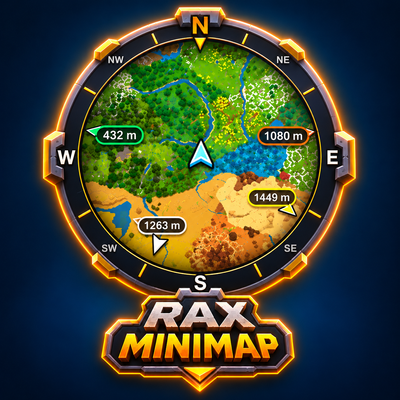
CurseForge · Hytale mod
RAX Minimap
Explore Hytale with a live minimap, automatic cave view, waypoint distances, and a customisable compass HUD.
Choose a version Pick your version below, then grab the matching file.
Quick answer
Which RAX Minimap release should I use?
Latest stable file Rax Minimap
Game version 0.7
Mod system Built-in Hytale mod system
Rax Minimap targets 0.7. Do not install it as a separate client mod. Enable it on the world host—the local server in singleplayer or the dedicated server in multiplayer. No required dependencies listed for this file.
Where it goes
Where should RAX Minimap be installed in Hytale?
Do not install it as a separate client mod. Enable it on the world host—the local server in singleplayer or the dedicated server in multiplayer.
Separate client mod Not supported
World host / dedicated server Required
Mod system for this release Built-in Hytale mod system
Required install it here Optional supported, not mandatory Not supported do not install here Source doesn’t say do not assume
Put Hytale mods on the world host or dedicated server. Singleplayer runs a local server too; Hytale does not use separate client mods.
What else does Rax Minimap need?
Rax Minimap. Change the file and its required mods may change too.
This file does not list any required mods. Do not add a library just because a different file uses it.
This file does not list any required or optional project dependencies. Check the creator notes before changing an existing world.
Before you install it
Add RAX Minimap without breaking your instance.
Built for Rax Minimap. Pick another file and the loader, install side or required mods may change.
- 01
Stick to this file
Use Rax Minimap. It targets 0.7; another release may target a different game build or dependency set.
- 02
Bring the mods it needs
This file does not list any required mods. Do not add a library just because a different file uses it.
- 03
Enable it on the world host
Do not install it as a separate client mod. Enable it on the world host—the local server in singleplayer or the dedicated server in multiplayer.
- 04
Pick the file you checked
Use the “Get this file” button beside Rax Minimap. It opens that exact file at the source.
About this project
What does RAX Minimap add?
RAX Minimap
Navigate the surface and the caves beneath it with a live minimap for Hytale. Follow your heading, see your distance to saved waypoints, and find your way back to the places you want to revisit.
Surface and cave navigation
RAX Minimap automatically switches to a cave view when you go underground. Enable the secondary surface map to keep the terrain above you in view while you explore below.
Waypoints and coordinates
Use coloured waypoints to keep track of your base, cave entrances, and other landmarks. The minimap shows the direction and distance to your waypoints as you move. You can also display your coordinates and choose between a rotating, heading-up map and a fixed, north-up view.
Customisable HUD
Choose a surface view radius of 250, 500, 750, or 1,000 blocks. Select from four HUD sizes, place the minimap in any screen corner, and adjust the size and colour of your player arrow.
In-game settings
Press M to open the world map, then select Settings under Minimap Settings. The live preview shows how your HUD will look as you adjust it.
Developed by Dragon Games Studio
Project description from CurseForge.
Pick your setup
RAX Minimap releases for each Hytale build.
Choose the version and loader you play, then open the matching release.
Check the dependencies, then try the file in a copied instance before changing a world you care about.
Recent files
RAX Minimap releases and Hytale builds
Rax Minimap
25 Nov 2026
Client Not supported Server Required Dependencies No extras listed Listed on Project page
Check the 0.7 setup 0.7 release
Looking for an older file? The official CurseForge project page is in Resources.
 mod
CurseForge · Hytale
HySkin
Change your skin in game, with a live 3D preview. Copy any player's skin, even when they're offline.
 mod
CurseForge · Hytale
TOGO - Weapons Combat & Runes
[Feedback welcomed] Turning Hytale into Fast-Paced ARPG, bringing New Combat style with Hytale Weapons, and Elemental powers
 mod
CurseForge · Hytale
Living World Events
A world that's truly alive: unexpected events, epic bosses and treasures waiting to be won.