Minecraft version
Back to mods 
CurseForge · Minecraft mod
JJThunder To The Max
2000 Block Realistic 1:1 Mountain Generation
Choose a version Pick your version below, then grab the matching file.
Quick answer
Which JJThunder To The Max release should I use?
Latest stable file ZZ.JJThunder_To_The_Max_1.20.1_v0.2.0.jar
Game version 1.20.1
Loader Fabric, Forge
JJThunder To The Max ZZ.JJThunder_To_The_Max_1.20.1_v0.2.0.jar targets 1.20.1 with Fabric, Forge. The project page does not say whether this file belongs on the client, dedicated server, or both. No extra mods listed for this file.
Where it goes
Is JJThunder To The Max required on the client, server, or both?
The project page does not say whether this file belongs on the client, dedicated server, or both.
Client Source doesn’t say
Dedicated server Source doesn’t say
Loader for this release Fabric, Forge
Required install it here Optional supported, not mandatory Not supported do not install here Source doesn’t say do not assume
The source does not explicitly classify this release as client-only or server-only.
What else does JJThunder To The Max ZZ.JJThunder_To_The_Max_1.20.1_v0.2.0.jar need?
ZZ.JJThunder_To_The_Max_1.20.1_v0.2.0.jar. Change the file and its required mods may change too.
This file does not list any required mods. Do not add a library just because a different file uses it.
This file does not list any required or optional mods.
Before you install it
Add JJThunder To The Max without breaking your instance.
Built for JJThunder To The Max ZZ.JJThunder_To_The_Max_1.20.1_v0.2.0.jar. Pick another file and the loader, install side or required mods may change.
- 01
Stick to this file
Use ZZ.JJThunder_To_The_Max_1.20.1_v0.2.0.jar. It targets 1.20.1 with Fabric, Forge; another release may have different loader, side or dependency requirements.
- 02
Bring the mods it needs
This file does not list any required mods. Do not add a library just because a different file uses it.
- 03
Put it on the correct side
The project page does not say whether this file belongs on the client, dedicated server, or both.
- 04
Pick the file you checked
Use the “Get this file” button beside ZZ.JJThunder_To_The_Max_1.20.1_v0.2.0.jar. It opens that exact file at the source.
About this project
What does JJThunder To The Max add?
Summary:
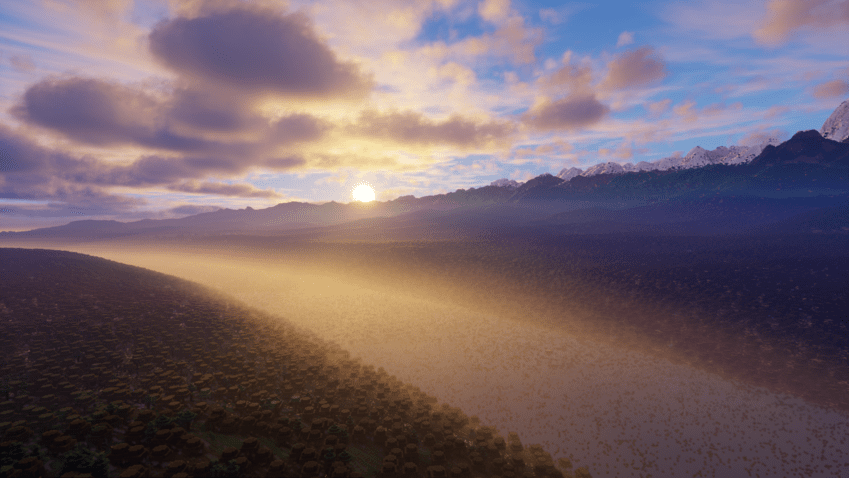
JJThunder to the max is a 1:1 world generation that completely changes the way the terrain is generated.
It focuses on adding massive mountains that stretch to almost 2000 blocks tall, while still having flat plains at the bottom.
It also terraforms caves to match the theme of the world generation.
Data pack Version:
v0.3.0 is out for 1.21 and only available for now as data pack version.
Don't worry, we'll release the mod version sooner or later!
Link:
https://modrinth.com/datapack/jjthunder-to-the-max
Notes:
Allocate more RAM. By default, its 2GB, so depending on your usage and render distance, you might need more.
Do not use in existing worlds, or it will corrupt your existing buillds.
Not compatible with terralith, tectonic, and other world generation data packs.
Semi-Compatible with biome mods like Biomes O Plenty, however, I wont call it compatible.
Requires beefy computers, or optimization mods like sodium, etc.
Project description from CurseForge.
Pick your setup
JJThunder To The Max by Minecraft version and loader
Choose the version and loader you play, then open the matching release.
Minecraft version
1.20.1
2 loader buildsCheck the dependencies, then try the file in a copied instance before changing a world you care about.
Recent files
JJThunder To The Max versions and loaders
ZZ.JJThunder_To_The_Max_1.20.1_v0.2.0.jar
2 Jun 2024
Client Source doesn’t say Server Source doesn’t say Dependencies No extras listed Listed on Release listing
Check the 1.20.1 · Fabric setup Fabric1.20.1Forge release
ZZ.JJThunder-To-The-Max_1.20.1_v0.1.0.jar
5 May 2024
Client Source doesn’t say Server Source doesn’t say Dependencies No extras listed Listed on Release listing
Check the 1.20.1 · Fabric setup Fabric1.20.1Forge release
ZZ.JJThunder-To-The-Max_1.20.4_v0.1.0.jar
13 Apr 2024
Client Source doesn’t say Server Source doesn’t say Dependencies No extras listed Listed on Release listing
Check the 1.20.4 · Fabric setup FabricForge1.20.4 release
Looking for an older file? The official CurseForge project page is in Resources.
 mod
CurseForge + Modrinth · Minecraft
Moyai
Adds naturally spawning Moyai to your game 🗿
 mod
CurseForge · Minecraft
Fire & Ice: Awakening
Choose Fire or Ice: grow a huge skill web, chain co-op combos, awaken, and face giant elemental bosses in cinematic fights.
 mod
CurseForge · Minecraft
MAN OF TOMORROW
THE BEST SUPERMAN MOD IN MINECRAFT