Minecraft version
Back to mods 
CurseForge · Minecraft mod
VaultarHUD
For Vault Hunters 3rd Edition: Adds a HUD that shows the currently required items for your Vault Altar
Choose a version Pick your version below, then grab the matching file.
Quick answer
Which VaultarHUD release matches 1.18.2?
Best match for your filters VaultarHUD 1.3.1
Game version 1.18.2
Loader Forge
VaultarHUD 1.3.1 targets 1.18.2 with Forge. The project page does not say whether this file belongs on the client, dedicated server, or both. No extra mods listed for this file.
Where it goes
Is VaultarHUD required on the client, server, or both?
The project page does not say whether this file belongs on the client, dedicated server, or both.
Client Source doesn’t say
Dedicated server Source doesn’t say
Loader for this release Forge
Required install it here Optional supported, not mandatory Not supported do not install here Source doesn’t say do not assume
The source does not explicitly classify this release as client-only or server-only.
What else does VaultarHUD 1.3.1 need?
VaultarHUD 1.3.1 on 1.18.2. Every mod below is checked against that same setup.
This file does not list any required mods. Do not add a library just because a different file uses it.
This file does not list any required or optional mods.
Before you install it
Add VaultarHUD without breaking your instance.
Built for VaultarHUD 1.3.1 on 1.18.2. Pick another file and the loader, install side or required mods may change.
- 01
Stick to this file
Use VaultarHUD 1.3.1. It targets 1.18.2 with Forge; another release may have different loader, side or dependency requirements.
- 02
Bring the mods it needs
This file does not list any required mods. Do not add a library just because a different file uses it.
- 03
Put it on the correct side
The project page does not say whether this file belongs on the client, dedicated server, or both.
- 04
Pick the file you checked
Use the “Get this file” button beside VaultarHUD 1.3.1. It opens that exact file at the source.
About this project
What does VaultarHUD add?

Requires Wold's Vaults or Vault Hunters 3rd Edition
Adds a HUD opposite the bounty table HUD (when you press Tab) that shows a similar progress bar for items towards your current vault crystal. Also shows the HUD in inventory screens. Required items that have variants (e.g. Oak logs, Birch logs) will cycle through the options automatically.
Installation / Usage:
- Drop the jar file into your
modsfolder - In game, press
Tabto show the HUD. The HUD will also show up automatically in any inventory screens. Pressing0will toggle the HUD on/off.
Notes:
This mod can be installed either on the client only, or on both the client and server with a few caveats:
- If it is installed on the client only, you will need to first track an altar by getting within 10 blocks of it, and then it will remain tracked while you are within its render distance (~5 chunks?). You can also manually right-click another altar to track that one instead.
- If it is installed on both the client and the server, then the HUD will update automatically and be live-tracked to you regardless of where you are.
Keybinds:
Key bindings can be reconfigured from the standard in-game menu.
Configuration:
- Chose whether the HUD shows up within inventories, or just when the
Tabkey is held in-game. - Also choose which type of inventory HUD (regular or small) is shown. Requires either editing the
vaultarhud-client.tomlconfig file, or using an in-game config mod such as Configured.
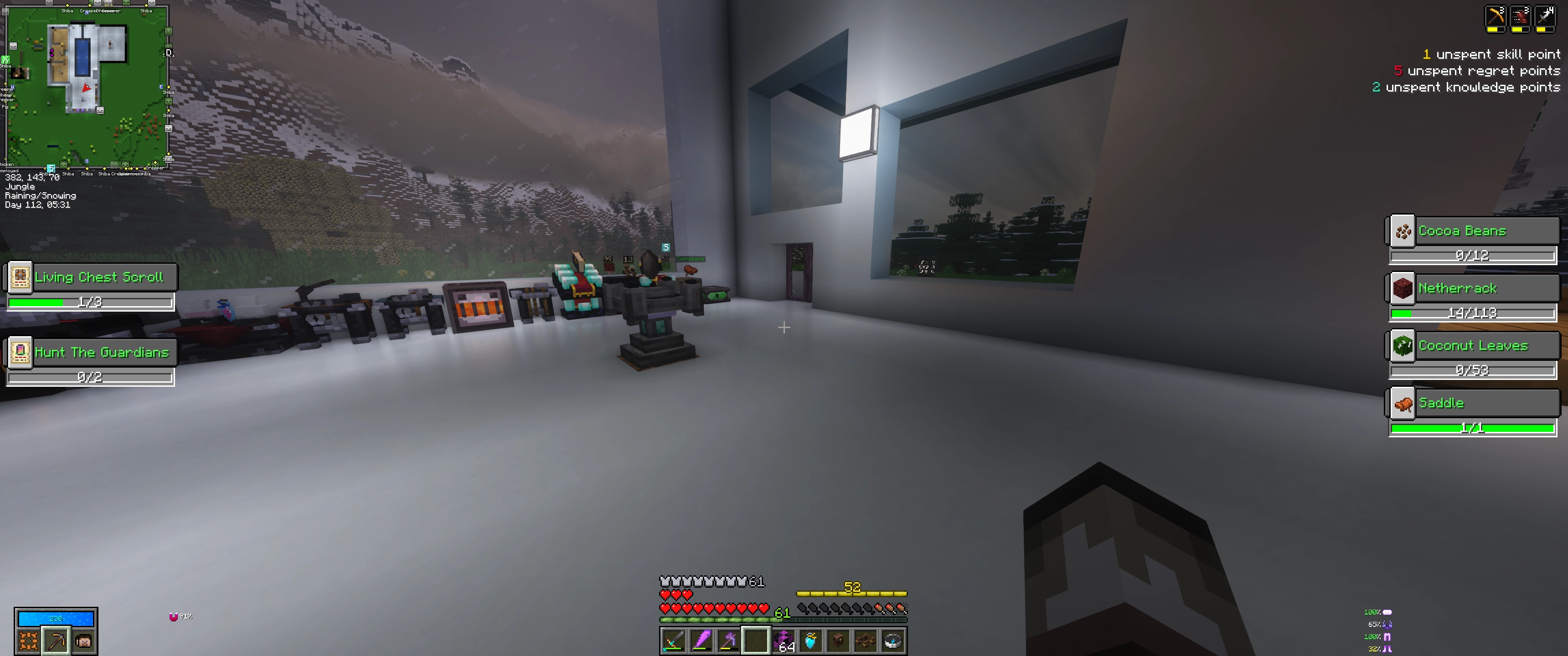
Project description from CurseForge.
Pick your setup
VaultarHUD by Minecraft version and loader
Choose the version and loader you play, then open the matching release.
Check the dependencies, then try the file in a copied instance before changing a world you care about.
Recent files
VaultarHUD versions and loaders
VaultarHUD 1.3.1
VaultarHUD-1.3.1-1.18.2.jar
11 Jul 2026
Client Source doesn’t say Server Source doesn’t say Dependencies No extras listed Listed on Release listing
Check the 1.18.2 · Forge setup Forge1.18.2 release
VaultarHUD 1.2.0
VaultarHUD-1.2.0-1.18.2.jar
15 Sept 2024
Client Source doesn’t say Server Source doesn’t say Dependencies No extras listed Listed on Release listing
Check the 1.18.2 · Forge setup 1.18.2Forge release
VaultarHUD 1.1.0
VaultarHUD-1.1.0-1.18.2.jar
13 Sept 2024
Client Source doesn’t say Server Source doesn’t say Dependencies No extras listed Listed on Release listing
Check the 1.18.2 · Forge setup 1.18.2Forge release
VaultarHud 1.0.0
vaultarhud-1.0.0-1.18.2.jar
9 Sept 2024
Client Source doesn’t say Server Source doesn’t say Dependencies No extras listed Listed on Release listing
Check the 1.18.2 · Forge setup 1.18.2Forge release
VaultarHud 0.0.12
vaultarhud-0.0.12-1.18.2.jar
12 Aug 2024
Client Source doesn’t say Server Source doesn’t say Dependencies No extras listed Listed on Release listing
Check the 1.18.2 · Forge setup 1.18.2Forge release
VaultarHud 0.0.11
vaultarhud-0.0.11-1.18.2.jar
4 Aug 2024
Client Source doesn’t say Server Source doesn’t say Dependencies No extras listed Listed on Release listing
Check the 1.18.2 · Forge setup 1.18.2Forge release
VaultarHud 0.0.10
vaultarhud-0.0.10-1.18.2.jar
9 Jun 2024
Client Source doesn’t say Server Source doesn’t say Dependencies No extras listed Listed on Release listing
Check the 1.18.2 · Forge setup 1.18.2Forge release
VaultarHUD 0.0.9
vaultarhud-0.0.9-1.18.2.jar
15 May 2024
Client Source doesn’t say Server Source doesn’t say Dependencies No extras listed Listed on Release listing
Check the 1.18.2 · Forge setup 1.18.2Forge release
VaultarHUD 0.0.8
vaultarhud-0.0.8-1.18.2.jar
30 Apr 2024
Client Source doesn’t say Server Source doesn’t say Dependencies No extras listed Listed on Release listing
Check the 1.18.2 · Forge setup 1.18.2Forge release
Looking for an older file? The official CurseForge project page is in Resources.
 mod
Modrinth · Minecraft
Physics Mod
Welcome to a more destructive Minecraft than you've ever seen before!
 mod
Modrinth · Minecraft
ViaBackwards
Allow older Java Edition clients to connect to newer servers.
 mod
Modrinth · Minecraft
ViaVersion
Allow newer Java Edition clients to connect to older servers.