Minecraft version
Back to mods 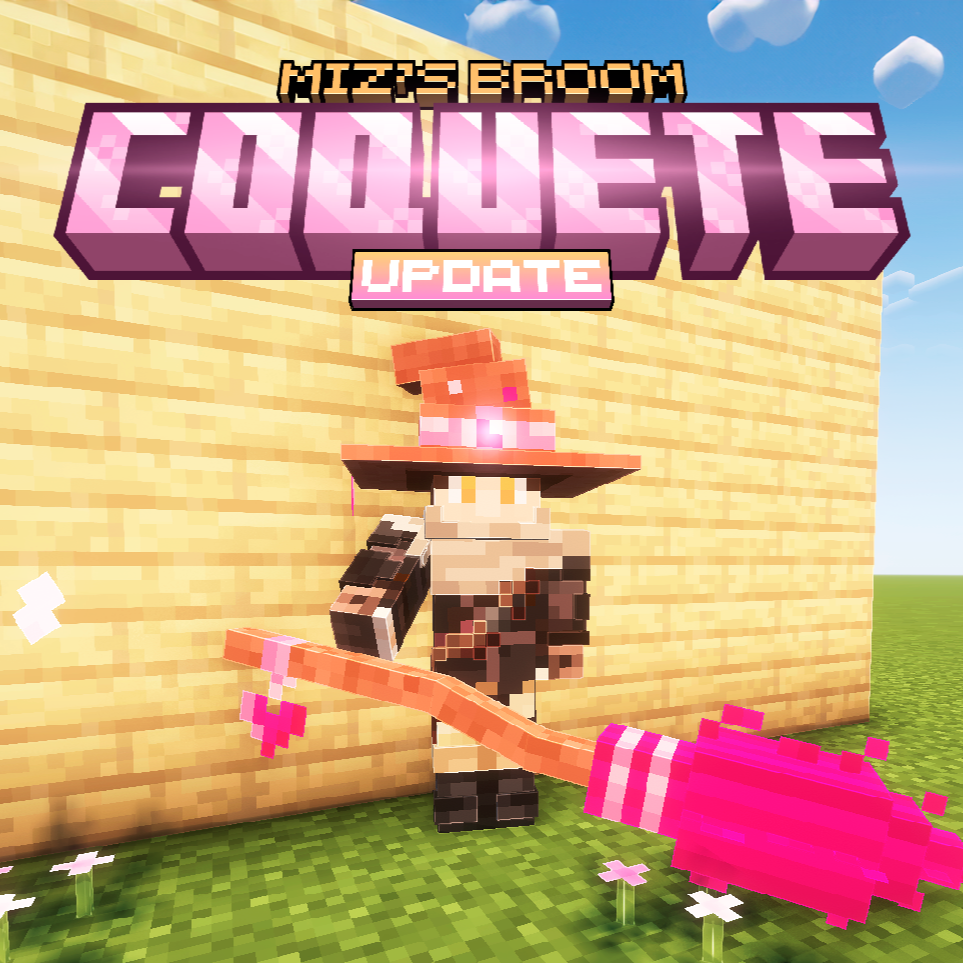
CurseForge · Minecraft mod
Miz's Broom
Adds a witch's broom and witch's hat to your world.
Choose a version Pick your version below, then grab the matching file.
Quick answer
Which Miz's Broom release should I use?
Latest stable file mizs_broom-1.0.4-neoforge-1.21.1.jar
Game version 1.21.1
Loader NeoForge
Miz's Broom mizs_broom-1.0.4-neoforge-1.21.1.jar targets 1.21.1 with NeoForge. The project page does not say whether this file belongs on the client, dedicated server, or both. No extra mods listed for this file.
Where it goes
Is Miz's Broom required on the client, server, or both?
The project page does not say whether this file belongs on the client, dedicated server, or both.
Client Source doesn’t say
Dedicated server Source doesn’t say
Loader for this release NeoForge
Required install it here Optional supported, not mandatory Not supported do not install here Source doesn’t say do not assume
The source does not explicitly classify this release as client-only or server-only.
What else does Miz's Broom mizs_broom-1.0.4-neoforge-1.21.1.jar need?
mizs_broom-1.0.4-neoforge-1.21.1.jar. Change the file and its required mods may change too.
This file does not list any required mods. Do not add a library just because a different file uses it.
This file does not list any required or optional mods.
Before you install it
Add Miz's Broom without breaking your instance.
Built for Miz's Broom mizs_broom-1.0.4-neoforge-1.21.1.jar. Pick another file and the loader, install side or required mods may change.
- 01
Stick to this file
Use mizs_broom-1.0.4-neoforge-1.21.1.jar. It targets 1.21.1 with NeoForge; another release may have different loader, side or dependency requirements.
- 02
Bring the mods it needs
This file does not list any required mods. Do not add a library just because a different file uses it.
- 03
Put it on the correct side
The project page does not say whether this file belongs on the client, dedicated server, or both.
- 04
Pick the file you checked
Use the “Get this file” button beside mizs_broom-1.0.4-neoforge-1.21.1.jar. It opens that exact file at the source.
About this project
What does Miz's Broom add?
Developing these mods takes time, dedication, and a lot of care — all because I love seeing you have fun with them. If this mod helped you have some epic moments in the game, consider buying me a coffee ☕. It keeps me motivated to keep creating, and you might even get some exclusive rewards. Every little bit helps! 


This mod adds a witch's broom and a witch's hat for you to explore your world.


When wearing the witch's hat, your flying speed increases.
To get the broom, simply crouch and right-click on it.
To place the broom on the floor, simply click on the floor with the broom in your hand.
Flight controls.
While stopped, you can go up by pressing “Space” and go down by pressing “S”.
During the flight you will move by pressing "W" and use the mouse control to change direction.
Mod created in mcreator.
Project description from CurseForge.
Pick your setup
Miz's Broom by Minecraft version and loader
Choose the version and loader you play, then open the matching release.
Minecraft version
1.20.4
1 loader buildMinecraft version
1.20.1
1 loader buildMinecraft version
1.19.2
1 loader buildCheck the dependencies, then try the file in a copied instance before changing a world you care about.
Recent files
Miz's Broom versions and loaders
mizs_broom-1.0.4-neoforge-1.21.1.jar
12 Apr 2025
Client Source doesn’t say Server Source doesn’t say Dependencies No extras listed Listed on Release listing
Check the 1.21.1 · NeoForge setup NeoForge1.21.1 release
mizs_broom-1.0.4-forge-1.20.1.jar
12 Apr 2025
Client Source doesn’t say Server Source doesn’t say Dependencies No extras listed Listed on Release listing
Check the 1.20.1 · Forge setup 1.20.1Forge release
mizs_broom-1.0.3-neoforge-1.21.1.jar
6 Feb 2025
Client Source doesn’t say Server Source doesn’t say Dependencies No extras listed Listed on Release listing
Check the 1.21.1 · NeoForge setup NeoForge1.21.1 release
mizs_broom-1.0.3-forge-1.20.1.jar
6 Feb 2025
Client Source doesn’t say Server Source doesn’t say Dependencies No extras listed Listed on Release listing
Check the 1.20.1 · Forge setup 1.20.1Forge release
mizs_broom-1.0.2-neoforge-1.21.1.jar
5 Feb 2025
Client Source doesn’t say Server Source doesn’t say Dependencies No extras listed Listed on Release listing
Check the 1.21.1 · NeoForge setup NeoForge1.21.1 release
mizs_broom-1.0.2-forge-1.20.1.jar
14 May 2024
Client Source doesn’t say Server Source doesn’t say Dependencies No extras listed Listed on Release listing
Check the 1.20.1 · Forge setup 1.20.1Forge release
mizs_broom-1.0.1-neoforge-1.20.4.jar
6 May 2024
Client Source doesn’t say Server Source doesn’t say Dependencies No extras listed Listed on Release listing
Check the 1.20.4 · NeoForge setup NeoForge1.20.4 beta
mizs_broom-1.0.1-forge-1.20.1.jar
6 May 2024
Client Source doesn’t say Server Source doesn’t say Dependencies No extras listed Listed on Release listing
Check the 1.20.1 · Forge setup 1.20.1Forge beta
mizs_broom-1.0.1-forge-1.19.2.jar
6 May 2024
Client Source doesn’t say Server Source doesn’t say Dependencies No extras listed Listed on Release listing
Check the 1.19.2 · Forge setup 1.19.2Forge beta
mizs_broom-1.0.0-neoforge-1.20.4.jar
5 May 2024
Client Source doesn’t say Server Source doesn’t say Dependencies No extras listed Listed on Release listing
Check the 1.20.4 · NeoForge setup NeoForge1.20.4 beta
mizs_broom-1.0.0-forge-1.19.2.jar
4 May 2024
Client Source doesn’t say Server Source doesn’t say Dependencies No extras listed Listed on Release listing
Check the 1.19.2 · Forge setup 1.19.2Forge beta
mizs_broom-1.0.0-forge-1.20.1.jar
4 May 2024
Client Source doesn’t say Server Source doesn’t say Dependencies No extras listed Listed on Release listing
Check the 1.20.1 · Forge setup 1.20.1Forge beta
Looking for an older file? The official CurseForge project page is in Resources.
 mod
CurseForge + Modrinth · Minecraft
ColoredWater
Colored water to decorate colorfully. And cauldrons!
 mod
CurseForge · Minecraft
TLM Formation Tactics
Squad management, formation follow, tactical HUD and Black Hawk airdrop for Touhou Little Maid.
 mod
CurseForge · Minecraft
Aki's Radio
In game radios! You can create your own!