Minecraft version
Back to mods 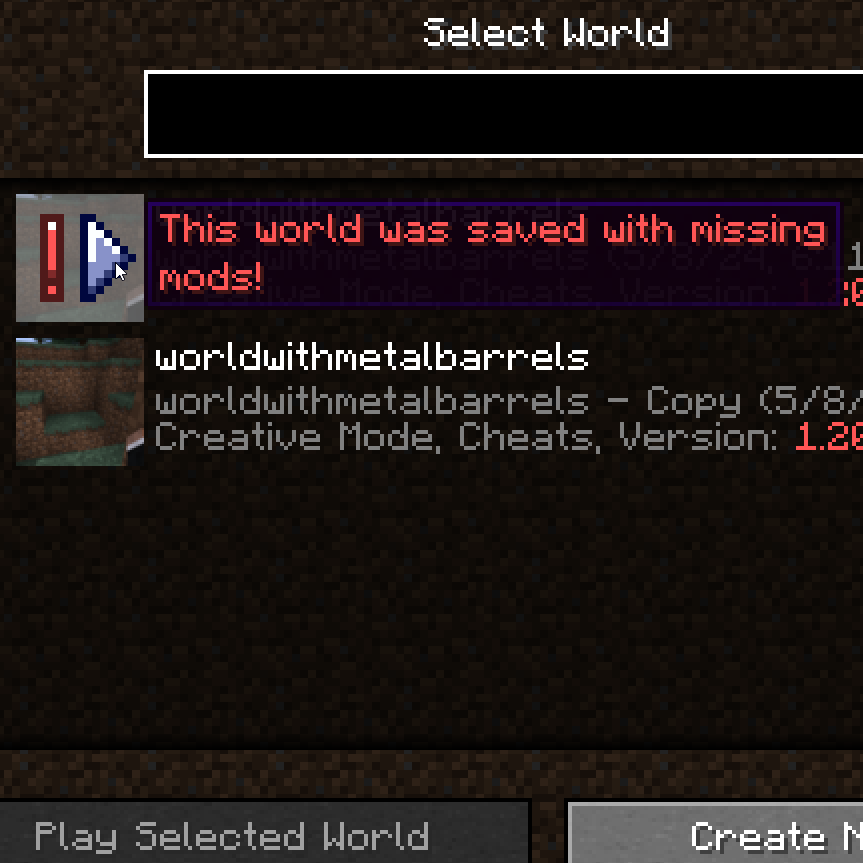
CurseForge · Minecraft mod
Missing Mods Warning
Warn the player when attempting to load worlds with missing mods
Choose a version Pick your version below, then grab the matching file.
Quick answer
Which Missing Mods Warning release matches 1.21.1 NeoForge?
Best match for your filters missingmodswarning-neoforge-1.21.1-0.jar
Game version 1.21.1
Loader NeoForge
Missing Mods Warning missingmodswarning-neoforge-1.21.1-0.jar targets 1.21.1 with NeoForge. The project page does not say whether this file belongs on the client, dedicated server, or both. No extra mods listed for this file.
Where it goes
Is Missing Mods Warning required on the client, server, or both?
The project page does not say whether this file belongs on the client, dedicated server, or both.
Client Source doesn’t say
Dedicated server Source doesn’t say
Loader for this release NeoForge
Required install it here Optional supported, not mandatory Not supported do not install here Source doesn’t say do not assume
The source does not explicitly classify this release as client-only or server-only.
What else does Missing Mods Warning missingmodswarning-neoforge-1.21.1-0.jar need?
missingmodswarning-neoforge-1.21.1-0.jar on 1.21.1 NeoForge. Every mod below is checked against that same setup.
This file does not list any required mods. Do not add a library just because a different file uses it.
This file does not list any required or optional mods.
Before you install it
Add Missing Mods Warning without breaking your instance.
Built for Missing Mods Warning missingmodswarning-neoforge-1.21.1-0.jar on 1.21.1 NeoForge. Pick another file and the loader, install side or required mods may change.
- 01
Stick to this file
Use missingmodswarning-neoforge-1.21.1-0.jar. It targets 1.21.1 with NeoForge; another release may have different loader, side or dependency requirements.
- 02
Bring the mods it needs
This file does not list any required mods. Do not add a library just because a different file uses it.
- 03
Put it on the correct side
The project page does not say whether this file belongs on the client, dedicated server, or both.
- 04
Pick the file you checked
Use the “Get this file” button beside missingmodswarning-neoforge-1.21.1-0.jar. It opens that exact file at the source.
About this project
What does Missing Mods Warning add?
This mod adds a warning screen when attempting to load a world with missing mods, tells what mods are missing and provides an option to go back to the main menu or proceed loading.
Forge used to provide a similar feature on pre-1.13 versions, but has since been removed.
An icon and tooltip is also added to the affected worlds in the selection screen
Useful for debugging mods without accidentally ruining a world. Clientside only
New tooltip

Warning screen


Need a custom mod for a reasonable fee? Just want to chat? Have a complex issue needing additional discussion? Join the Discord:

Want to help support this mod and others? Donate to my Patreon in the link below

Project description from CurseForge.
Pick your setup
Missing Mods Warning by Minecraft version and loader
Choose the version and loader you play, then open the matching release.
Minecraft version
1.20.1
1 loader buildCheck the dependencies, then try the file in a copied instance before changing a world you care about.
Recent files
Missing Mods Warning versions and loaders
missingmodswarning-neoforge-1.21.1-0.jar
21 Oct 2024
Client Source doesn’t say Server Source doesn’t say Dependencies No extras listed Listed on Release listing
Check the 1.21.1 · NeoForge setup NeoForge1.21.1 release
Looking for an older file? The official CurseForge project page is in Resources.
 mod
CurseForge · Minecraft
Turbo for Distant Horizons
Distant Horizons addon: generates distant terrain from the world noise several times faster, with real trees and structures.
 mod
CurseForge · Minecraft
musicaldash
Insert Musical Dash discs into any Jukebox to teleport to live action stages across all Minecraft updates, spawn a Bot with your exact skin that builds, mines, and fights, record your own replay discs, and return anytime via the Skip Block!
 mod
CurseForge · Minecraft
Markethold
Balance of the trades: no Mending in the trades and in fishing, with a list of blocked enchantments.