Minecraft version
Back to mods 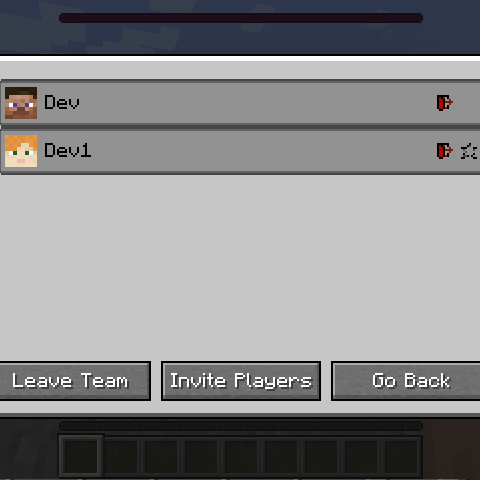
CurseForge · Minecraft mod
Teams HUD
Adding functional teams with a GUI, pinging, item transfer, advancement sharing and more
Choose a version Pick your version below, then grab the matching file.
Quick answer
Which Teams HUD release should I use?
Latest stable file TeamsHUD-forge-1.20.1-4.jar
Game version 1.20.1
Loader Forge
Teams HUD TeamsHUD-forge-1.20.1-4.jar targets 1.20.1 with Forge. The project page does not say whether this file belongs on the client, dedicated server, or both. No extra mods listed for this file.
Where it goes
Is Teams HUD required on the client, server, or both?
The project page does not say whether this file belongs on the client, dedicated server, or both.
Client Source doesn’t say
Dedicated server Source doesn’t say
Loader for this release Forge
Required install it here Optional supported, not mandatory Not supported do not install here Source doesn’t say do not assume
The source does not explicitly classify this release as client-only or server-only.
What else does Teams HUD TeamsHUD-forge-1.20.1-4.jar need?
TeamsHUD-forge-1.20.1-4.jar. Change the file and its required mods may change too.
This file does not list any required mods. Do not add a library just because a different file uses it.
This file does not list any required or optional mods.
Before you install it
Add Teams HUD without breaking your instance.
Built for Teams HUD TeamsHUD-forge-1.20.1-4.jar. Pick another file and the loader, install side or required mods may change.
- 01
Stick to this file
Use TeamsHUD-forge-1.20.1-4.jar. It targets 1.20.1 with Forge; another release may have different loader, side or dependency requirements.
- 02
Bring the mods it needs
This file does not list any required mods. Do not add a library just because a different file uses it.
- 03
Put it on the correct side
The project page does not say whether this file belongs on the client, dedicated server, or both.
- 04
Pick the file you checked
Use the “Get this file” button beside TeamsHUD-forge-1.20.1-4.jar. It opens that exact file at the source.
About this project
What does Teams HUD add?
Teams
A simple mod extending vanilla teams with a management GUI and a HUD showing teammate health / hunger / position Team Management GUI
Features
- Commands for creating, removing teams, inviting players, kicking players, listing teams, listing players in team, leaving a team
- GUI for creating a team, leaving a team, requesting to join a team, kicking a player, favouriting a player, etc.
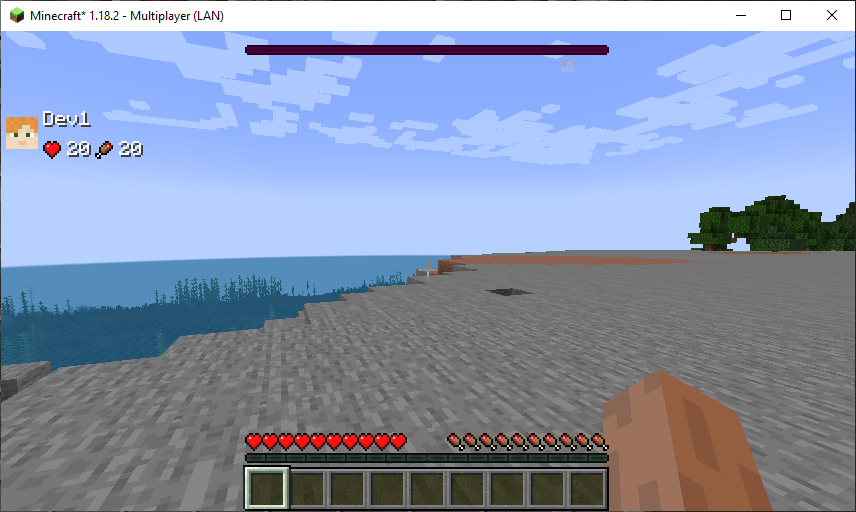
- HUD showing teammate health and hunger
- HUD showing teammates relative position to you
- Toasts for different team events (joining, leaving)
- Advancement sync
HUD
There's a compass HUD showing location of nearby teammates, and a status HUD that live updates their health / hunger.
Commands
Uses /teams prefix. Commands exist to add a team, remove a team (must be OP), invite players, kick players (must be oldest in team or OP), list teams, list players in team.
The first options are all setting defaults for teams.Teams created by this mod have a corresponding scoreboard team, where you can set all the parameters you normally would be able to with a scoreboard team.
Config 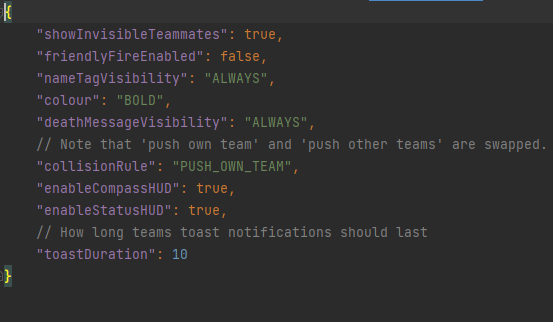
Notes
This mod supports both Forge and Fabric
Want to commission a custom mod? Just want to chat? Have a complex issue needing additional discussion? Join the Discord:

Want to help support this mod and others? Donate to my Patreon in the link below

Project description from CurseForge.
Pick your setup
Teams HUD by Minecraft version and loader
Choose the version and loader you play, then open the matching release.
Minecraft version
1.19.2
2 loader buildsMinecraft version
1.18.2
2 loader buildsCheck the dependencies, then try the file in a copied instance before changing a world you care about.
Recent files
Teams HUD versions and loaders
TeamsHUD-forge-1.20.1-4.jar
14 Jul 2024
Client Source doesn’t say Server Source doesn’t say Dependencies No extras listed Listed on Release listing
Check the 1.20.1 · Forge setup 1.20.1Forge release
TeamsHUD-fabric-1.20.1-4.jar
14 Jul 2024
Client Source doesn’t say Server Source doesn’t say Dependencies No extras listed Listed on Release listing
Check the 1.20.1 · Fabric setup Fabric1.20.1 release
TeamsHUD-forge-1.20.1-3.jar
30 May 2024
Client Source doesn’t say Server Source doesn’t say Dependencies No extras listed Listed on Release listing
Check the 1.20.1 · Forge setup 1.20.1Forge release
TeamsHUD-fabric-1.20.1-3.jar
30 May 2024
Client Source doesn’t say Server Source doesn’t say Dependencies No extras listed Listed on Release listing
Check the 1.20.1 · Fabric setup Fabric1.20.1 release
TeamsHUD-fabric-1.20.1-2.jar
24 May 2024
Client Source doesn’t say Server Source doesn’t say Dependencies No extras listed Listed on Release listing
Check the 1.20.1 · Fabric setup Fabric1.20.1 release
TeamsHUD-forge-1.20.1-1.jar
21 May 2024
Client Source doesn’t say Server Source doesn’t say Dependencies No extras listed Listed on Release listing
Check the 1.20.1 · Forge setup 1.20.1Forge release
TeamsHUD-fabric-1.20.1-1.jar
21 May 2024
Client Source doesn’t say Server Source doesn’t say Dependencies No extras listed Listed on Release listing
Check the 1.20.1 · Fabric setup Fabric1.20.1 release
TeamsHUD-forge-1.19.2-0.jar
21 May 2024
Client Source doesn’t say Server Source doesn’t say Dependencies No extras listed Listed on Release listing
Check the 1.19.2 · Forge setup 1.19.2Forge release
TeamsHUD-fabric-1.19.2-0.jar
21 May 2024
Client Source doesn’t say Server Source doesn’t say Dependencies No extras listed Listed on Release listing
Check the 1.19.2 · Fabric setup Fabric1.19.2 release
TeamsHUD-fabric-1.18.2-2.jar
21 May 2024
Client Source doesn’t say Server Source doesn’t say Dependencies No extras listed Listed on Release listing
Check the 1.18.2 · Fabric setup Fabric1.18.2 release
TeamsHUD-forge-1.18.2-2.jar
21 May 2024
Client Source doesn’t say Server Source doesn’t say Dependencies No extras listed Listed on Release listing
Check the 1.18.2 · Forge setup 1.18.2Forge release
TeamsHUD-forge-1.18.2-1.jar
21 May 2024
Client Source doesn’t say Server Source doesn’t say Dependencies No extras listed Listed on Release listing
Check the 1.18.2 · Forge setup 1.18.2Forge release
Looking for an older file? The official CurseForge project page is in Resources.
 mod
mod CurseForge · Minecraft
CullingAO
Mod that includes Battle royale like Rules
 mod
mod CurseForge + Modrinth · Minecraft
Easy Hopper
Speed up Hoppers and add classification function to it!
 mod
mod CurseForge · Minecraft
Ride Anything
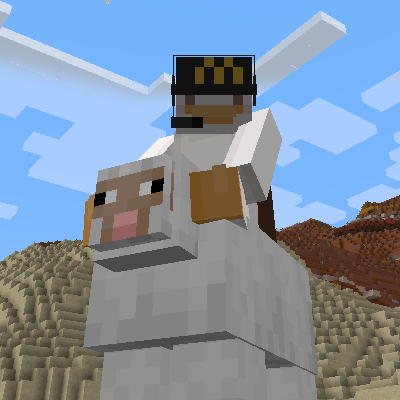
Universal mob sitting system that lets you sit on any mob using Right Shift + double right click or the /sit command