Exposure Needed by Exposure Catalog - NeoForge 1.21.1 - 1.1.2
requiredMatching file found Matched file: Exposure - NeoForge 1.21.1 - 1.9.18

CurseForge · Minecraft mod
Creative-mode tool to view and manage exposures
Quick answer
Exposure Catalog - NeoForge 1.21.1 - 1.1.2 targets 1.21.1 with NeoForge. The project page does not say whether this file belongs on the client, dedicated server, or both. All 1 required mods have matching files.
Where it goes
The project page does not say whether this file belongs on the client, dedicated server, or both.
The source does not explicitly classify this release as client-only or server-only.
Exposure Catalog - NeoForge 1.21.1 - 1.1.2. Change the file and its required mods may change too.
Install Exposure first. We found matching files for this game-version and loader setup. 2 come through another mod in the chain.
2 extra mods were pulled in by other dependencies. Indented rows show who needs each one. We only count dependency files that match this setup. A file for another loader does not fill the gap.
Before you install it
Built for Exposure Catalog - NeoForge 1.21.1 - 1.1.2. Pick another file and the loader, install side or required mods may change.
Use Exposure Catalog - NeoForge 1.21.1 - 1.1.2. It targets 1.21.1 with NeoForge; another release may have different loader, side or dependency requirements.
Install Exposure first. We found matching files for this game-version and loader setup. 2 come through another mod in the chain.
The project page does not say whether this file belongs on the client, dedicated server, or both.
Use the “Get this file” button beside Exposure Catalog - NeoForge 1.21.1 - 1.1.2. It opens that exact file at the source.
About this project
It adds /exposure catalog command, that will open a GUI where all exposures stored in the current world can be viewed, exported or deleted.
It also has a "textures" mode, where all loaded textures (from Minecraft, mods and resource packs) can be viewed.
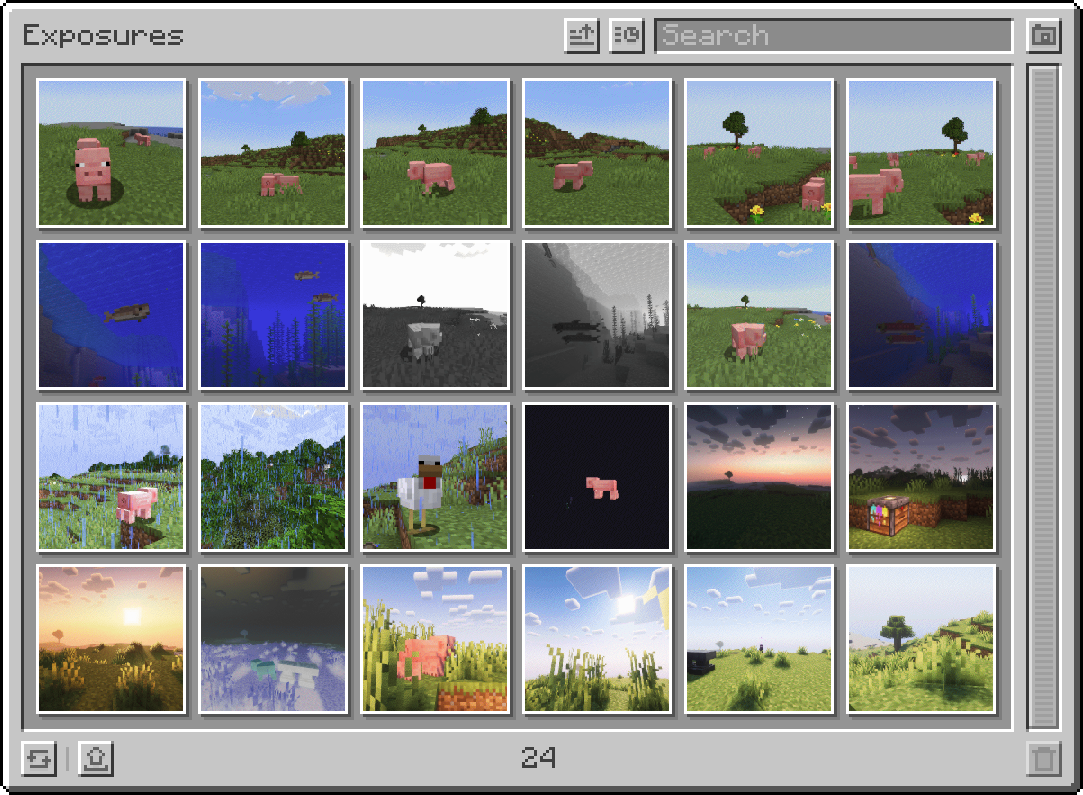
Command requires level 3 permissions (cheats enabled in singleplayer covers that).
Needs to be installed on both client and server.
Project description from CurseForge.
Pick your setup
Choose the version and loader you play, then open the matching release.
Check the dependencies, then try the file in a copied instance before changing a world you care about.
Recent files
exposure_catalog-neoforge-1.1.2.jar
29 Jul 2026
exposure_catalog-fabric-1.20.1-1.1.1.jar
23 Feb 2026
exposure_catalog-forge-1.20.1-1.1.1.jar
23 Feb 2026
exposure_catalog-neoforge-1.1.1.jar
31 Jul 2025
exposure_catalog-fabric-1.1.1.jar
31 Jul 2025
exposure_catalog-fabric-1.1.0.jar
21 Feb 2025
exposure_catalog-neoforge-1.1.0.jar
21 Feb 2025
exposure_catalog-1.20.1-1.0.3-forge.jar
4 Aug 2024
exposure_catalog-1.20.1-1.0.3-fabric.jar
4 Aug 2024
exposure_catalog-1.20.1-1.0.2-forge.jar
22 Jul 2024
exposure_catalog-1.20.1-1.0.2-fabric.jar
22 Jul 2024
exposure_catalog-1.20.1-1.0.1-forge.jar
19 Jul 2024
Looking for an older file? The official CurseForge project page is in Resources.
 mod
modAn unofficial Pipez add-on that significantly reduces server lag, optimizes transfer logic, and adds custom extraction frequencies and high-tier upgrades.
 mod
modAn admin panel for Verity JE that lets you control Verity, use powerful abilities, and troll your friends!
 mod
modClimate-controlled farming, exotic animal ranching, new crops and new foods.