Minecraft version
Back to mods 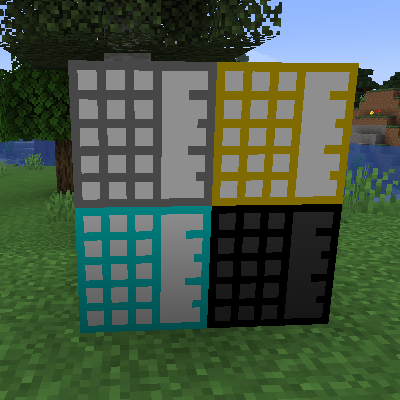
CurseForge · Minecraft mod
Crafticube
A block that combines a chest and a tank
Choose a version Pick your version below, then grab the matching file.
Quick answer
Which Crafticube release should I use?
Latest stable file crafticube-20.3.0.jar
Game version 1.20.3, 1.20.4
Loader Forge
crafticube-20.3.0.jar targets 1.20.3, 1.20.4 with Forge. The project page does not say whether this file belongs on the client, dedicated server, or both. No extra mods listed for this file.
Where it goes
Is Crafticube required on the client, server, or both?
The project page does not say whether this file belongs on the client, dedicated server, or both.
Client Source doesn’t say
Dedicated server Source doesn’t say
Loader for this release Forge
Required install it here Optional supported, not mandatory Not supported do not install here Source doesn’t say do not assume
The source does not explicitly classify this release as client-only or server-only.
What else does crafticube-20.3.0.jar need?
crafticube-20.3.0.jar. Change the file and its required mods may change too.
This file does not list any required mods. Do not add a library just because a different file uses it.
This file does not list any required or optional mods.
Before you install it
Add Crafticube without breaking your instance.
Built for crafticube-20.3.0.jar. Pick another file and the loader, install side or required mods may change.
- 01
Stick to this file
Use crafticube-20.3.0.jar. It targets 1.20.3, 1.20.4 with Forge; another release may have different loader, side or dependency requirements.
- 02
Bring the mods it needs
This file does not list any required mods. Do not add a library just because a different file uses it.
- 03
Put it on the correct side
The project page does not say whether this file belongs on the client, dedicated server, or both.
- 04
Pick the file you checked
Use the “Get this file” button beside crafticube-20.3.0.jar. It opens that exact file at the source.
About this project
What does Crafticube add?
Overview
Welcome to the Crafticube Mod, your ultimate solution for managing complex crafting operations in Minecraft! The Crafticube is a unique block designed to simplify and streamline your crafting processes by providing temporary storage for both items and fluids.
Features
- Crafticubes: These specialized blocks come in different tiers, each offering a varying number of item slots and fluid tank sizes. Perfect for automation setups, Crafticubes are ideal for holding items and fluids temporarily during intricate crafting sequences.
- Fluid Management: Each Crafticube has four fluid tanks, allowing you to store and manage various fluids simultaneously. Piping in and out of these tanks is seamless, making fluid automation a breeze.
- Inventory Retention: When broken, Crafticubes can retain their contents, ensuring your precious items and fluids are not lost.
- No GUI Needed: Designed for automation, Crafticubes do not require a GUI, providing a more immersive and less intrusive experience. Easily check contents through integrated HUD mods like Jade or TOP. Using a Crafting Core on a Crafticube will also print out its contents in the chat.
Usage
- Crafting Crafticubes: Start by crafting a Crafting Core, then use it to create various tiers of Crafticubes, each tailored for different storage needs.
- Automation Ready: Integrate Crafticubes into your existing automation setups to enhance efficiency and streamline complex crafting operations.
Compatibility
The Crafticube Mod is designed to work seamlessly with other popular mods, enhancing your automation and crafting experience without conflicts.
Get Started
Download the Crafticube Mod today and revolutionize your crafting operations! For community support and the latest updates, visit our GitHub repository.
Installation
- Ensure you have the latest version of Forge installed.
- Download the Crafticube Mod from CurseForge.
- Place the downloaded file into your
modsfolder. - Launch Minecraft and enjoy the enhanced crafting experience!
Transform your crafting operations today with the Crafticube Mod, the ultimate solution for managing complex crafting tasks in Minecraft. Download now and start crafting smarter!
Project description from CurseForge.
Pick your setup
Crafticube by Minecraft version and loader
Choose the version and loader you play, then open the matching release.
Minecraft version
1.20.3
1 loader buildMinecraft version
1.20.2
1 loader buildMinecraft version
1.20.1
1 loader buildCheck the dependencies, then try the file in a copied instance before changing a world you care about.
Recent files
Crafticube versions and loaders
crafticube-20.3.0.jar
17 Jun 2024
Client Source doesn’t say Server Source doesn’t say Dependencies No extras listed Listed on Release listing
Check the 1.20.4 · Forge setup 1.20.3Forge1.20.4 release
crafticube-0.1.4.jar
16 Jun 2024
Client Source doesn’t say Server Source doesn’t say Dependencies No extras listed Listed on Release listing
Check the 1.20.2 · Forge setup 1.20.21.20.1Forge release
crafticube-0.1.3.jar
16 Jun 2024
Client Source doesn’t say Server Source doesn’t say Dependencies No extras listed Listed on Release listing
Check the 1.20.2 · Forge setup 1.20.21.20.1Forge release
Looking for an older file? The official CurseForge project page is in Resources.