Minecraft version
Back to mods 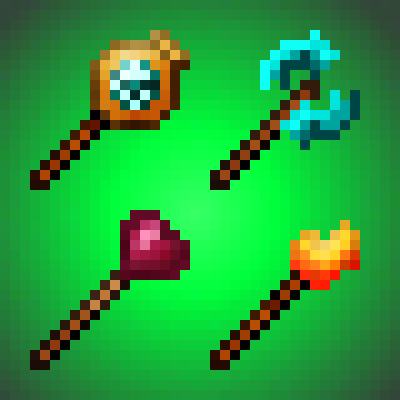
CurseForge · Minecraft mod
Magical Creative Tools
A set of various tools for mod devs, map makers, server admins and creative gamemod players
Choose a version Pick your version below, then grab the matching file.
Quick answer
Which Magical Creative Tools release should I use?
Latest stable file magical_creative_tools_1.21.1(v.1.42).jar
Game version 1.21.1
Loader NeoForge
Magical Creative Tools magical_creative_tools_1.21.1(v.1.42).jar targets 1.21.1 with NeoForge. The project page does not say whether this file belongs on the client, dedicated server, or both. No extra mods listed for this file.
Where it goes
Is Magical Creative Tools required on the client, server, or both?
The project page does not say whether this file belongs on the client, dedicated server, or both.
Client Source doesn’t say
Dedicated server Source doesn’t say
Loader for this release NeoForge
Required install it here Optional supported, not mandatory Not supported do not install here Source doesn’t say do not assume
The source does not explicitly classify this release as client-only or server-only.
What else does Magical Creative Tools magical_creative_tools_1.21.1(v.1.42).jar need?
magical_creative_tools_1.21.1(v.1.42).jar. Change the file and its required mods may change too.
This file does not list any required mods. Do not add a library just because a different file uses it.
This file does not list any required or optional mods.
Before you install it
Add Magical Creative Tools without breaking your instance.
Built for Magical Creative Tools magical_creative_tools_1.21.1(v.1.42).jar. Pick another file and the loader, install side or required mods may change.
- 01
Stick to this file
Use magical_creative_tools_1.21.1(v.1.42).jar. It targets 1.21.1 with NeoForge; another release may have different loader, side or dependency requirements.
- 02
Bring the mods it needs
This file does not list any required mods. Do not add a library just because a different file uses it.
- 03
Put it on the correct side
The project page does not say whether this file belongs on the client, dedicated server, or both.
- 04
Pick the file you checked
Use the “Get this file” button beside magical_creative_tools_1.21.1(v.1.42).jar. It opens that exact file at the source.
About this project
What does Magical Creative Tools add?
Introduction
This is a set of tools aimed to help testing mod elements, building structures and administrating SMPs.
Features
Day And Weather Cycles Switch
Key bind (default F10)
Requires command permission to use
Can be turned off etirely in the config file
Useful while generating dozens of new worlds while testing something.
Air To Structure Void Staff

On right-click:
Changes air to structure void in 10 block radius around you.
Useful while creating custom structures.
Anvil Staff

On right-click:
Reapair the item in your off-hand to full durability...
...or damage a full durabiliy item down to 1 durability.
Useful for testing mod elements that revolve around damaging or repairing items.
Cave Air Staff

On right-click:
Changes air to cave air in 10 block radius around you.
Useful while creating custom underground structures.
Clock Staff

On right-click:
Turn day time 1000 ticks forwards
On sneak + right-click:
Turn day time 1000 ticks backwards*
*it technically turns it 23000 ticks forwards
Useful for testing daytime-releated mod elements.
Config Staff

On right-click:
Opens the Magical Creative Tools mod config GUI.
In the GUI you can:
-choose one of two sounds for the tools or turn off their sounds
-turn off particles of the tools
Death Staff

Upon hitting an entity:
Sets the hit entity's health to 0.
Useful for testing mod elements related to mobs.
Depoisonous Staff

On right-click:
Removes all effects from you.
Useful for testing mod elements related to effects.
Destroyer 3000

Huge knockback.
Makes the BONK meme sound on hit.
Zero damage + Knockback X.
Useful for punishing troublesome players on a server.
Earth Staff

On right-click:
Teleports you to the Overworld.
You may end up in a wall or in the air...
...as it teleports you to the same coordinates as your current ones.
Useful for fast travel.
Egg Staff

Right-click a mob:
Copy its ID.
Right-click a block:
Spawn the mob on the block.
Right-click in the air:
Spawn the mob at your position.
Sneak while using this staff:
Spawn the mob with its AI toggled off.
Useful for testing and placing mobs.
End Staff

On right-click:
Teleports you to the End.
You may end up in a wall or in the air...
...as it teleports you to the same coordinates as your current ones.
Useful for fast travel.
Experienced Staff

On right-click:
Gain 30 levels of experience.
On sneak + right-click:
Loose all your levels of experience.
Useful for testing experience-related mod elements.
Food Staff

On right-click:
If you're hungry - it fills the hunger and saturation bars.
If you're not hungry - it empties the hunger and saturation bars.
Useful for testing food-related mod elements.
Healing Staff

If you're hurt - you regain full health.
If you have full health - it sets your health to 1.
Useful for testing health-related mod elements.
Horizontal Block Rotation Staff

On right-click on block:
Rotate the block horizontally in clockwise direction.
Sneak + right-click on block:
Rotate the block horizontally in counter-clockwise direction.
Useful for building.
Lava Staff

On right-click:
Teleports you to the Nether.
You may end up in a wall or in the air...
...as it teleports you to the same coordinates as your current ones.
Useful for fast travel.
Mob Screenshot Staff

On right-clicking a mob:
Turn off its AI and make it look at you.
Right-click the mob while sneaking:
Turn its AI back on.
Useful for screenshots with mobs and building maps with NPCs.
Night Vision Staff

On right-click:
Turns infinite Night Vision on or off for you.
Useful for testing things in darkness and building in darkness.
Registry Name Staff

On right-click:
Opens a GUI for checking registry names of blocks and items.
The registry name can be copied - click on it and use:
[Ctrl + A] and [Ctrl + C].
Useful for documenting mods e.g. in a form of a WIKI.
Replace Blocks Staff

On right-click on a block:
Replaces the blocks of the same type as the one you clicked on.
They are replaced with the block you are holding in your off-hand.
The radius of replacing is the number of blocks in your off-hand.
The difference between this and the /fill command is that
the replaced blocks will keep their blockstate, rotation,
inventory and other NBT data.
Useful for building.
Speed Staff

On right-click:
Gain +1 level of infinite Speed effect.
Sneak + right-click:
Remove the Speed effect from yourself.
Useful for moving around.
Vertical Block Rotation Staff

On right-click on block:
Rotate the block vertically.
Useful for building.
Water Bucket Staff

On right-click:
Extinguishes Fire blocks and entities that are on fire.
Range: 20 blocks.
Useful for testing fire-related mod elements.
Donation
If you want to support me and help me creating even more mods consider buying me a coffee... or a fruit shake or a pizza ;D ...or whatever will I be eating at the moment xDD
Modpacks
Yeah, you can use it in your modpack! 😇

Project description from CurseForge.
Pick your setup
Magical Creative Tools by Minecraft version and loader
Choose the version and loader you play, then open the matching release.
Minecraft version
1.20.1
1 loader buildCheck the dependencies, then try the file in a copied instance before changing a world you care about.
Recent files
Magical Creative Tools versions and loaders
magical_creative_tools_1.21.1(v.1.42).jar
23 Mar 2026
Client Source doesn’t say Server Source doesn’t say Dependencies No extras listed Listed on Release listing
Check the 1.21.1 · NeoForge setup 1.21.1NeoForge release
magical_creative_tools_1.20.1(v.1.42).jar
23 Mar 2026
Client Source doesn’t say Server Source doesn’t say Dependencies No extras listed Listed on Release listing
Check the 1.20.1 · Forge setup 1.20.1Forge release
magical_creative_tools_1.21.1(v.1.38).jar
26 Jan 2026
Client Source doesn’t say Server Source doesn’t say Dependencies No extras listed Listed on Release listing
Check the 1.21.1 · NeoForge setup 1.21.1NeoForge release
magical_creative_tools_1.20.1(v.1.38).jar
26 Jan 2026
Client Source doesn’t say Server Source doesn’t say Dependencies No extras listed Listed on Release listing
Check the 1.20.1 · Forge setup 1.20.1Forge release
magical_creative_tools_1.21.1(v.1.16).jar
15 Oct 2025
Client Source doesn’t say Server Source doesn’t say Dependencies No extras listed Listed on Release listing
Check the 1.21.1 · NeoForge setup 1.21.1NeoForge release
magical_creative_tools_1.20.1(v.1.16).jar
15 Oct 2025
Client Source doesn’t say Server Source doesn’t say Dependencies No extras listed Listed on Release listing
Check the 1.20.1 · Forge setup 1.20.1Forge release
magical_creative_tools_1.21.1(v.1.15).jar
6 Dec 2024
Client Source doesn’t say Server Source doesn’t say Dependencies No extras listed Listed on Release listing
Check the 1.21.1 · NeoForge setup NeoForge1.21.1 release
magical_creative_tools_1.20.1(v.1.15).jar
8 Jul 2024
Client Source doesn’t say Server Source doesn’t say Dependencies No extras listed Listed on Release listing
Check the 1.20.1 · Forge setup 1.20.1Forge release
magical_creative_tools_1.20.1(v.1.14).jar
21 Jun 2024
Client Source doesn’t say Server Source doesn’t say Dependencies No extras listed Listed on Release listing
Check the 1.20.1 · Forge setup 1.20.1Forge release
Looking for an older file? The official CurseForge project page is in Resources.
 mod
CurseForge + Modrinth · Minecraft
ChatSphere
A sleek social chat mod for Minecraft that replaces vanilla chat with channels, private messaging, and a modern GUI.
 mod
CurseForge + Modrinth · Minecraft
Multi Builder Tool
Build Multiblocks with one click
 mod
CurseForge · Minecraft
HighStakes
Turn your survival nights into cozy tavern parlour games! Bet diamonds and gold in Liar's Dice, Miner's Blackjack, and Coin Flip with 3D physical wagers and an immersive non-blocking HUD.