Minecraft version
Back to mods 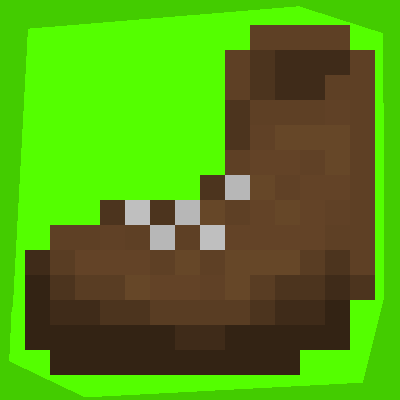
CurseForge · Minecraft mod
Link15's Craftables
Adds a few attribute modifying items
Choose a version Pick your version below, then grab the matching file.
Quick answer
Which Link15's Craftables release should I use?
beta file Link15's Craftables 0.1.3
Game version 1.19.4
Loader Forge
Link15's Craftables 0.1.3 targets 1.19.4 with Forge. The project page does not say whether this file belongs on the client, dedicated server, or both. No extra mods listed for this file.
Where it goes
Is Link15's Craftables required on the client, server, or both?
The project page does not say whether this file belongs on the client, dedicated server, or both.
Client Source doesn’t say
Dedicated server Source doesn’t say
Loader for this release Forge
Required install it here Optional supported, not mandatory Not supported do not install here Source doesn’t say do not assume
The source does not explicitly classify this release as client-only or server-only.
What else does Link15's Craftables 0.1.3 need?
Link15's Craftables 0.1.3. Change the file and its required mods may change too.
This file does not list any required mods. Do not add a library just because a different file uses it.
This file does not list any required or optional mods.
Before you install it
Add Link15's Craftables without breaking your instance.
Built for Link15's Craftables 0.1.3. Pick another file and the loader, install side or required mods may change.
- 01
Stick to this file
Use Link15's Craftables 0.1.3. It targets 1.19.4 with Forge; another release may have different loader, side or dependency requirements.
- 02
Bring the mods it needs
This file does not list any required mods. Do not add a library just because a different file uses it.
- 03
Put it on the correct side
The project page does not say whether this file belongs on the client, dedicated server, or both.
- 04
Pick the file you checked
Use the “Get this file” button beside Link15's Craftables 0.1.3. It opens that exact file at the source.
About this project
What does Link15's Craftables add?
Craftables introduces a variety of new wearable items and accessories that enhance your gameplay experience by providing buffs to movement speed, damage reduction, and attack power. Discover these items in new chests, craft them at the smithing table, and equip them in a dedicated accessories menu for ultimate convenience.
New Items and Features:
Running Shoes:
- Location: Found in villagers' chests and ruin portals.
- Effect: Increases movement speed by 5%.
Red Shoes:
- Crafting: Made at the smithing table with Running Shoes and a Fire Charge.
- Effect: Increases movement speed by 7%.
Green Shoes:
- Crafting: Made at the smithing table with Red Shoes and a Moss Block.
- Effect: Increases movement speed by 8%.
Gold Ring:
- Location: Spawns in new chests found underground.
- Effect: Increases movement speed by 2% and reduces damage taken by 1%.
Combat Shoes:
- Crafting: Made at the smithing table with Green Shoes and a Gold Ring.
- Effect: Increases movement speed by 11% and reduces damage taken by 3%.
Fire Ring:
- Crafting: Made at the smithing table with a Gold Ring and a Fire Charge.
- Effect: Increases movement speed by 4% and reduces damage taken by 4%.
Fire Combat Shoes:
- Crafting: Made at the smithing table with Green Shoes and a Fire Ring.
- Effect: Increases movement speed by 13% and reduces damage taken by 6%.
Cloud in a Bottle:
- Location: Found in new Underground Houses, which generally contain mid-tier loot but occasionally provide high-tier items.
- Effect: Allows double jumping and can save you from fall damage.
Gold Bracelet:
- Location: Found in Nether Fortresses.
- Effect: Increases attack damage against entities.
Fire Bracelet:
- Crafting: Made at the smithing table with a Gold Bracelet and a Fire Charge.
- Effect: Increases attack damage by 4%.
Attack Combat Shoes:
- Crafting: Made at the smithing table with Combat Shoes and a Gold Bracelet.
- Effect: Increases movement speed by 12%, reduces damage taken by 4%, and increases attack damage by 3%.
Fire Attack Combat Shoes:
- Crafting: Made at the smithing table with Fire Combat Shoes and a Fire Bracelet.
- Effect: Increases movement speed by 15%, reduces damage taken by 8%, and increases attack damage by 5%.
- Note: These are currently the highest tier of shoes available, with more to come in future updates.
Accessories Menu:
- Activation: Default keybind is "", but it can be customized.
- Function: Equip your accessories in this menu to gain their effects without occupying inventory space.
Installation:
- Download the mod from the official source.
- Place the mod file in the Minecraft "mods" folder.
- Launch Minecraft with the Forge mod loader.
Notes:
- Balance has been carefully considered to ensure that each item and combination provides meaningful enhancements without disrupting gameplay.
- Future updates will introduce more items and potentially new mechanics, so stay tuned!
Enjoy your enhanced Minecraft experience with Craftables!
Description made by ChatGPT 4o

Project description from CurseForge.
Pick your setup
Link15's Craftables by Minecraft version and loader
Choose the version and loader you play, then open the matching release.
Check the dependencies, then try the file in a copied instance before changing a world you care about.
Recent files
Link15's Craftables versions and loaders
Link15's Craftables 0.1.3
Link15's Craftables 0.1.3.jar
19 Jan 2025
Client Source doesn’t say Server Source doesn’t say Dependencies No extras listed Listed on Release listing
Check the 1.19.4 · Forge setup 1.19.4Forge beta
Link15's Craftables 0.1.2
Link15's Craftables 0.1.2.jar
16 Jan 2025
Client Source doesn’t say Server Source doesn’t say Dependencies No extras listed Listed on Release listing
Check the 1.19.4 · Forge setup 1.19.4Forge beta
Link15's Craftables 0.1.1
craftables 0.1.1.jar
26 Jun 2024
Client Source doesn’t say Server Source doesn’t say Dependencies No extras listed Listed on Release listing
Check the 1.19.4 · Forge setup 1.19.4Forge beta
Link15's Craftables 0.1.0
craftables 0.1.0.jar
22 Jun 2024
Client Source doesn’t say Server Source doesn’t say Dependencies No extras listed Listed on Release listing
Check the 1.19.4 · Forge setup 1.19.4Forge beta
Looking for an older file? The official CurseForge project page is in Resources.
 mod
mod CurseForge + Modrinth · Minecraft
Nature's Spirit
A minecraft mod which enhances world generation with new biomes, blocks, and items
 mod
mod CurseForge · Minecraft
Bons Voyage
190+ ruins of a lost civilization, hidden rooms, archaeology and a working waystone in every ruin. For Minecraft 1.20.1 Forge, with Waystones.
 mod
mod CurseForge · Minecraft
Laze
A mod to add blissful things into and get all of your TOILS out