
Minecraft version
Back to mods 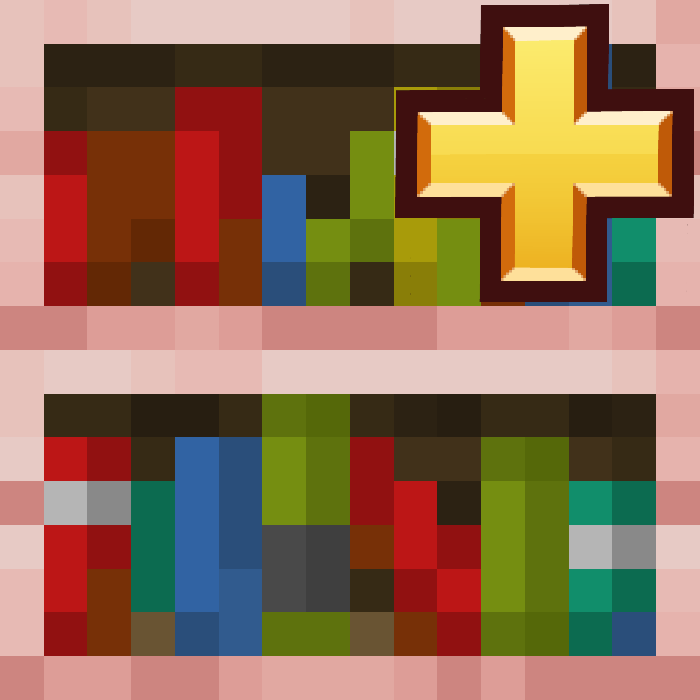
CurseForge · Minecraft mod
Bookshelves+
Bookshelves beyond your wildest dreams!
Choose a version Pick your version below, then grab the matching file.
Quick answer
Which Bookshelves+ release should I use?
Latest stable file Bookshelves+ 1.0.1 - 1.20.4 - Neoforge
Game version 1.20.4
Loader NeoForge
Bookshelves+ 1.0.1 - 1.20.4 - Neoforge targets 1.20.4 with NeoForge. The project page does not say whether this file belongs on the client, dedicated server, or both. No extra mods listed for this file.
Where it goes
Is Bookshelves+ required on the client, server, or both?
The project page does not say whether this file belongs on the client, dedicated server, or both.
Client Source doesn’t say
Dedicated server Source doesn’t say
Loader for this release NeoForge
Required install it here Optional supported, not mandatory Not supported do not install here Source doesn’t say do not assume
The source does not explicitly classify this release as client-only or server-only.
What else does Bookshelves+ 1.0.1 - 1.20.4 - Neoforge need?
Bookshelves+ 1.0.1 - 1.20.4 - Neoforge. Change the file and its required mods may change too.
This file does not list any required mods. Do not add a library just because a different file uses it.
This file does not list any required or optional mods.
Before you install it
Add Bookshelves+ without breaking your instance.
Built for Bookshelves+ 1.0.1 - 1.20.4 - Neoforge. Pick another file and the loader, install side or required mods may change.
- 01
Stick to this file
Use Bookshelves+ 1.0.1 - 1.20.4 - Neoforge. It targets 1.20.4 with NeoForge; another release may have different loader, side or dependency requirements.
- 02
Bring the mods it needs
This file does not list any required mods. Do not add a library just because a different file uses it.
- 03
Put it on the correct side
The project page does not say whether this file belongs on the client, dedicated server, or both.
- 04
Pick the file you checked
Use the “Get this file” button beside Bookshelves+ 1.0.1 - 1.20.4 - Neoforge. It opens that exact file at the source.
About this project
What does Bookshelves+ add?
Overview
Discover the aesthetic potential of Minecraft's diverse wood types with the Bookshelves+ Mod! This mod expands your creative possibilities by introducing beautifully crafted bookshelves for every wood type available in the game. Whether you're designing a cozy library, an elaborate study, or just adding a touch of charm to your builds, these new bookshelf variants will help you achieve the perfect look.
Features
- New Bookshelf Designs: Enjoy bookshelves made from all existing wood types in Minecraft, including:
- Spruce
- Birch
- Jungle
- Acacia
- Dark Oak
- Crimson
- Warped
- Bamboo
- Cherry
- Mangrove
- Seamless Integration: Each bookshelf variant matches its respective wood type's aesthetics, blending seamlessly into your existing builds and offering a cohesive look.
How to Use
- Crafting: To create a bookshelf, simply put a normal bookshelf and the plank of the wood you want the bookshelf to become!
- Decoration: Place these bookshelves in your builds to add a touch of personality and warmth. Mix and match different wood types for a unique look.
Installation
- Download the latest version of the Bookshelf Variants Mod from CurseForge.
- Install the mod by placing it in your Minecraft
modsfolder. - Launch Minecraft and enjoy your new bookshelf options!
Future Plans
We have exciting plans for future updates, including:
- Additional customization options.
- Integration with other decorative mods.
- Support for upcoming Minecraft wood types.
Credits
- Lead Developer: WestGames
Project description from CurseForge.
Pick your setup
Bookshelves+ by Minecraft version and loader
Choose the version and loader you play, then open the matching release.
Check the dependencies, then try the file in a copied instance before changing a world you care about.
Recent files
Bookshelves+ versions and loaders
Bookshelves+ 1.0.1 - 1.20.4 - Neoforge
bookshelves-1.0.1-neoforge-1.20.4.jar
24 Jun 2024
Client Source doesn’t say Server Source doesn’t say Dependencies No extras listed Listed on Release listing
Check the 1.20.4 · NeoForge setup NeoForge1.20.4 release
Bookshelves+ 1.0.0 - 1.20.4 - Neoforge
bookshelves-1.0.0-neoforge-1.20.4.jar
24 Jun 2024
Client Source doesn’t say Server Source doesn’t say Dependencies No extras listed Listed on Release listing
Check the 1.20.4 · NeoForge setup NeoForge1.20.4 release
Looking for an older file? The official CurseForge project page is in Resources.
 mod
CurseForge · Minecraft
Pigeon Express
Send letters and item parcels with carrier pigeons, a searchable address book, and personal medieval mailboxes.
 mod
CurseForge · Minecraft
Samurai Dynasty: Legends of Feudal Japan
Feudal Japan RPG: katana combos and parries, ninja parkour, dragon-wing elytra you wear over full armor, sakura forests, shrines and pagodas, and oni, tengu and kitsune to fight or befriend.
 mod
CurseForge · Minecraft
CustomFishing
CustomFishing is a CraftTweaker addon that allows users to add fishing conditions using scripts. For example, you can set a 50% chance of catching an apple when fishing in lava.