Minecraft version
Back to mods 
CurseForge · Minecraft mod
OptimalHit
Highlights the best place for you to aim.
Choose a version Pick your version below, then grab the matching file.
Quick answer
Which OptimalHit release should I use?
Latest stable file optimalhit-1.0.jar
Game version 1.8.9
Loader Forge
optimalhit-1.0.jar targets 1.8.9 with Forge. The project page does not say whether this file belongs on the client, dedicated server, or both. No extra mods listed for this file.
Where it goes
Is OptimalHit required on the client, server, or both?
The project page does not say whether this file belongs on the client, dedicated server, or both.
Client Source doesn’t say
Dedicated server Source doesn’t say
Loader for this release Forge
Required install it here Optional supported, not mandatory Not supported do not install here Source doesn’t say do not assume
The source does not explicitly classify this release as client-only or server-only.
What else does optimalhit-1.0.jar need?
optimalhit-1.0.jar. Change the file and its required mods may change too.
This file does not list any required mods. Do not add a library just because a different file uses it.
This file does not list any required or optional mods.
Before you install it
Add OptimalHit without breaking your instance.
Built for optimalhit-1.0.jar. Pick another file and the loader, install side or required mods may change.
- 01
Stick to this file
Use optimalhit-1.0.jar. It targets 1.8.9 with Forge; another release may have different loader, side or dependency requirements.
- 02
Bring the mods it needs
This file does not list any required mods. Do not add a library just because a different file uses it.
- 03
Put it on the correct side
The project page does not say whether this file belongs on the client, dedicated server, or both.
- 04
Pick the file you checked
Use the “Get this file” button beside optimalhit-1.0.jar. It opens that exact file at the source.
About this project
What does OptimalHit add?
This mod is focused on the PvP aspect of minecraft.
The mod draws 3 boxes onto other players. First 2 (referred to as Green and Red) show the best vertical area while the last one (referred to as Red2) shows the best horizontal area to aim at.
The mod's configuration screen can be accessed by these commands:
/optimalhit
/optimalhits
/ohit
/optimalh
You can configure the following:
Enable/Disable the mod
Enable/Disable any of the 3 highlight boxes
Size of any of the 3 highlight boxes
Box opacity
Whether to only draw on Players
Whether to highlight hitbox or collisionbox
From personal use, I recommend the default settings.
It uses the same technology as F3+B (Collision boxes), therefore it does not show players through walls neither does it show invisible players.
(Made for survival mode, creative mode reach works a little bit differently)
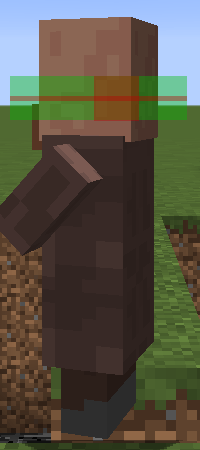
(Highlight example on a villager)
Project description from CurseForge.
Pick your setup
OptimalHit by Minecraft version and loader
Choose the version and loader you play, then open the matching release.
Check the dependencies, then try the file in a copied instance before changing a world you care about.
Recent files
OptimalHit versions and loaders
optimalhit-1.0.jar
14 Jul 2024
Client Source doesn’t say Server Source doesn’t say Dependencies No extras listed Listed on Release listing
Check the 1.8.9 · Forge setup Forge1.8.9 release
Looking for an older file? The official CurseForge project page is in Resources.
 mod
mod CurseForge · Minecraft
Chaos Heart
Shows every player's health in real time above their nametag and in the TAB list (20❤). Supports absorption and extra hearts from other mods, turns gold above 20, and the heart beats when health is low.
 mod
mod CurseForge · Minecraft
Wynntils
Enhance your Wynncraft gameplay with Wynntils!
 mod
mod CurseForge · Minecraft
Panels (Decoration)
Panels adds a new type of stone block subtype for building and decoration.