Minecraft version
Back to mods 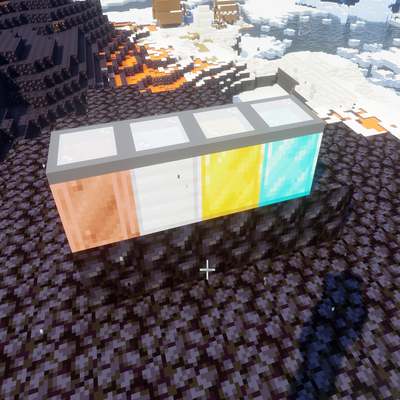
CurseForge · Minecraft mod
MoreCoolers
A small mod that adds in four types of expensive storage units to be used with the Spoiled mod.
Choose a version Pick your version below, then grab the matching file.
Quick answer
Which MoreCoolers release should I use?
Latest stable file MoreCoolers-forge-1.20.1-0.jar
Game version 1.20.1
Loader Forge
MoreCoolers-forge-1.20.1-0.jar targets 1.20.1 with Forge. The project page does not say whether this file belongs on the client, dedicated server, or both. No extra mods listed for this file.
Where it goes
Is MoreCoolers required on the client, server, or both?
The project page does not say whether this file belongs on the client, dedicated server, or both.
Client Source doesn’t say
Dedicated server Source doesn’t say
Loader for this release Forge
Required install it here Optional supported, not mandatory Not supported do not install here Source doesn’t say do not assume
The source does not explicitly classify this release as client-only or server-only.
What else does MoreCoolers-forge-1.20.1-0.jar need?
MoreCoolers-forge-1.20.1-0.jar. Change the file and its required mods may change too.
This file does not list any required mods. Do not add a library just because a different file uses it.
This file does not list any required or optional mods.
Before you install it
Add MoreCoolers without breaking your instance.
Built for MoreCoolers-forge-1.20.1-0.jar. Pick another file and the loader, install side or required mods may change.
- 01
Stick to this file
Use MoreCoolers-forge-1.20.1-0.jar. It targets 1.20.1 with Forge; another release may have different loader, side or dependency requirements.
- 02
Bring the mods it needs
This file does not list any required mods. Do not add a library just because a different file uses it.
- 03
Put it on the correct side
The project page does not say whether this file belongs on the client, dedicated server, or both.
- 04
Pick the file you checked
Use the “Get this file” button beside MoreCoolers-forge-1.20.1-0.jar. It opens that exact file at the source.
About this project
What does MoreCoolers add?
Really simple and straightforward mod to be used with the Spoiled mod.
In the spoiled-common.toml file, just add the following:
containerModifier = [ "morecoolers:copper_cooler,0.6", "morecoolers:iron_cooler,0.4", "morecoolers:gold_cooler,0.2", "morecoolers:diamond_cooler,0.05"]
In the above example, food placed in the copper_cooler will spoil at 60% the normal rate, iron 40%, gold 20%, and diamond 5%.
The config file for this mod allows you to add more storage rows but that's it. Also, don't change the rows after you've installed this mod. Determine how many rows you want first. You cannot change the recipe. Recipe is very expensive as it takes 7 blocks of the corresponding ore, a snow bucket in the middle, and a glass pane on the top middle.
This mod was meant to be simple and used as a reward in the endgame to essentially keep you food from spoiling.
Please take note that this was made just for my family and I's survival modpack and will likely never receive any sort of update.
In case anyone uses this and wants to change the recipe, this works for CraftTweaker 14.0.40. Change the shaped recipe to whatever suits you:
// Removing existing recipes for coolerscraftingTable.remove(<item:morecoolers:copper_cooler>);craftingTable.remove(<item:morecoolers:iron_cooler>);craftingTable.remove(<item:morecoolers:gold_cooler>);craftingTable.remove(<item:morecoolers:diamond_cooler>);
// Adding new recipes for copper coolercraftingTable.addShaped("copper_cooler", <item:morecoolers:copper_cooler>, [ [<item:minecraft:copper_block>, <item:minecraft:glass>, <item:minecraft:copper_block>], [<item:minecraft:copper_block>, <item:minecraft:powder_snow_bucket>, <item:minecraft:copper_block>], [<item:minecraft:copper_block>, <item:minecraft:copper_block>, <item:minecraft:copper_block>] ]);
// Adding new recipes for iron coolercraftingTable.addShaped("iron_cooler", <item:morecoolers:iron_cooler>, [ [<item:minecraft:iron_block>, <item:minecraft:glass>, <item:minecraft:iron_block>], [<item:minecraft:iron_block>, <item:minecraft:powder_snow_bucket>, <item:minecraft:iron_block>], [<item:minecraft:iron_block>, <item:minecraft:iron_block>, <item:minecraft:iron_block>] ]);
// Adding new recipes for gold coolercraftingTable.addShaped("gold_cooler", <item:morecoolers:gold_cooler>, [ [<item:minecraft:gold_block>, <item:minecraft:glass>, <item:minecraft:gold_block>], [<item:minecraft:gold_block>, <item:minecraft:powder_snow_bucket>, <item:minecraft:gold_block>], [<item:minecraft:gold_block>, <item:minecraft:gold_block>, <item:minecraft:gold_block>] ]);
// Adding new recipes for diamond coolercraftingTable.addShaped("diamond_cooler", <item:morecoolers:diamond_cooler>, [ [<item:minecraft:diamond_block>, <item:minecraft:glass>, <item:minecraft:diamond_block>], [<item:minecraft:diamond_block>, <item:minecraft:powder_snow_bucket>, <item:minecraft:diamond_block>], [<item:minecraft:diamond_block>, <item:minecraft:diamond_block>, <item:minecraft:diamond_block>] ]);
Project description from CurseForge.
Pick your setup
MoreCoolers by Minecraft version and loader
Choose the version and loader you play, then open the matching release.
Check the dependencies, then try the file in a copied instance before changing a world you care about.
Recent files
MoreCoolers versions and loaders
MoreCoolers-forge-1.20.1-0.jar
26 Jul 2024
Client Source doesn’t say Server Source doesn’t say Dependencies No extras listed Listed on Release listing
Check the 1.20.1 · Forge setup 1.20.1Forge release
Looking for an older file? The official CurseForge project page is in Resources.
 mod
mod CurseForge · Minecraft
Mecha Dragons
Adds 3 Mechanical-themed dragons to Ice & Fire,with unique fire, ice, and lightning abilities.
 mod
mod CurseForge · Minecraft
Naruto: Will of Fire
Become a shinobi. There are hand seals, 150+ jutsu's, 10 boss fights, tailed beasts, story arcs, hidden villages and ninja dimensions and more.
 mod
mod CurseForge · Minecraft
Siege Overhaul - A Villager Recruits Addon
Turn your kingdom into a battlefield: recruit armies, fortify your walls, and defend your Siege Core against invading factions or fight to reclaim it in this tactical PvE siege addon for Villager Recruits on Minecraft 1.20.1 Forge.