Minecraft version
Back to mods 
CurseForge · Minecraft mod
One Stack
Set the maximum count of items to stack
Choose a version Pick your version below, then grab the matching file.
Quick answer
Which One Stack release matches 1.20.1 Forge?
beta file onestack-1.20.1-forge-2.2.4.jar
Game version 1.20.1
Loader Forge
One Stack onestack-1.20.1-forge-2.2.4.jar targets 1.20.1 with Forge. The project page does not say whether this file belongs on the client, dedicated server, or both. No extra mods listed for this file.
Where it goes
Is One Stack required on the client, server, or both?
The project page does not say whether this file belongs on the client, dedicated server, or both.
Client Source doesn’t say
Dedicated server Source doesn’t say
Loader for this release Forge
Required install it here Optional supported, not mandatory Not supported do not install here Source doesn’t say do not assume
The source does not explicitly classify this release as client-only or server-only.
What else does One Stack onestack-1.20.1-forge-2.2.4.jar need?
onestack-1.20.1-forge-2.2.4.jar on 1.20.1 Forge. Every mod below is checked against that same setup.
This file does not list any required mods. Do not add a library just because a different file uses it.
This file does not list any required or optional mods.
Before you install it
Add One Stack without breaking your instance.
Built for One Stack onestack-1.20.1-forge-2.2.4.jar on 1.20.1 Forge. Pick another file and the loader, install side or required mods may change.
- 01
Stick to this file
Use onestack-1.20.1-forge-2.2.4.jar. It targets 1.20.1 with Forge; another release may have different loader, side or dependency requirements.
- 02
Bring the mods it needs
This file does not list any required mods. Do not add a library just because a different file uses it.
- 03
Put it on the correct side
The project page does not say whether this file belongs on the client, dedicated server, or both.
- 04
Pick the file you checked
Use the “Get this file” button beside onestack-1.20.1-forge-2.2.4.jar. It opens that exact file at the source.
About this project
What does One Stack add?
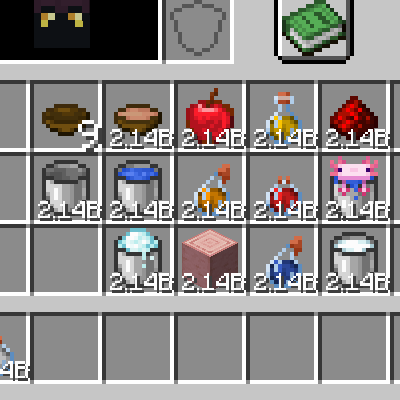
目前版本為 2.x.x,與 1.x.x 的設定檔不兼容
NEW TAG
新增物品標籤 forge:stackable
這個標籤會自動添加到原始堆疊上限為1的物品上
Command
你可以用指令設定每種物品的堆疊上限 (1~2147483646)
priority的數字越大,優先度越高。如果沒有填入則根據item/tag來決定優先度,item預設為1000,tag預設為0
/maxcount set <item|tag> <count|max|default> [priority]
/maxcount unset <item|tag>
/maxcount set minecraft:copper_ingot 999
/maxcount set minecraft:iron_ingot default
/maxcount set #forge:stackable max
/maxcount unset minecraft:iron_ingot
Config
你也可以在配置檔案中設定堆疊上限 (1~2147483646)
在存檔目錄底下 saves\ <your saved> \serverconfig\onestack-server.toml
可以在遊戲途中修改配置
[[items]]
	tag = "forge:stackable"
	priority = 0
	maxCount = "default"
[[items]]
	name = "minecraft:mushroom_stew"
	priority = 1000
	maxCount = "max"
[[items]]
	name = "minecraft:iron_ingot"
	priority = 1000
	maxCount = 12345
Install
Server和Client都要安裝
API
查看github
Issues
Incompatible
- Sophisticated Storage/Backpacks
- 不會為Sophisticated Storage/Backpack修復錯誤
- 建議maxcount設定成小於等於15,887的數來獲得最佳兼容性 floor(2147483646 / 132 / 1024)
Project description from CurseForge.
Pick your setup
One Stack by Minecraft version and loader
Choose the version and loader you play, then open the matching release.
Check the dependencies, then try the file in a copied instance before changing a world you care about.
Recent files
One Stack versions and loaders
onestack-1.20.1-forge-2.2.4.jar
31 May 2025
Client Source doesn’t say Server Source doesn’t say Dependencies No extras listed Listed on Release listing
Check the 1.20.1 · Forge setup 1.20.1Forge beta
onestack-1.20.1-forge-2.2.3.jar
21 Sept 2024
Client Source doesn’t say Server Source doesn’t say Dependencies No extras listed Listed on Release listing
Check the 1.20.1 · Forge setup 1.20.1Forge beta
onestack-1.20.1-forge-2.2.2.jar
20 Sept 2024
Client Source doesn’t say Server Source doesn’t say Dependencies No extras listed Listed on Release listing
Check the 1.20.1 · Forge setup 1.20.1Forge beta
onestack-1.20.1-forge-2.2.0.jar
31 Aug 2024
Client Source doesn’t say Server Source doesn’t say Dependencies No extras listed Listed on Release listing
Check the 1.20.1 · Forge setup 1.20.1Forge beta
onestack-1.20.1-forge-2.1.0.jar
27 Aug 2024
Client Source doesn’t say Server Source doesn’t say Dependencies No extras listed Listed on Release listing
Check the 1.20.1 · Forge setup 1.20.1Forge beta
onestack-1.20.1-forge-2.0.1.jar
24 Aug 2024
Client Source doesn’t say Server Source doesn’t say Dependencies No extras listed Listed on Release listing
Check the 1.20.1 · Forge setup 1.20.1Forge beta
onestack-1.20.1-forge-2.0.0.jar
14 Aug 2024
Client Source doesn’t say Server Source doesn’t say Dependencies No extras listed Listed on Release listing
Check the 1.20.1 · Forge setup 1.20.1Forge beta
onestack-1.20.1-forge-1.0.1.jar
1 Aug 2024
Client Source doesn’t say Server Source doesn’t say Dependencies No extras listed Listed on Release listing
Check the 1.20.1 · Forge setup 1.20.1Forge beta
onestack-1.20.1-forge-1.0.0.jar
31 Jul 2024
Client Source doesn’t say Server Source doesn’t say Dependencies No extras listed Listed on Release listing
Check the 1.20.1 · Forge setup 1.20.1Forge beta
Looking for an older file? The official CurseForge project page is in Resources.
 mod
CurseForge · Minecraft
Turbo for Distant Horizons
Distant Horizons addon: generates distant terrain from the world noise several times faster, with real trees and structures.
 mod
CurseForge · Minecraft
musicaldash
Insert Musical Dash discs into any Jukebox to teleport to live action stages across all Minecraft updates, spawn a Bot with your exact skin that builds, mines, and fights, record your own replay discs, and return anytime via the Skip Block!
 mod
CurseForge · Minecraft
Ember's Questing
Powerful data driven questing mod using LDLib2 for maximum customizability