Minecraft version
Back to mods 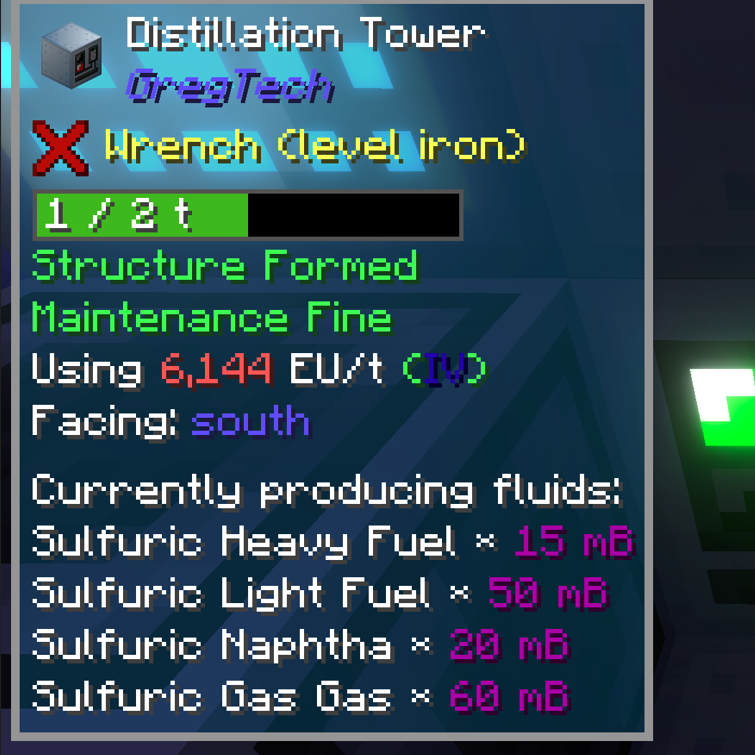
CurseForge · Minecraft mod
GT TOP Addition
Support more info for Top and GTCEu
Choose a version Pick your version below, then grab the matching file.
Quick answer
Which GT TOP Addition release should I use?
Latest stable file gttopaddition-1.8.5.jar
Game version 1.12.2
Loader Forge
GT TOP Addition gttopaddition-1.8.5.jar targets 1.12.2 with Forge. The project page does not say whether this file belongs on the client, dedicated server, or both. No extra mods listed for this file.
Where it goes
Is GT TOP Addition required on the client, server, or both?
The project page does not say whether this file belongs on the client, dedicated server, or both.
Client Source doesn’t say
Dedicated server Source doesn’t say
Loader for this release Forge
Required install it here Optional supported, not mandatory Not supported do not install here Source doesn’t say do not assume
The source does not explicitly classify this release as client-only or server-only.
What else does GT TOP Addition gttopaddition-1.8.5.jar need?
gttopaddition-1.8.5.jar. Change the file and its required mods may change too.
This file does not list any required mods. Do not add a library just because a different file uses it.
This file does not list any required or optional mods.
Before you install it
Add GT TOP Addition without breaking your instance.
Built for GT TOP Addition gttopaddition-1.8.5.jar. Pick another file and the loader, install side or required mods may change.
- 01
Stick to this file
Use gttopaddition-1.8.5.jar. It targets 1.12.2 with Forge; another release may have different loader, side or dependency requirements.
- 02
Bring the mods it needs
This file does not list any required mods. Do not add a library just because a different file uses it.
- 03
Put it on the correct side
The project page does not say whether this file belongs on the client, dedicated server, or both.
- 04
Pick the file you checked
Use the “Get this file” button beside gttopaddition-1.8.5.jar. It opens that exact file at the source.
About this project
What does GT TOP Addition add?
In the vast world of Minecraft, exploration and creation have always been the core allure of the game. Throughout this journey, the acquisition and display of information becomes paramount, empowering players to manage resources more efficiently, optimize production processes, and gain a deeper understanding of intricate mechanical systems. To this end, we proudly introduce the integration mod between The One Probe and the beloved GregTech mod, aimed at delivering an unprecedented gaming experience to players.
Mod Overview:
This integration mod seamlessly merges The One Probe, a powerful information display tool, with the popular GregTech mod, enhancing the visibility of key details for GregTech's myriad of complex machines. Both novice and veteran players alike can effortlessly grasp the working status, production efficiency, energy consumption, and other crucial information of their machines, enabling more informed decision-making.
Core Features:
- Real-time Production Information: The mod displays in real-time the items or fluids currently being produced by GregTech machines, giving players instant insight into production progress and output content.
- Parallel Limitations & Efficiency: By inspecting machines' parallel limitations through The One Probe, players can precisely control the scale of their production lines, avoiding resource waste and inefficiencies. Additionally, the mod provides actual input/output information, aiding players in assessing machines' actual working efficiency.
- Temperature & Orientation: For machines requiring precise temperature control or orientation, the mod offers intuitive temperature displays and orientation indicators, ensuring players can accurately adjust machine parameters for optimal performance.
- Power Monitoring: Real-time monitoring of current and voltage allows players to effortlessly oversee the operational status of their power networks, preventing power overloads or shortages, and ensuring the stable operation of production lines.
User Experience:
Upon installation and activation of this integration mod, players simply need to point The One Probe at any GregTech machine to view a detailed information panel on their screens. Presented in a clear and readable format, this information allows players to swiftly grasp various metrics of their machines. Furthermore, the mod boasts excellent compatibility and stability, ensuring seamless collaboration with the GregTech mod and other commonly used mods, providing players with a smooth gaming experience.
Project description from CurseForge.
Pick your setup
GT TOP Addition by Minecraft version and loader
Choose the version and loader you play, then open the matching release.
Check the dependencies, then try the file in a copied instance before changing a world you care about.
Recent files
GT TOP Addition versions and loaders
gttopaddition-1.8.5.jar
31 Aug 2025
Client Source doesn’t say Server Source doesn’t say Dependencies No extras listed Listed on Release listing
Check the 1.12.2 · Forge setup Forge1.12.2 release
gttopaddition-1.8.4.jar
24 Aug 2025
Client Source doesn’t say Server Source doesn’t say Dependencies No extras listed Listed on Release listing
Check the 1.12.2 · Forge setup Forge1.12.2 release
gttopaddition-1.8.1.jar
31 Jul 2025
Client Source doesn’t say Server Source doesn’t say Dependencies No extras listed Listed on Release listing
Check the 1.12.2 · Forge setup Forge1.12.2 release
gttopaddition-1.8.0.jar
28 Jul 2025
Client Source doesn’t say Server Source doesn’t say Dependencies 2 required · 2 unchecked Listed on Release listing
Check the 1.12.2 · Forge setup Forge1.12.2 release
gttopaddition-1.0.3.jar
3 Oct 2024
Client Source doesn’t say Server Source doesn’t say Dependencies No extras listed Listed on Release listing
Check the 1.12.2 · Forge setup Forge1.12.2 release
gttopaddition-1.0.2.jar
1 Oct 2024
Client Source doesn’t say Server Source doesn’t say Dependencies 2 required · 2 unchecked Listed on Release listing
Check the 1.12.2 · Forge setup Forge1.12.2 release
gttopaddition-1.0.2.jar
18 Sept 2024
Client Source doesn’t say Server Source doesn’t say Dependencies No extras listed Listed on Release listing
Check the 1.12.2 · Forge setup Forge1.12.2 release
gttopaddition-1.0.1.jar
29 Aug 2024
Client Source doesn’t say Server Source doesn’t say Dependencies 2 required · 2 unchecked Listed on Release listing
Check the 1.12.2 · Forge setup Forge1.12.2 release
gttopaddition-1.0.0.jar
8 Aug 2024
Client Source doesn’t say Server Source doesn’t say Dependencies No extras listed Listed on Release listing
Check the 1.12.2 · Forge setup Forge1.12.2 release
gttopaddition-1.0.0.jar
1 Aug 2024
Client Source doesn’t say Server Source doesn’t say Dependencies 1 required · 1 unchecked Listed on Release listing
Check the 1.12.2 · Forge setup Forge1.12.2 release
Looking for an older file? The official CurseForge project page is in Resources.
 mod
CurseForge + Modrinth · Minecraft
CarianStyle
An enchantment type mod based on the Elden Ring game
 mod
CurseForge · Minecraft
Enthalpy
Enthalpy is a tech mod where everything feeds something else. Engines power your machines. Your machines feed your fish. Your fish turn into iron, diamonds and fuel. And that fuel? Straight back into the engines!
 mod
CurseForge · Minecraft
Masterful Machinery Upgraded
Masterful Machinery but for neoforge