Fabric API Needed by Re:Entity Outliner [26.3] Re:Entity Outliner - Fabric - 26.3.0.0
requiredMatching file found Matched file: [26.3] Fabric API 0.166.2+26.3
CurseForge · Minecraft mod
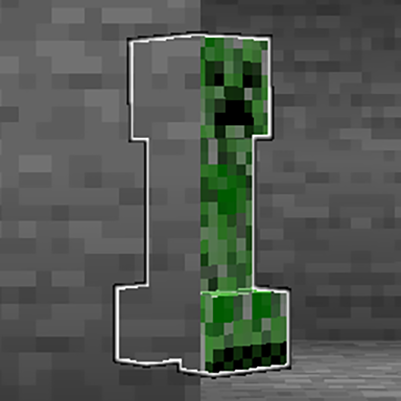
A clientside entity xray mod that allows you to select entity types to outline, making them visible through obstructions at any distance.
Quick answer
Re:Entity Outliner [26.3] Re:Entity Outliner - Fabric - 26.3.0.0 targets 26.3 with Fabric. The project page does not say whether this file belongs on the client, dedicated server, or both. All 1 required mods have matching files.
Where it goes
The project page does not say whether this file belongs on the client, dedicated server, or both.
The source does not explicitly classify this release as client-only or server-only.
[26.3] Re:Entity Outliner - Fabric - 26.3.0.0. Change the file and its required mods may change too.
Install Fabric API first. We found matching files for this game-version and loader setup. 1 comes through another mod in the chain.
1 extra mod was pulled in by another dependency. Indented rows show who needs each one. We only count dependency files that match this setup. A file for another loader does not fill the gap.
Before you install it
Built for Re:Entity Outliner [26.3] Re:Entity Outliner - Fabric - 26.3.0.0. Pick another file and the loader, install side or required mods may change.
Use [26.3] Re:Entity Outliner - Fabric - 26.3.0.0. It targets 26.3 with Fabric; another release may have different loader, side or dependency requirements.
Install Fabric API first. We found matching files for this game-version and loader setup. 1 comes through another mod in the chain.
The project page does not say whether this file belongs on the client, dedicated server, or both.
Use the “Get this file” button beside [26.3] Re:Entity Outliner - Fabric - 26.3.0.0. It opens that exact file at the source.
About this project
Re:Entity Outliner is a clientside mod that allows you to select entity types to outline, making them visible through obstructions like a entity xray / entity ESP / wallhack) at any distance (by using a glowing effect).

New : Forge and NeoForge mod versions (1.21.8+)
For players on older versions, the mod is now also available for Forge 1.20.1
For older fabric versions, Re:Entity Outliner is a continuation of adamviola's initial mod : https://www.curseforge.com/minecraft/mc-mods/entity-outliner
This mod will help with:


And many more!
Entity Selector

This screen allows outlining of any entity in the game. There's a search bar for narrowing down entities and buttons to organize the results by entity category, deselect all entities, and toggle on/off the outlines. Entities added by other mods do appear in the results.
For the technically inclined, the search works using a precomputed hashtable that maps a string prefix to a corresponding list of results. The lists of results are computed for all prefixes that correspond at least one entity type.
Controls for toggling the outlines and opening the selector

Custom keybinds are provided to open the entity selector and toggle the outline. The outline can also be toggled via a button inside the entity selector.
MIT. Feel free to use this mod in any modpack.
Project description from CurseForge.
Pick your setup
Choose the version and loader you play, then open the matching release.
Showing the newest 12 of 20 game versions. Older files are in the list below.
Check the dependencies, then try the file in a copied instance before changing a world you care about.
Recent files
reentityoutliner-fabric-26.3-26.3.0.0.jar
22 Sept 2026
reentityoutliner-neoforge-26.3-26.3.0.0.jar
22 Sept 2026
reentityoutliner-neoforge-26.2-26.2.1.0.jar
24 Jul 2026
reentityoutliner-fabric-26.2-26.2.1.0.jar
24 Jul 2026
reentityoutliner-fabric-26.1.1-26.1.2.4.jar
20 Jun 2026
reentityoutliner-neoforge-26.1.1-26.1.2.4.jar
20 Jun 2026
reentityoutliner-fabric-1.21.11-25.4.0.2.jar
20 Jun 2026
reentityoutliner-neoforge-1.21.11-25.4.0.2.jar
20 Jun 2026
ReEntityOutliner-forge-1.21.11-25.4.0.2.jar
20 Jun 2026
reentityoutliner-fabric-1.21.9-25.3.0.2.jar
20 Jun 2026
reentityoutliner-neoforge-1.21.9-25.3.0.2.jar
20 Jun 2026
ReEntityOutliner-forge-1.21.9-25.3.0.2.jar
20 Jun 2026
Looking for an older file? The official CurseForge project page is in Resources.
 mod
One mod where a server usually runs dozens: a Discord chat bridge, ranks, claims, votes, tickets and a web editor inside the jar. NeoForge 1.21.1 and 26.2.
 mod
OnlyMouse is an accessibility-focused Minecraft Java Edition mod that enables players to play using only a mouse, reducing the need for a physical keyboard.
 mod
Restricts players to using only TP-related commands, or completely disables all non-TP commands.
