Mod Menu Needed by CCDDI (Damage Indicator) v1.1.1-1.20.1
requiredMatching file found Matched file: v7.2.2 for 1.20.1

CurseForge · Minecraft mod
CCDDI, or Customizable Clientside Direction Damage Indicator, adds a simple, configurable, and reliable damage indicator to your heads-up-display.
Quick answer
CCDDI (Damage Indicator) v1.1.1-1.20.1 targets 1.20.1 with Fabric. The project page does not say whether this file belongs on the client, dedicated server, or both. All 3 required mods have matching files.
Where it goes
The project page does not say whether this file belongs on the client, dedicated server, or both.
The source does not explicitly classify this release as client-only or server-only.
v1.1.1-1.20.1. Change the file and its required mods may change too.
Install Mod Menu, YetAnotherConfigLib, Fabric API first. We found matching files for this game-version and loader setup. 1 comes through another mod in the chain.
1 extra mod was pulled in by another dependency. Indented rows show who needs each one. We only count dependency files that match this setup. A file for another loader does not fill the gap.
Before you install it
Built for CCDDI (Damage Indicator) v1.1.1-1.20.1. Pick another file and the loader, install side or required mods may change.
Use v1.1.1-1.20.1. It targets 1.20.1 with Fabric; another release may have different loader, side or dependency requirements.
Install Mod Menu, YetAnotherConfigLib, Fabric API first. We found matching files for this game-version and loader setup. 1 comes through another mod in the chain.
The project page does not say whether this file belongs on the client, dedicated server, or both.
Use the “Get this file” button beside v1.1.1-1.20.1. It opens that exact file at the source.
About this project
Customizable Client-side Directional Damage Indicator (CCDDI) adds a simple yet extremely helpful damage indicator around your crosshair, alerting the player to nearby damage sources.
Depends on ModMenu and YetAnotherConfigLib (YACL) for the extreme customization of the indicator, including its position and appearance in the heads-up-display (you can even choose your own textures for the indicator!)
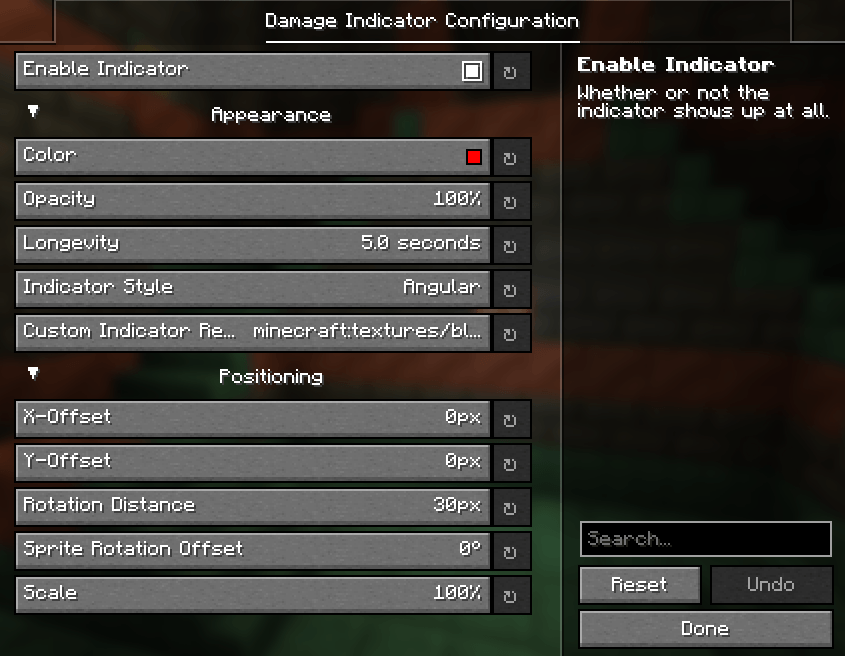
Vanilla Minecraft already has a damage indicator (shaking the camera in the direction of the damage), but it is more disorienting than useful.
I am considering porting to Neo/Legacy Forge, so please refrain from asking!
Project description from CurseForge.
Pick your setup
Choose the version and loader you play, then open the matching release.
Check the dependencies, then try the file in a copied instance before changing a world you care about.
Recent files
CCDDI-1.1.1-1.20.1.jar
1 Sept 2024
CCDDI-1.1.1-1.21.1.jar
1 Sept 2024
CCDDI-1.1.1-1.20.1.jar
1 Sept 2024
CCDDI-1.1.0.jar
1 Sept 2024
CCDDI-1.0.1.jar
15 Aug 2024
CCDDI-1.0.0.jar
15 Aug 2024
Looking for an older file? The official CurseForge project page is in Resources.
 mod
An add-on for Player Animator that allows it to work with humanoid mobs. A fork for 1.21.1 with small improvements and compatibility additions.
 mod
Discover Plants, Animals and Monsters with a Spyglass. Collect them all and take notes in your personal Field Guide!
 mod
Makes the shelf mushroom an actual shelf!