Minecraft version
Back to mods 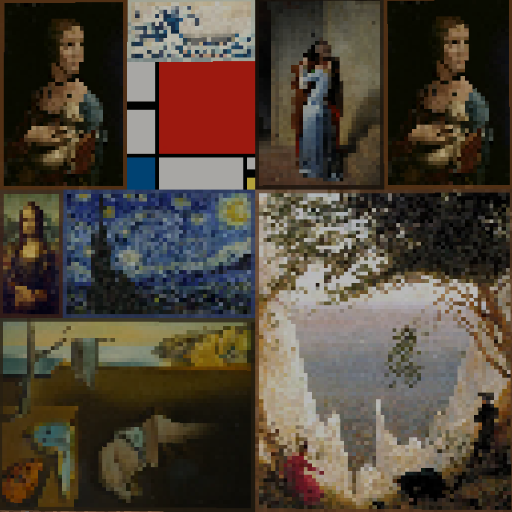
CurseForge · Minecraft mod
Advanced Paintings
🎨 Transform your game into an art gallery with Advanced Paintings! This mod adds a diverse selection of paintings, from abstract to serene landscapes, in pixel art styles. Personalize your spaces and bring timeless art into your game! 🎮
Choose a version Pick your version below, then grab the matching file.
Quick answer
Which Advanced Paintings release should I use?
Latest stable file advanced_paintings-1.3-neoforge-26.2.jar
Game version 26.2
Loader NeoForge
Advanced Paintings advanced_paintings-1.3-neoforge-26.2.jar targets 26.2 with NeoForge. The project page does not say whether this file belongs on the client, dedicated server, or both. No extra mods listed for this file.
Where it goes
Is Advanced Paintings required on the client, server, or both?
The project page does not say whether this file belongs on the client, dedicated server, or both.
Client Source doesn’t say
Dedicated server Source doesn’t say
Loader for this release NeoForge
Required install it here Optional supported, not mandatory Not supported do not install here Source doesn’t say do not assume
The source does not explicitly classify this release as client-only or server-only.
What else does Advanced Paintings advanced_paintings-1.3-neoforge-26.2.jar need?
advanced_paintings-1.3-neoforge-26.2.jar. Change the file and its required mods may change too.
This file does not list any required mods. Do not add a library just because a different file uses it.
This file does not list any required or optional mods.
Before you install it
Add Advanced Paintings without breaking your instance.
Built for Advanced Paintings advanced_paintings-1.3-neoforge-26.2.jar. Pick another file and the loader, install side or required mods may change.
- 01
Stick to this file
Use advanced_paintings-1.3-neoforge-26.2.jar. It targets 26.2 with NeoForge; another release may have different loader, side or dependency requirements.
- 02
Bring the mods it needs
This file does not list any required mods. Do not add a library just because a different file uses it.
- 03
Put it on the correct side
The project page does not say whether this file belongs on the client, dedicated server, or both.
- 04
Pick the file you checked
Use the “Get this file” button beside advanced_paintings-1.3-neoforge-26.2.jar. It opens that exact file at the source.
About this project
What does Advanced Paintings add?
🎨 MOD "Advanced Paintings" - Bring Art into Your Game! 🎨
Ready to turn your game world into an unparalleled art gallery? With Advanced Paintings, you can enrich your spaces with a unique selection of paintings that capture the essence of various artistic styles.
🌟 Explore a Unique Collection 🌟
This mod introduces a wide variety of paintings, from vibrant colors and abstract forms to serene and delicate scenes. Each artwork is chosen to add depth and character to your game environments, making every space unique and evocative.
🎮 Customize Your Game Spaces 🎮
Decorate your builds with artistic masterpieces that reflect your creative vision. Whether you want to create an art gallery or simply enhance the ambiance of a room, Advanced Paintings offers endless customization possibilities.
📦 Easy Installation & Compatibility 📦
Installing Advanced Paintings is quick and easy, with full compatibility guaranteed with the latest game versions. Download the mod and start transforming your world into an extraordinary art gallery!
Project description from CurseForge.
Pick your setup
Advanced Paintings by Minecraft version and loader
Choose the version and loader you play, then open the matching release.
Minecraft version
26.1.2
1 loader buildMinecraft version
1.21.8
2 loader buildsMinecraft version
1.21.4
1 loader buildMinecraft version
1.21.1
1 loader buildMinecraft version
1.21
1 loader buildMinecraft version
1.20.6
1 loader buildMinecraft version
1.20.1
2 loader buildsMinecraft version
1.19.4
1 loader buildMinecraft version
1.19.2
1 loader buildMinecraft version
1.18.2
1 loader buildCheck the dependencies, then try the file in a copied instance before changing a world you care about.
Recent files
Advanced Paintings versions and loaders
advanced_paintings-1.3-neoforge-26.2.jar
19 Aug 2026
Client Source doesn’t say Server Source doesn’t say Dependencies No extras listed Listed on Release listing
Check the 26.2 · NeoForge setup NeoForge26.2 release
advanced_paintings-1.4-neoforge-26.1.2.jar
5 Jul 2026
Client Source doesn’t say Server Source doesn’t say Dependencies No extras listed Listed on Release listing
Check the 26.1.2 · NeoForge setup NeoForge26.1.2 release
advanced_paintings-1.4-neoforge-1.21.1.jar
17 Jun 2026
Client Source doesn’t say Server Source doesn’t say Dependencies No extras listed Listed on Release listing
Check the 1.21.1 · NeoForge setup 1.21.1NeoForge release
advanced_paintings-1.4-forge-1.20.1.jar
17 Jun 2026
Client Source doesn’t say Server Source doesn’t say Dependencies No extras listed Listed on Release listing
Check the 1.20.1 · Forge setup 1.20.1Forge release
Advanced Paintings 1.3
advanced_paintings-1.3-fabric-1.21.8.jar
2 Nov 2025
Client Source doesn’t say Server Source doesn’t say Dependencies No extras listed Listed on Release listing
Check the 1.21.8 · Fabric setup Fabric1.21.8 release
Advanced Paintings 1.3
advanced_paintings-1.3-neoforge-1.21.8.jar
2 Nov 2025
Client Source doesn’t say Server Source doesn’t say Dependencies No extras listed Listed on Release listing
Check the 1.21.8 · NeoForge setup 1.21.8NeoForge release
Advanced Paintings 1.2
advanced_paintings-1.2-forge-1.20.1.jar
20 Aug 2025
Client Source doesn’t say Server Source doesn’t say Dependencies No extras listed Listed on Release listing
Check the 1.20.1 · Forge setup 1.20.1Forge release
Advanced Paintings 1.2
advanced_paintings-1.2-fabric-1.20.1.jar
20 Aug 2025
Client Source doesn’t say Server Source doesn’t say Dependencies No extras listed Listed on Release listing
Check the 1.20.1 · Fabric setup Fabric1.20.1 release
Advanced Paintings 1.2
advanced_paintings-1.2-neoforge-1.21.1.jar
20 Aug 2025
Client Source doesn’t say Server Source doesn’t say Dependencies No extras listed Listed on Release listing
Check the 1.21.1 · NeoForge setup NeoForge1.21.1 release
Advanced Paintings 1.2
advanced_paintings-1.2-neoforge-1.21.4.jar
20 Aug 2025
Client Source doesn’t say Server Source doesn’t say Dependencies No extras listed Listed on Release listing
Check the 1.21.4 · NeoForge setup 1.21.4NeoForge release
Advanced Paintings 1.1
advanced_paintings-1.1-forge-1.18.2.jar
11 Jun 2025
Client Source doesn’t say Server Source doesn’t say Dependencies No extras listed Listed on Release listing
Check the 1.18.2 · Forge setup 1.18.2Forge release
Advanced Paintings 1.1
advanced_paintings-1.1-forge-1.19.2.jar
11 Jun 2025
Client Source doesn’t say Server Source doesn’t say Dependencies No extras listed Listed on Release listing
Check the 1.19.2 · Forge setup 1.19.2Forge release
Looking for an older file? The official CurseForge project page is in Resources.
 mod
CurseForge + Modrinth · Minecraft
Modern Morph
A modern port of iChun's iconic Morph mod
 mod
CurseForge + Modrinth · Minecraft
VanillaHUD
A mod that modifies various vanilla HUD elements, such as the bossbar, action bar, sidebar / scoreboard, hotbar, title / subtitle, and more. By Polyfrost, best with OneClient.
 mod
CurseForge + Modrinth · Minecraft
VillageCraft 3 Essentials
The custom mod used in the VillageCraft 3 Modpack.