Minecraft version
Back to mods 
CurseForge · Minecraft mod
Just DoubleJump!
This Mod Adds a simple highly configurable double Jump System.
Choose a version Pick your version below, then grab the matching file.
Quick answer
Which Just DoubleJump! release should I use?
Latest stable file justdoublejump-1.6-forge-1.20.1.jar
Game version 1.20.1
Loader NeoForge, Forge
Just DoubleJump! justdoublejump-1.6-forge-1.20.1.jar targets 1.20.1 with NeoForge, Forge. The project page does not say whether this file belongs on the client, dedicated server, or both. No extra mods listed for this file.
Where it goes
Is Just DoubleJump! required on the client, server, or both?
The project page does not say whether this file belongs on the client, dedicated server, or both.
Client Source doesn’t say
Dedicated server Source doesn’t say
Loader for this release NeoForge, Forge
Required install it here Optional supported, not mandatory Not supported do not install here Source doesn’t say do not assume
The source does not explicitly classify this release as client-only or server-only.
What else does Just DoubleJump! justdoublejump-1.6-forge-1.20.1.jar need?
justdoublejump-1.6-forge-1.20.1.jar. Change the file and its required mods may change too.
This file does not list any required mods. Do not add a library just because a different file uses it.
This file does not list any required or optional mods.
Before you install it
Add Just DoubleJump! without breaking your instance.
Built for Just DoubleJump! justdoublejump-1.6-forge-1.20.1.jar. Pick another file and the loader, install side or required mods may change.
- 01
Stick to this file
Use justdoublejump-1.6-forge-1.20.1.jar. It targets 1.20.1 with NeoForge, Forge; another release may have different loader, side or dependency requirements.
- 02
Bring the mods it needs
This file does not list any required mods. Do not add a library just because a different file uses it.
- 03
Put it on the correct side
The project page does not say whether this file belongs on the client, dedicated server, or both.
- 04
Pick the file you checked
Use the “Get this file” button beside justdoublejump-1.6-forge-1.20.1.jar. It opens that exact file at the source.
About this project
What does Just DoubleJump! add?
A Decently in-Depth Doublejump mod
Feel Free To Use it Anywhere!
This mod is now no longer being updated.
if you want, you can toggle the ability to doublejump for EACH individual player using attributes, 1=true and 0=false, -1 will set the attribute to the config value
This mod also adds the ability to jump over water (white doublejump), can be disabled separatley in the config)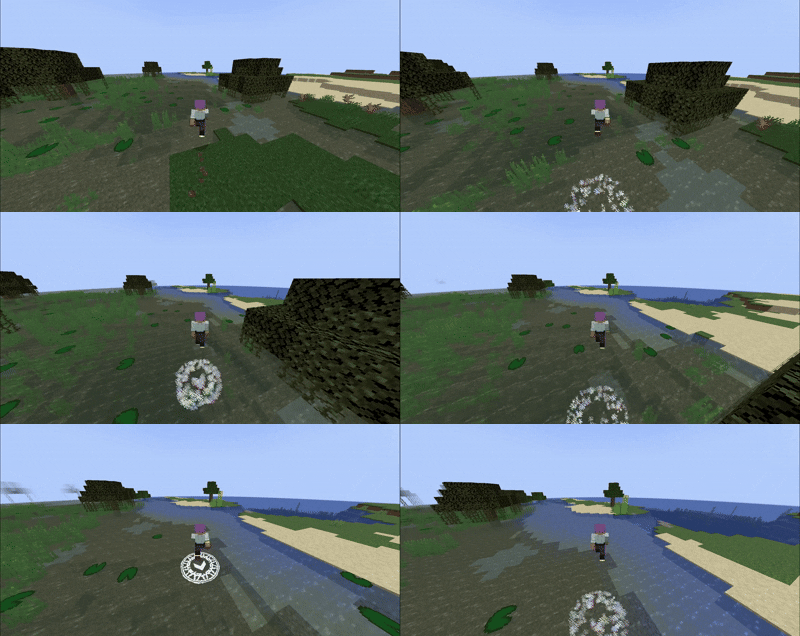
feel free to ask for any extra configuration option in the discord!
(the doublejump system used in this mod is the same as the one used in the mod ''movement arrows'', im currently separating each feature the mod adds in different smaller mods to make it easier to manage, this is one of them)
hey, yes i know this looks like just another random Ad for a bad overpriced Hosting Service
but there must be a reason if Bisetcthosting has enough money to burn on these sponsorships right?
i assure you, an unhappy customer dosent make a company money!
these banners are plastered everywhere for a reason,
bisecthosting offers one of the highest performance/price ratios in the industry and has by a
Looong shot the best customer service i have ever interacted with!
if that wasn't enough you can get all of this with a 25% DISCOUNT, wich let's be real is actually a
99% discount since you are also supporting your favourite mod developer, am i right or am i right?
Bisecthosting, the banner even has a cute axoltl, come on dude click on me
Project description from CurseForge.
Pick your setup
Just DoubleJump! by Minecraft version and loader
Choose the version and loader you play, then open the matching release.
Check the dependencies, then try the file in a copied instance before changing a world you care about.
Recent files
Just DoubleJump! versions and loaders
justdoublejump-1.6-forge-1.20.1.jar
19 Apr 2025
Client Source doesn’t say Server Source doesn’t say Dependencies No extras listed Listed on Release listing
Check the 1.20.1 · NeoForge setup NeoForge1.20.1Forge release
justdoublejump-1.5-forge-1.20.1.jar
18 Apr 2025
Client Source doesn’t say Server Source doesn’t say Dependencies No extras listed Listed on Release listing
Check the 1.20.1 · NeoForge setup NeoForge1.20.1Forge release
justdoublejump-1.4.0-forge-1.20.1.jar
12 Mar 2025
Client Source doesn’t say Server Source doesn’t say Dependencies No extras listed Listed on Release listing
Check the 1.20.1 · NeoForge setup NeoForge1.20.1Forge release
justdoublejump-1.2.5-forge-1.20.1.jar
13 Feb 2025
Client Source doesn’t say Server Source doesn’t say Dependencies No extras listed Listed on Release listing
Check the 1.20.1 · NeoForge setup NeoForge1.20.1Forge release
justdoublejump-1.2.0-forge-1.20.1.jar
3 Jan 2025
Client Source doesn’t say Server Source doesn’t say Dependencies No extras listed Listed on Release listing
Check the 1.20.1 · NeoForge setup NeoForge1.20.1Forge release
Just Doublejump!-1.1.1-forge-1.20.1.jar
justdoublejump-1.1.1-forge-1.20.1.jar
31 Aug 2024
Client Source doesn’t say Server Source doesn’t say Dependencies No extras listed Listed on Release listing
Check the 1.20.1 · Forge setup 1.20.1Forge release
Just Doublejump!-1.1.0-forge-1.20.1.jar
justdoublejump-1.1.0-forge-1.20.1.jar
31 Aug 2024
Client Source doesn’t say Server Source doesn’t say Dependencies No extras listed Listed on Release listing
Check the 1.20.1 · Forge setup 1.20.1Forge release
Just DoubleJump!-1.0.0-forge-1.20.1.jar
JustDoubleJump!.jar
24 Aug 2024
Client Source doesn’t say Server Source doesn’t say Dependencies No extras listed Listed on Release listing
Check the 1.20.1 · Forge setup 1.20.1Forge release
Looking for an older file? The official CurseForge project page is in Resources.
 mod
mod CurseForge · Minecraft
L (el)
Adds a new chat interface with more customization options, allowing you to personalize your Minecraft chat experience.
 mod
mod CurseForge · Minecraft
Pocket List
A checklist in the corner of your screen that ticks itself off as you gather. Pin items or recipes and break them down into ingredients. Client-side.
 mod
mod CurseForge · Minecraft
Polis
A registry for land, contracts, money and a court - it records what players do and never prevents it.