Minecraft version
Back to mods 
CurseForge · Minecraft mod
Better Tooltips
Highly configurable tooltip rendering, so you can always read them!
Choose a version Pick your version below, then grab the matching file.
Quick answer
Which Better Tooltips release matches 1.21?
Best match for your filters better_tooltips-1.0.3.jar
Game version 1.21, 1.21.1
Loader NeoForge
Better Tooltips better_tooltips-1.0.3.jar targets 1.21, 1.21.1 with NeoForge. The project page does not say whether this file belongs on the client, dedicated server, or both. No extra mods listed for this file.
Where it goes
Is Better Tooltips required on the client, server, or both?
The project page does not say whether this file belongs on the client, dedicated server, or both.
Client Source doesn’t say
Dedicated server Source doesn’t say
Loader for this release NeoForge
Required install it here Optional supported, not mandatory Not supported do not install here Source doesn’t say do not assume
The source does not explicitly classify this release as client-only or server-only.
What else does Better Tooltips better_tooltips-1.0.3.jar need?
better_tooltips-1.0.3.jar on 1.21. Every mod below is checked against that same setup.
This file does not list any required mods. Do not add a library just because a different file uses it.
This file does not list any required or optional mods.
Before you install it
Add Better Tooltips without breaking your instance.
Built for Better Tooltips better_tooltips-1.0.3.jar on 1.21. Pick another file and the loader, install side or required mods may change.
- 01
Stick to this file
Use better_tooltips-1.0.3.jar. It targets 1.21, 1.21.1 with NeoForge; another release may have different loader, side or dependency requirements.
- 02
Bring the mods it needs
This file does not list any required mods. Do not add a library just because a different file uses it.
- 03
Put it on the correct side
The project page does not say whether this file belongs on the client, dedicated server, or both.
- 04
Pick the file you checked
Use the “Get this file” button beside better_tooltips-1.0.3.jar. It opens that exact file at the source.
About this project
What does Better Tooltips add?
Highly configurable tooltip rendering, so you can always read them!
fork of AdaptiveTooltips
Why was this mod created?
Vanilla tooltips are not very smart: this mod aims to fix that. In vanilla, there are a lot of situations (especially when modded) where you just cannot read a tooltip due to it being just too long to fit on the screen. There are many solutions!
BetterTooltips aims to dream up and implement these solutions into Minecraft for a vanilla-like tooltip experience without the frustrations.
Features
There are many methods in which BetterTooltips can save your tooltips from the clutches of the bezels; below are a list of all the (toggleable) options to fix this.
Text Wrapping
There is one very obvious fix to tooltips going off-screen horizontally: text wrapping! If a line is too long to fit on your screen, BetterTooltips intelligently splits it into however many necessary, using words as cut-offs to not interrupt your reading.
There are multiple methods of wrapping:
Screen Width- The mod wraps with a max line width of the width of your screen (minus 15). Intended to be paired with Bedrock Centering option.Remaining Width- Allows tooltip lines to fill a maximum of what's left until the tooltip reaches the end of the screen, picking either the left or the right depending on which would require less wrapping.Half Screen Width- Only allows tooltips to have a width of half of the screen.Smart- Wraps lines that are considerably longer than the others, with a hard limit of 3/4 of the screen width.
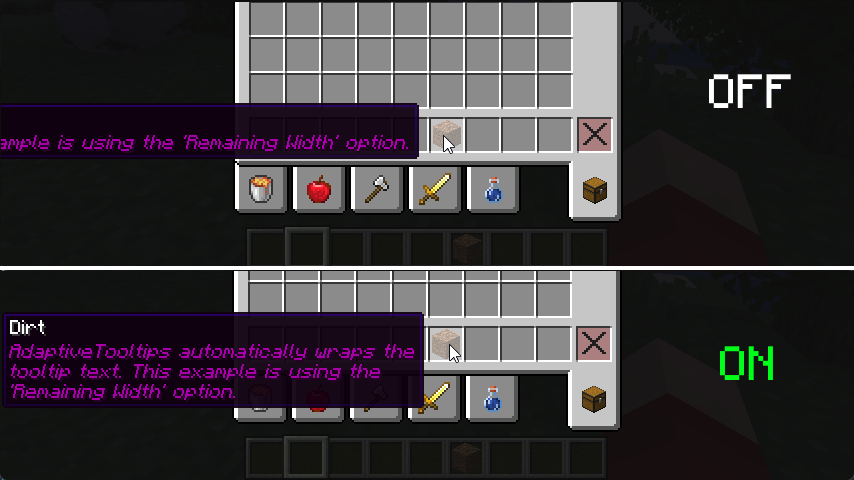 screenshot is using
Remaining Width wrapping method
Prioritize Tooltip Top
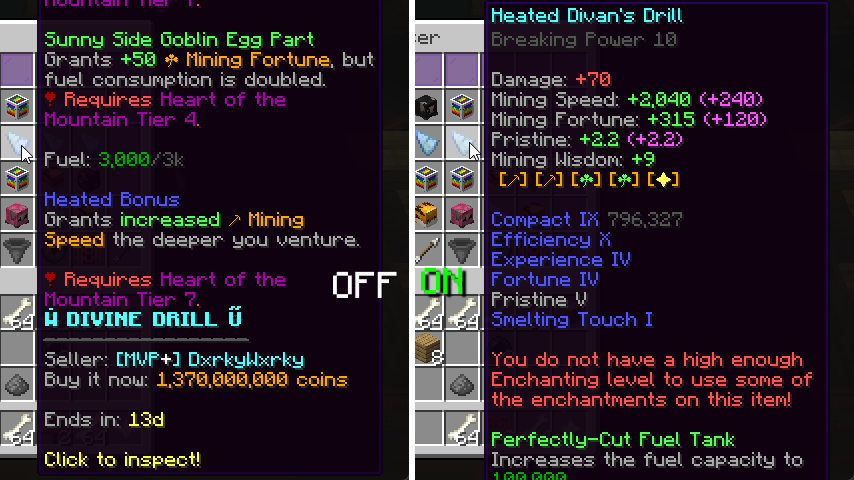
I'm actually surprised even Mojang didn't think of adding this one, by default, tooltips that are taller than your screen limit their bottom to the edge of the screen, not the top. This results in you being able to read the (often less important) bottom of the tooltip instead of the top. This fix addresses that.
Bedrock Centering
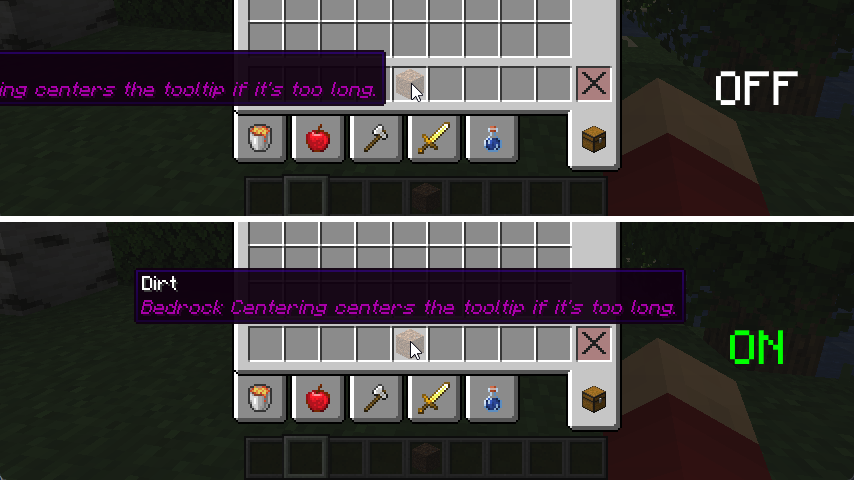
This feature grants parity between Java and Bedrock Edition. By default, Bedrock automatically centers the tooltip if it is too long to fit on either the left or the right, this adds that. For the best experience, it is best to pair this with Screen Width Text Wrapping.
Align To Corner
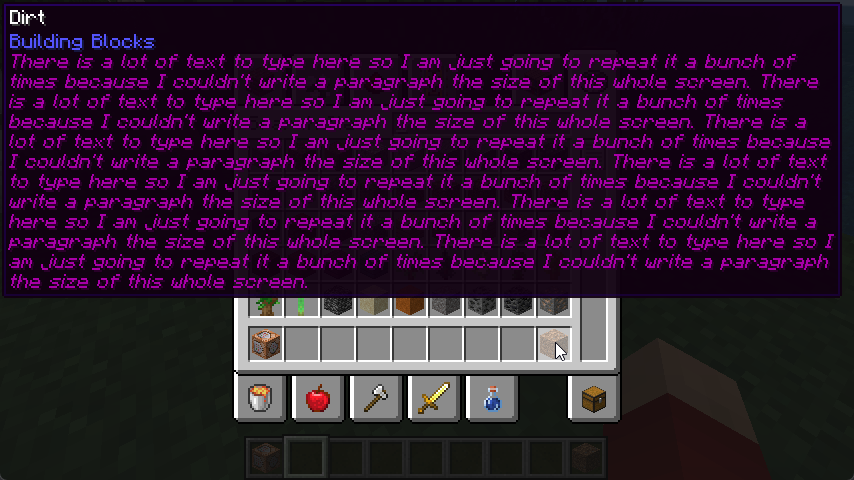
When all else fails, this feature is a good fallback. If after all the above features fail to keep the tooltip on the screen, BetterTooltips just places the tooltip in any of the 4 corners of the window, determining that based on the least obstruction of the mouse cursor.
Tooltip Scrolling
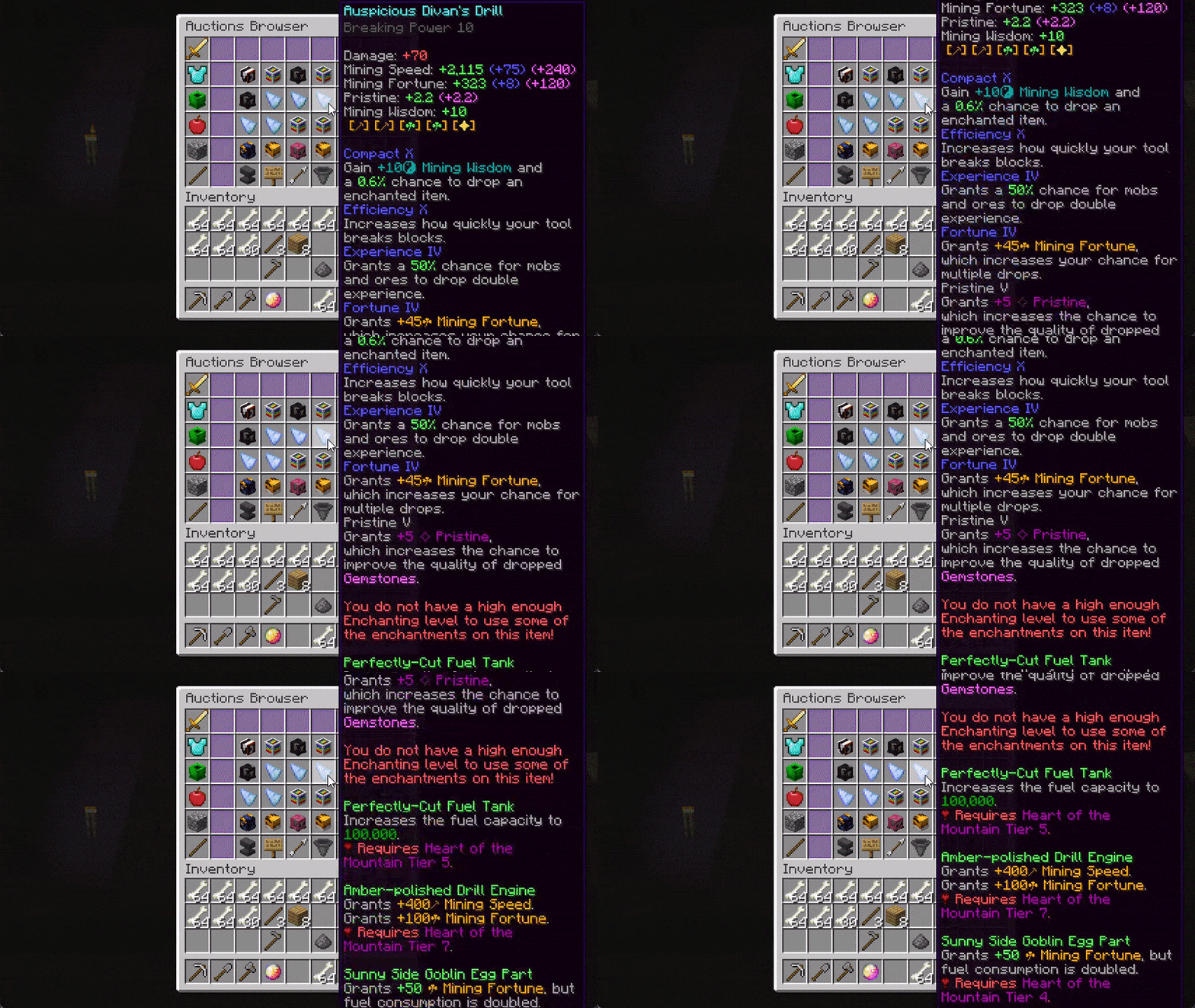
Yes, that's right, scrolling. It's been tried on Fabric many a times with little success with annoying edge-cases and bugs that make using scrolling annoying, but I've fixed all grievances! You can scroll vertically and horizontally with smooth animations and fine-tuning from the scroll direction to the sensitivity of the scrolling. BetterTooltips is also smart and knows the difference between two different tooltips and discards scrolling data when necessary.
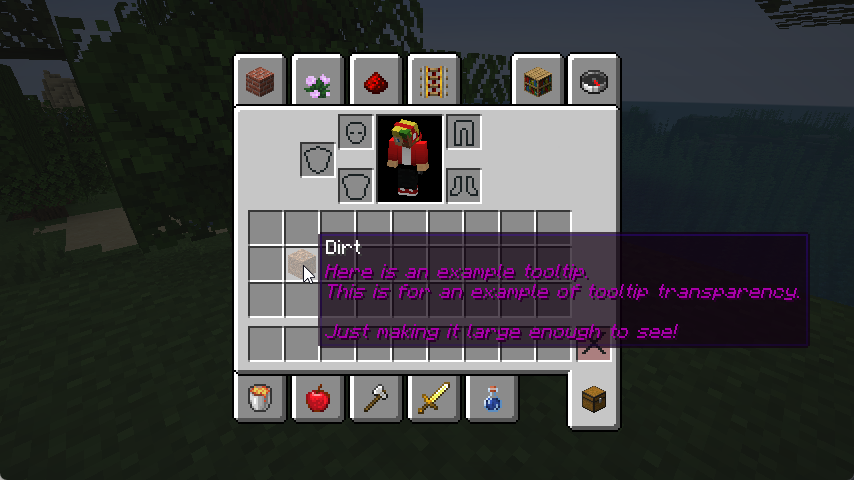
Transparency Modification
You may be bothered that tooltips may obstruct the view of the next few items in your inventory, this fix aims to mitigate that by allowing you to adjust the transparency of the tooltip, allowing you to decide what's best for in terms of visibility and transparency.
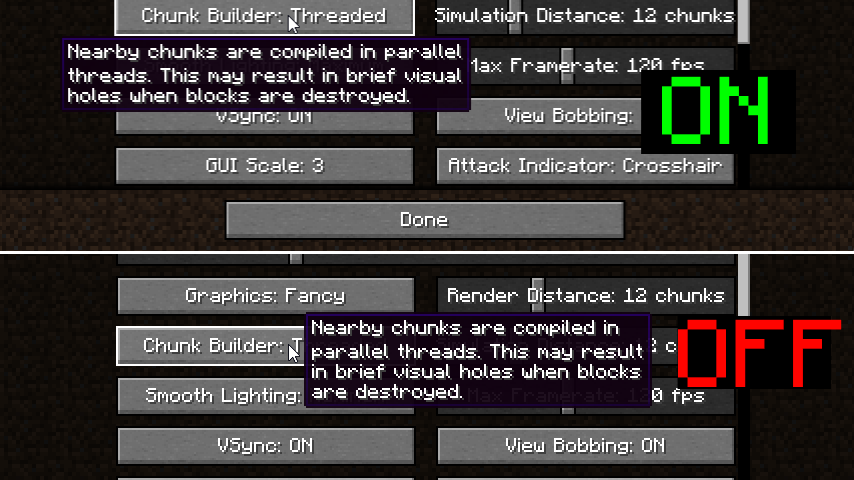
YACL-style GUI Tooltips
Capture the style of YetAnotherConfigLib's tooltip positioning by placing tooltips above or below a hovered button.
License
This mod is under the GNU Lesser General Public License, v3.0.
Project description from CurseForge.
Pick your setup
Better Tooltips by Minecraft version and loader
Choose the version and loader you play, then open the matching release.
Minecraft version
1.21
1 loader buildCheck the dependencies, then try the file in a copied instance before changing a world you care about.
Recent files
Better Tooltips versions and loaders
better_tooltips-1.0.3.jar
31 Mar 2025
Client Source doesn’t say Server Source doesn’t say Dependencies No extras listed Listed on Release listing
Check the 1.21 · NeoForge setup 1.21NeoForge1.21.1 release
better_tooltips-1.0.2.jar
11 Sept 2024
Client Source doesn’t say Server Source doesn’t say Dependencies No extras listed Listed on Release listing
Check the 1.21 · NeoForge setup 1.21NeoForge1.21.1 release
better_tooltips-1.0.1.jar
11 Sept 2024
Client Source doesn’t say Server Source doesn’t say Dependencies No extras listed Listed on Release listing
Check the 1.21 · NeoForge setup 1.21NeoForge1.21.1 release
better_tooltips-1.0.0.jar
9 Sept 2024
Client Source doesn’t say Server Source doesn’t say Dependencies No extras listed Listed on Release listing
Check the 1.21 · NeoForge setup 1.21NeoForge1.21.1 release
Looking for an older file? The official CurseForge project page is in Resources.