Minecraft version
Back to mods 
CurseForge · Minecraft mod
Storage Pots
Interactive Storage Pots for Bulk Single-Item Storage
Choose a version Pick your version below, then grab the matching file.
Quick answer
Which Storage Pots release should I use?
Latest stable file storage_pots-neoforge-1.21.1.jar
Game version 1.21.1
Loader NeoForge
Storage Pots storage_pots-neoforge-1.21.1.jar targets 1.21.1 with NeoForge. The project page does not say whether this file belongs on the client, dedicated server, or both. No extra mods listed for this file.
Where it goes
Is Storage Pots required on the client, server, or both?
The project page does not say whether this file belongs on the client, dedicated server, or both.
Client Source doesn’t say
Dedicated server Source doesn’t say
Loader for this release NeoForge
Required install it here Optional supported, not mandatory Not supported do not install here Source doesn’t say do not assume
The source does not explicitly classify this release as client-only or server-only.
What else does Storage Pots storage_pots-neoforge-1.21.1.jar need?
storage_pots-neoforge-1.21.1.jar. Change the file and its required mods may change too.
This file does not list any required mods. Do not add a library just because a different file uses it.
This file does not list any required or optional mods.
Before you install it
Add Storage Pots without breaking your instance.
Built for Storage Pots storage_pots-neoforge-1.21.1.jar. Pick another file and the loader, install side or required mods may change.
- 01
Stick to this file
Use storage_pots-neoforge-1.21.1.jar. It targets 1.21.1 with NeoForge; another release may have different loader, side or dependency requirements.
- 02
Bring the mods it needs
This file does not list any required mods. Do not add a library just because a different file uses it.
- 03
Put it on the correct side
The project page does not say whether this file belongs on the client, dedicated server, or both.
- 04
Pick the file you checked
Use the “Get this file” button beside storage_pots-neoforge-1.21.1.jar. It opens that exact file at the source.
About this project
What does Storage Pots add?
Storage Pots Mod
Overview
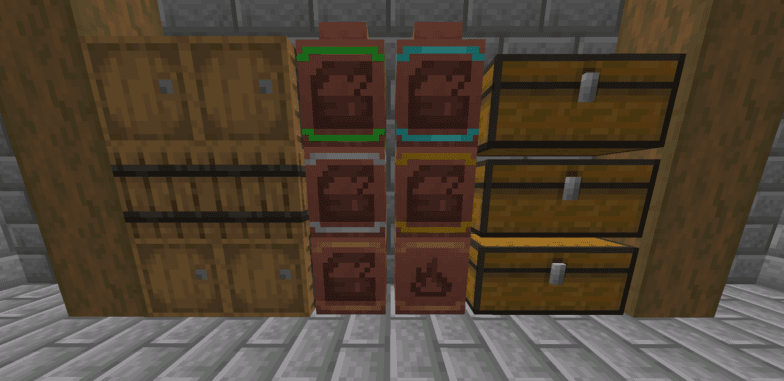
Quickly access your most frequently used or most plentiful items with a click of the mouse. Great for storing tons of the same items in order to tidy up your chests for an overabundance of identical items!
Usage
While the pots do not have a traditional inventory to them, you can still interact with the storage pots by right or left click.
- Right Click: Insert one item in hand into the pot
- Shift Right Click: Insert 64 of the item in hand into the pot (or all if you have less than 64 items)
- Left Click: Remove one item from the pot
- Shift Left Click: Remove 64 of the item from the pot (or all if the pot contains less than 64 items)
Items and item count will display on the front face of the pots which you can orient in all four cardinal directions.
Pots are Upgradeable!
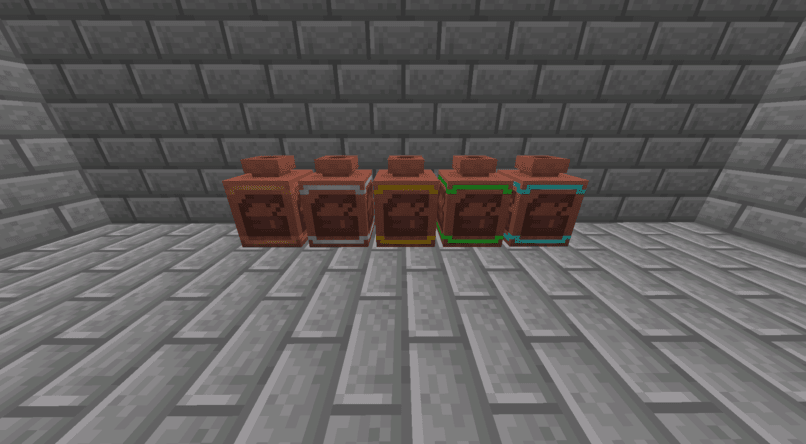
/ Emerald
Basic Storage Pot -> Iron -> Gold \ Diamond
You can upgrade from the regular storage pot to iron, gold, and then emerald or diamond for greater feats of storage!
Trash Pots
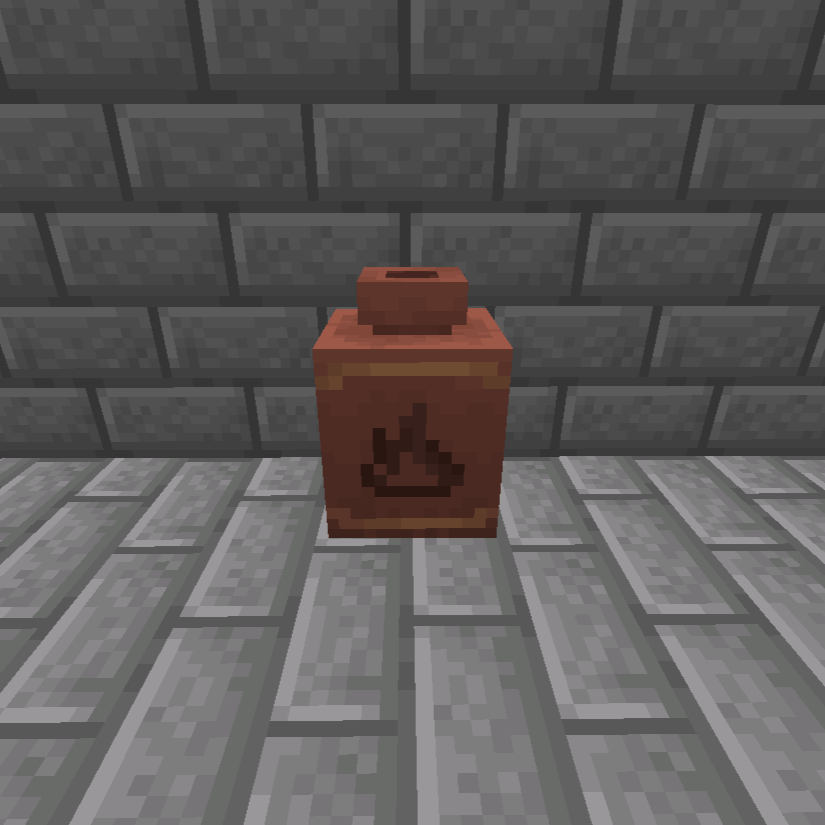
The trash pot is used to permanently delete excess items that are cluttering up your storage WITHOUT causing a gross pileup of items on the ground.
Feel free to use this mod in any modpack!
If you have any comments / suggestions / bugs I will be glad to read and respond in the comments!
Project description from CurseForge.
Pick your setup
Storage Pots by Minecraft version and loader
Choose the version and loader you play, then open the matching release.
Minecraft version
1.20.1
1 loader buildCheck the dependencies, then try the file in a copied instance before changing a world you care about.
Recent files
Storage Pots versions and loaders
storage_pots-neoforge-1.21.1.jar
23 Oct 2025
Client Source doesn’t say Server Source doesn’t say Dependencies No extras listed Listed on Release listing
Check the 1.21.1 · NeoForge setup NeoForge1.21.1 release
storage_pots-forge-1.20.1.jar
storage_pots-1.20.1.jar
25 Dec 2024
Client Source doesn’t say Server Source doesn’t say Dependencies No extras listed Listed on Release listing
Check the 1.20.1 · Forge setup 1.20.1Forge release
storage_pots-forge-1.20.1.jar
26 Sept 2024
Client Source doesn’t say Server Source doesn’t say Dependencies No extras listed Listed on Release listing
Check the 1.20.1 · Forge setup 1.20.1Forge release
Looking for an older file? The official CurseForge project page is in Resources.
 mod
mod CurseForge · Minecraft
Cam Utilities
Client-side camera control mod: smooth zoom, detached freecam, custom 3rd-person distance, cinematic camera smoothing, and custom perspective presets.
 mod
mod CurseForge · Minecraft
ItemGraph
A server-side forensic moderation mod for NeoForge 1.21.1. Reconstructs item movement, stack splits, and transformations through time from authoritative evidence.
 mod
mod Modrinth · Minecraft
Better Copper Golem
Make Copper Golems much smarter sorters with chest content memory. Add support for barrels, shulkers and most modded storage. Fine tune potion sorting and every Copper Golem attribute.