Minecraft version
Back to mods 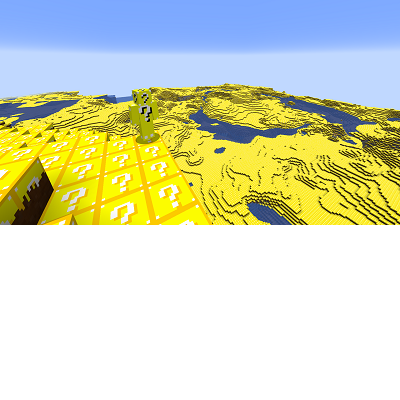
CurseForge · Minecraft mod
Kimi's Lucky Blocks
Adds a Lucky Block DImension that has Lucky Block Trees
Choose a version Pick your version below, then grab the matching file.
Quick answer
Which Kimi's Lucky Blocks release should I use?
Latest stable file LuckyBlockMod_1-21-1_0-1-0.jar
Game version 1.21.1
Loader NeoForge
Kimi's Lucky Blocks LuckyBlockMod_1-21-1_0-1-0.jar targets 1.21.1 with NeoForge. The project page does not say whether this file belongs on the client, dedicated server, or both. No extra mods listed for this file.
Where it goes
Is Kimi's Lucky Blocks required on the client, server, or both?
The project page does not say whether this file belongs on the client, dedicated server, or both.
Client Source doesn’t say
Dedicated server Source doesn’t say
Loader for this release NeoForge
Required install it here Optional supported, not mandatory Not supported do not install here Source doesn’t say do not assume
The source does not explicitly classify this release as client-only or server-only.
What else does Kimi's Lucky Blocks LuckyBlockMod_1-21-1_0-1-0.jar need?
LuckyBlockMod_1-21-1_0-1-0.jar. Change the file and its required mods may change too.
This file does not list any required mods. Do not add a library just because a different file uses it.
This file does not list any required or optional mods.
Before you install it
Add Kimi's Lucky Blocks without breaking your instance.
Built for Kimi's Lucky Blocks LuckyBlockMod_1-21-1_0-1-0.jar. Pick another file and the loader, install side or required mods may change.
- 01
Stick to this file
Use LuckyBlockMod_1-21-1_0-1-0.jar. It targets 1.21.1 with NeoForge; another release may have different loader, side or dependency requirements.
- 02
Bring the mods it needs
This file does not list any required mods. Do not add a library just because a different file uses it.
- 03
Put it on the correct side
The project page does not say whether this file belongs on the client, dedicated server, or both.
- 04
Pick the file you checked
Use the “Get this file” button beside LuckyBlockMod_1-21-1_0-1-0.jar. It opens that exact file at the source.
About this project
What does Kimi's Lucky Blocks add?
Adds Lucky Ores which drop Lucky Gem which can be used to craft a Block of Lucky Gem
Lucky Gems can also be used to craft a Lucky Dimension Portal Igniter
Building a Nether Portal but with Block of Lucky Gems can create a Lucky Portal which can take you to the Lucky Dimension
Find Lucky Wells and Lucky Trees in the Lucky Dimension
Throw a Golden Nugget down a Lucky Well to get a surprise
Break the Lucky Blocks on Lucky Trees to get a surprise
Find Lucky/Unlucky Block Dudes in cave in the Lucky Dimension
There are 4 different types of Lucky Blocks:
Lucky Blocks
Unlucky Blocks
Very Lucky Blocks
Very Unlucky Blocks
If you load or make a world and it says "These features are experimental" ignore it. It works as intended
Yt: https://www.youtube.com/@KimiTNB
Mod Review on this Mod: https://www.youtube.com/watch?v=UQ-s80SGl3g
If you have any suggestions feel free to let me know!
Project description from CurseForge.
Pick your setup
Kimi's Lucky Blocks by Minecraft version and loader
Choose the version and loader you play, then open the matching release.
Minecraft version
1.20.1
1 loader buildMinecraft version
1.19.4
1 loader buildCheck the dependencies, then try the file in a copied instance before changing a world you care about.
Recent files
Kimi's Lucky Blocks versions and loaders
LuckyBlockMod_1-21-1_0-1-0.jar
22 Oct 2025
Client Source doesn’t say Server Source doesn’t say Dependencies No extras listed Listed on Release listing
Check the 1.21.1 · NeoForge setup NeoForge1.21.1 release
LuckyBlockMod_1-20-1_0-1-1.jar
6 Oct 2024
Client Source doesn’t say Server Source doesn’t say Dependencies No extras listed Listed on Release listing
Check the 1.20.1 · Forge setup 1.20.1Forge release
LuckyBlockMod_1-20-1_0-1-0.jar
6 Oct 2024
Client Source doesn’t say Server Source doesn’t say Dependencies No extras listed Listed on Release listing
Check the 1.20.1 · Forge setup 1.20.1Forge release
LuckyBlockMod_1-19-4_0-1-0.jar
5 Oct 2024
Client Source doesn’t say Server Source doesn’t say Dependencies No extras listed Listed on Release listing
Check the 1.19.4 · Forge setup 1.19.4Forge release
Looking for an older file? The official CurseForge project page is in Resources.
 mod
CurseForge · Minecraft
Smartphone mini games
Smartphone Mod adds a phone with 9 diverse mini-games to buy and beat in order. Experience joy, anger, or fear, or take a break to craft instruments and play or listen to music! Leave your feedback in the comments. Thanks from dev sordelka!
 mod
CurseForge · Minecraft
BCLib: Remastered
BCLib Remastered is a powerful core library and API for Minecraft Fabric 1.21.1. It provides essential shared utilities, rendering tools, custom configs, and procedural models for BetterEnd and BetterNether. Specially optimized for modern modpacks!
 mod
CurseForge · Minecraft
WorldWeaver: Remastered
WorldWeaver Remastered is a powerful modern API and world generation library! As the successor to BCLib, it provides the essential framework for BetterEnd and BetterNether, fixing core terrain bugs and unlocking advanced data-driven dimensions!