Minecraft version
Back to mods 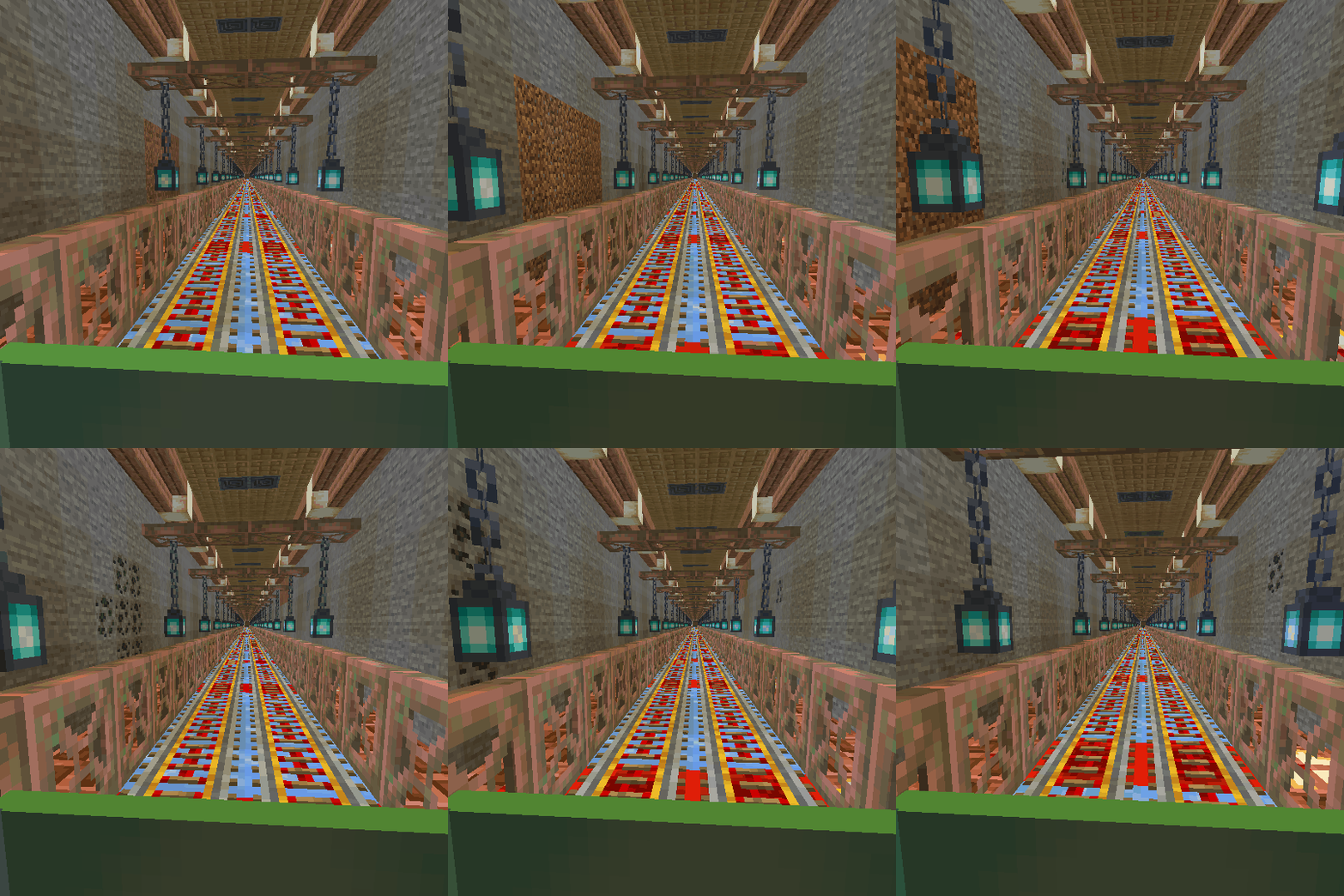
CurseForge · Minecraft mod
Block Express
Stations that automatically connect your bases
Choose a version Pick your version below, then grab the matching file.
Quick answer
Which Block Express release should I use?
Latest stable file BlockExpress-1.1.0-neoforge-1.21.1.jar
Game version 1.21.1
Loader NeoForge
Block Express BlockExpress-1.1.0-neoforge-1.21.1.jar targets 1.21.1 with NeoForge. The project page does not say whether this file belongs on the client, dedicated server, or both. No extra mods listed for this file.
Where it goes
Is Block Express required on the client, server, or both?
The project page does not say whether this file belongs on the client, dedicated server, or both.
Client Source doesn’t say
Dedicated server Source doesn’t say
Loader for this release NeoForge
Required install it here Optional supported, not mandatory Not supported do not install here Source doesn’t say do not assume
The source does not explicitly classify this release as client-only or server-only.
What else does Block Express BlockExpress-1.1.0-neoforge-1.21.1.jar need?
BlockExpress-1.1.0-neoforge-1.21.1.jar. Change the file and its required mods may change too.
This file does not list any required mods. Do not add a library just because a different file uses it.
This file does not list any required or optional mods.
Before you install it
Add Block Express without breaking your instance.
Built for Block Express BlockExpress-1.1.0-neoforge-1.21.1.jar. Pick another file and the loader, install side or required mods may change.
- 01
Stick to this file
Use BlockExpress-1.1.0-neoforge-1.21.1.jar. It targets 1.21.1 with NeoForge; another release may have different loader, side or dependency requirements.
- 02
Bring the mods it needs
This file does not list any required mods. Do not add a library just because a different file uses it.
- 03
Put it on the correct side
The project page does not say whether this file belongs on the client, dedicated server, or both.
- 04
Pick the file you checked
Use the “Get this file” button beside BlockExpress-1.1.0-neoforge-1.21.1.jar. It opens that exact file at the source.
About this project
What does Block Express add?
To create your station; first, craft the Station Builder block.
When you place this block, a station will be created at that location. If you place this block a second time, a railway will be established between the first and second stations, allowing for fast travel between your bases. You can also create connecting routes between more than two stations.
For the Station Builder block to connect to the previous station, it must be at the same Y-coordinate, and the X and Z coordinates must be at least 20 blocks apart. Depending on the direction of the connected stations, some old tracks may become damaged; you can manually repair these sections.
If you wish to disconnect from old stations and start a new station network from scratch, you will need to craft the Station Builder block again. Each time you craft a Station Builder, it resets your connection to the old station network. Therefore, ensure you craft enough Station Builder blocks before creating your initial station and starting your network.
When you craft a Station Builder block, your connection to the old station network is reset, allowing you to set up a station at your desired Y-coordinate to start a new network.
Conductor can spawn Blocktrain when you right click on him (cooldown 120 second)
____________________________________________________________________________________________________________
I haven't set a limit on the distance for creating railway. However, I recommend keeping this distance low depending on your computer's power. When I tested with 8GB of RAM, a distance of about 4000 blocks caused issues and posed a crash risk, so be careful.
____________________________________________________________________________________________________________
maybe you like these mods


Project description from CurseForge.
Pick your setup
Block Express by Minecraft version and loader
Choose the version and loader you play, then open the matching release.
Minecraft version
1.20.1
1 loader buildCheck the dependencies, then try the file in a copied instance before changing a world you care about.
Recent files
Block Express versions and loaders
BlockExpress-1.1.0-neoforge-1.21.1.jar
14 Oct 2024
Client Source doesn’t say Server Source doesn’t say Dependencies No extras listed Listed on Release listing
Check the 1.21.1 · NeoForge setup NeoForge1.21.1 release
BlockExpress-1.1.0-forge-1.20.1.jar
14 Oct 2024
Client Source doesn’t say Server Source doesn’t say Dependencies No extras listed Listed on Release listing
Check the 1.20.1 · Forge setup 1.20.1Forge release
BlockExpress-1.0.0-neoforge-1.21.1.jar
12 Oct 2024
Client Source doesn’t say Server Source doesn’t say Dependencies No extras listed Listed on Release listing
Check the 1.21.1 · NeoForge setup NeoForge1.21.1 release
Looking for an older file? The official CurseForge project page is in Resources.
 mod
CurseForge + Modrinth · Minecraft
Kinetic Minecart
This mod increases damage to moving minecarts; the faster they move, the higher the damage, with virtually no damage limit!
 mod
CurseForge + Modrinth · Minecraft
Dungeon Train: A Lore-Rich Roguelite RPG Adventure
Adventure time inspired dungeon crawler on a train. Procedurally generated carriages on a infinite sable physics train. Rich narrative, with custom made mods for a completely unique experience.
 mod
CurseForge · Minecraft
Neural Exosuit
A modular sci-fi exosuit that deploys from a neural band, with per-skin helmet visors, a full HUD, jetpack, shield, Aegis hearts, grapple and FE-powered upgrade chips.