Applied Energistics 2 Needed by AE2 Web Integration 1.0.2-neoforge-1.21.1
requiredMatching file found Matched file: AE2 19.2.17 [NEOFORGE]

CurseForge · Minecraft mod
An add-on for Applied Energistics 2 that lets you view your terminal in your web browser wherever you are!
This page is having a moment, so a few details may be a little behind.
Quick answer
AE2 Web Integration 1.0.2-neoforge-1.21.1 targets 1.21.1 with NeoForge. The project page does not say whether this file belongs on the client, dedicated server, or both. All 1 required mods have matching files.
Where it goes
The project page does not say whether this file belongs on the client, dedicated server, or both.
The source does not explicitly classify this release as client-only or server-only.
1.0.2-neoforge-1.21.1. Change the file and its required mods may change too.
Install Applied Energistics 2 first. We found matching files for this game-version and loader setup.
We only count dependency files that match this setup. A file for another loader does not fill the gap.
Before you install it
Built for AE2 Web Integration 1.0.2-neoforge-1.21.1. Pick another file and the loader, install side or required mods may change.
Use 1.0.2-neoforge-1.21.1. It targets 1.21.1 with NeoForge; another release may have different loader, side or dependency requirements.
Install Applied Energistics 2 first. We found matching files for this game-version and loader setup.
The project page does not say whether this file belongs on the client, dedicated server, or both.
Use the “Get this file” button beside 1.0.2-neoforge-1.21.1. It opens that exact file at the source.
About this project
An add-on for AE2 that lets you view your terminal in your web browser wherever you are! This also includes viewing orders, cancelling them and even making a new ones! There is also a discord integration (through a webhook)!
Now also works on multiple networks and on public server = all players can have their own account!
THE MOD SHOULD ONLY BE INSTALLED ON SERVER SIDE, THERE IS NO ITEMS ADDED IN THE GAME!
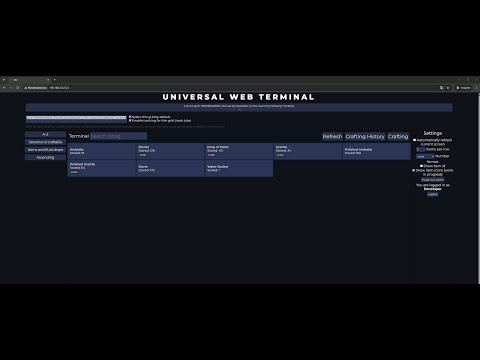
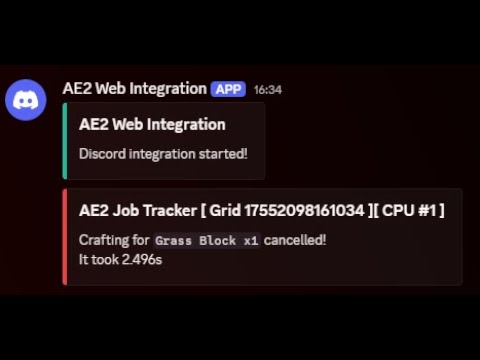
This mod starts a web server on server boot that hosts a simple website that you can access directly, or through API calls
Because the mod is server sided only, there is no additional terminal or block added that could identify the networks,
Networks are identified through wireless access points (or security terminal on older mc versions),
all players who wants to access a specific network through the website, must place an wireless access point on that network,
Additionally, if you access the website through an Admin account, you will have access to all networks with at least one wireless access point (doesn't matter if you placed it)
On older minecraft versions where there is a security terminal, networks are identified through an security terminal,
all players who wants to access the network should have their bio cards in the security terminal block (wild bio card is ignored for security reasons!) Admin account will have access to all networks on the server that have security terminal (doesn't matter it has your bio card)
<details> <summary>Gallery</summary>
</details>
all users on your server can create an account on the website and access their AE2 networks,
passwords are saved on the server as a PBKDF2WithHmacSHA1 hash
Once a user is authenticated, server generates a token valid for 1 hour/7 days and uses it to verify all requests after
there is only an admin account which password is set in the config. token mechanism is the same as in public mode.
Note: localhost connections are automatically authenticated by default, you can change that in config!
Note: Discord integration is working only in public mode disabled!
The mod is currently implemented only on 1.21.1 (NEO), 1.20.1, 1.12.2 and 1.7.10 versions, although it might change in the future!
A few remarks about compatibility:
Project description from CurseForge.
Pick your setup
Choose the version and loader you play, then open the matching release.
Check the dependencies, then try the file in a copied instance before changing a world you care about.
Recent files
ae2webintegration-1.0.2-neoforge-1.21.1.jar
28 Apr 2026
ae2webintegration-1.0.2-forge-1.20.1.jar
28 Apr 2026
ae2webintegration-1.0.1-forge-1.12.2.jar
28 Apr 2026
ae2webintegration-1.0.2-forge-1.7.10.jar
28 Apr 2026
ae2webintegration-1.0.1-neoforge-1.21.1.jar
11 Dec 2025
ae2webintegration-1.0.0-neoforge-1.21.1.jar
10 Oct 2025
ae2webintegration-1.0.0-forge-1.20.1.jar
19 Aug 2025
ae2webintegration-1.0.0-forge-1.12.2.jar
19 Aug 2025
ae2webintegration-1.0.0-forge-1.7.10.jar
19 Aug 2025
ae2webintegration-0.2.1-alpha-forge-1.12.2.jar
15 Aug 2025
ae2webintegration-0.2.1-alpha-forge-1.7.10.jar
15 Aug 2025
ae2webintegration-0.0.9-alpha-forge-1.7.10.jar
12 Feb 2025
Looking for an older file? The official CurseForge project page is in Resources.