Minecraft version
Back to mods 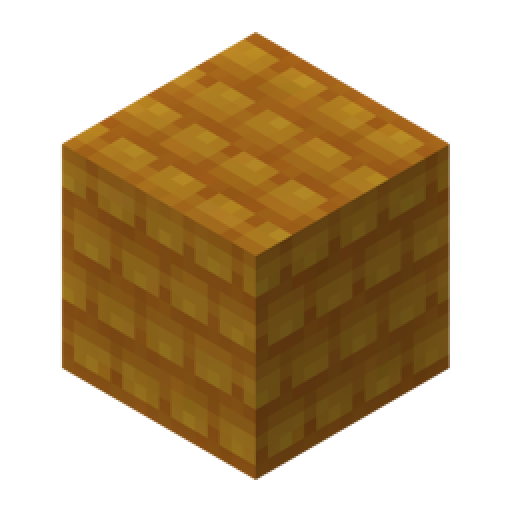
CurseForge · Minecraft mod
Terracotta Shingles
Decorate your builds with the vibrancy of colourful roof tiles!
Choose a version Pick your version below, then grab the matching file.
Quick answer
Which Terracotta Shingles release should I use?
Latest stable file [1.21.9] Terracotta Shingles 1.1
Game version 1.21.9
Loader Fabric
Terracotta Shingles [1.21.9] Terracotta Shingles 1.1 targets 1.21.9 with Fabric. The project page does not say whether this file belongs on the client, dedicated server, or both. No extra mods listed for this file.
Where it goes
Is Terracotta Shingles required on the client, server, or both?
The project page does not say whether this file belongs on the client, dedicated server, or both.
Client Source doesn’t say
Dedicated server Source doesn’t say
Loader for this release Fabric
Required install it here Optional supported, not mandatory Not supported do not install here Source doesn’t say do not assume
The source does not explicitly classify this release as client-only or server-only.
What else does Terracotta Shingles [1.21.9] Terracotta Shingles 1.1 need?
[1.21.9] Terracotta Shingles 1.1. Change the file and its required mods may change too.
This file does not list any required mods. Do not add a library just because a different file uses it.
This file does not list any required or optional mods.
Before you install it
Add Terracotta Shingles without breaking your instance.
Built for Terracotta Shingles [1.21.9] Terracotta Shingles 1.1. Pick another file and the loader, install side or required mods may change.
- 01
Stick to this file
Use [1.21.9] Terracotta Shingles 1.1. It targets 1.21.9 with Fabric; another release may have different loader, side or dependency requirements.
- 02
Bring the mods it needs
This file does not list any required mods. Do not add a library just because a different file uses it.
- 03
Put it on the correct side
The project page does not say whether this file belongs on the client, dedicated server, or both.
- 04
Pick the file you checked
Use the “Get this file” button beside [1.21.9] Terracotta Shingles 1.1. It opens that exact file at the source.
About this project
What does Terracotta Shingles add?
Terracotta Shingles
🎨 Variants
Adding 17 variants to decorate your builds with! Make your roofs stand out by giving them the hue and vibrancy of Terracotta, with Walls, Slabs & Stairs so you can build in all shapes and sizes. 
⚒️ Crafting & dyeing
You can craft Terracotta into Terracotta Shingles by combining Terracotta in a 2x2 grid in your Inventory or Crafting Table! You can also dye unstained Terracotta Shingles in the same way as you would Terracotta (this works for Walls, Slabs & Stairs too!).
ℹ️ If you would like to universally dye (a.k.a. regardless of the existing colour of the input) your Terracotta Shingles, you can enable this via the optional terracotta_shingles:universal_dyeing datapack! 
👷🏽 Stonecutting & Mason
The Stonecutter allows you to cut Terracotta straight into Terracotta Shingles and its variants! Meanwhile, an expert level Mason can also give you access to a random color of Terracotta Shingles!

🎵 Unique Sounds
Noise! Terracotta Shingles come with Unique Sounds to satisfy your ears with and immerse yourself into the world!

Project description from CurseForge.
Pick your setup
Terracotta Shingles by Minecraft version and loader
Choose the version and loader you play, then open the matching release.
Minecraft version
1.21.8
1 loader buildMinecraft version
1.21.7
1 loader buildMinecraft version
1.21.6
1 loader buildMinecraft version
1.21.5
1 loader buildMinecraft version
1.21.4
1 loader buildMinecraft version
1.21.3
1 loader buildMinecraft version
1.21.2
1 loader buildMinecraft version
1.21.1
1 loader buildMinecraft version
1.21
1 loader buildCheck the dependencies, then try the file in a copied instance before changing a world you care about.
Recent files
Terracotta Shingles versions and loaders
[1.21.9] Terracotta Shingles 1.1
terracotta-shingles-1.1+1.21.9.jar
30 Sept 2025
Client Source doesn’t say Server Source doesn’t say Dependencies No extras listed Listed on Release listing
Check the 1.21.9 · Fabric setup Fabric1.21.9 release
[1.21.5+] Terracotta Shingles 1.1
terracotta-shingles-1.1+1.21.5.jar
18 Jun 2025
Client Source doesn’t say Server Source doesn’t say Dependencies 1 required · 1 unchecked Listed on Release listing
Check the 1.21.8 · Fabric setup 1.21.5Fabric1.21.81.21.7 release
[1.21.4] Terracotta Shingles 1.1
terracotta-shingles-1.1+1.21.4.jar
3 Dec 2024
Client Source doesn’t say Server Source doesn’t say Dependencies No extras listed Listed on Release listing
Check the 1.21.4 · Fabric setup Fabric1.21.4 release
[1.21.3] Terracotta Shingles 1.1
terracotta-shingles-1.1+1.21.3.jar
15 Nov 2024
Client Source doesn’t say Server Source doesn’t say Dependencies 1 required · 1 unchecked Listed on Release listing
Check the 1.21.3 · Fabric setup Fabric1.21.3 release
[1.21.2+] Terracotta Shingles 1.0
terracotta-shingles-1.0+1.21.2.jar
22 Oct 2024
Client Source doesn’t say Server Source doesn’t say Dependencies No extras listed Listed on Release listing
Check the 1.21.3 · Fabric setup Fabric1.21.31.21.2 release
[1.21-1.21.1] Terracotta Shingles 1.0
terracotta-shingles-1.0+1.21.jar
19 Oct 2024
Client Source doesn’t say Server Source doesn’t say Dependencies 1 required · 1 unchecked Listed on Release listing
Check the 1.21.1 · Fabric setup 1.21Fabric1.21.1 release
Looking for an older file? The official CurseForge project page is in Resources.
 mod
CurseForge + Modrinth · Minecraft
WTHIT
What the hell is that? A fork of Hwyla which is a fork of Waila.
 mod
CurseForge · Minecraft
Kings & Monsters
An adventure and progression mod featuring the Ogre Tribe, guarded outposts, escalating patrols, powerful relics, a massive fort, and a multi-stage boss fight.
 mod
GitHub · Minecraft
modpacks-ch-github-test
Disposable public fixture for testing the Modpacks.ch GitHub catalogue flow