Minecraft version
Back to mods 
CurseForge · Minecraft mod
FTB Materials
Home-grown resources mod that attempts to provide a wide range of resources
Choose a version Pick your version below, then grab the matching file.
Quick answer
Which FTB Materials release should I use?
Latest stable file [NEOFORGE] FTB Materials 26.1.2.6
Game version 26.1.2
Loader NeoForge
FTB Materials [NEOFORGE] FTB Materials 26.1.2.6 targets 26.1.2 with NeoForge. The project page does not say whether this file belongs on the client, dedicated server, or both. No extra mods listed for this file.
Where it goes
Is FTB Materials required on the client, server, or both?
The project page does not say whether this file belongs on the client, dedicated server, or both.
Client Source doesn’t say
Dedicated server Source doesn’t say
Loader for this release NeoForge
Required install it here Optional supported, not mandatory Not supported do not install here Source doesn’t say do not assume
The source does not explicitly classify this release as client-only or server-only.
What else does FTB Materials [NEOFORGE] FTB Materials 26.1.2.6 need?
[NEOFORGE] FTB Materials 26.1.2.6. Change the file and its required mods may change too.
This file does not list any required mods. Do not add a library just because a different file uses it.
This file does not list any required or optional mods.
Before you install it
Add FTB Materials without breaking your instance.
Built for FTB Materials [NEOFORGE] FTB Materials 26.1.2.6. Pick another file and the loader, install side or required mods may change.
- 01
Stick to this file
Use [NEOFORGE] FTB Materials 26.1.2.6. It targets 26.1.2 with NeoForge; another release may have different loader, side or dependency requirements.
- 02
Bring the mods it needs
This file does not list any required mods. Do not add a library just because a different file uses it.
- 03
Put it on the correct side
The project page does not say whether this file belongs on the client, dedicated server, or both.
- 04
Pick the file you checked
Use the “Get this file” button beside [NEOFORGE] FTB Materials 26.1.2.6. It opens that exact file at the source.
About this project
What does FTB Materials add?
FTB Materials
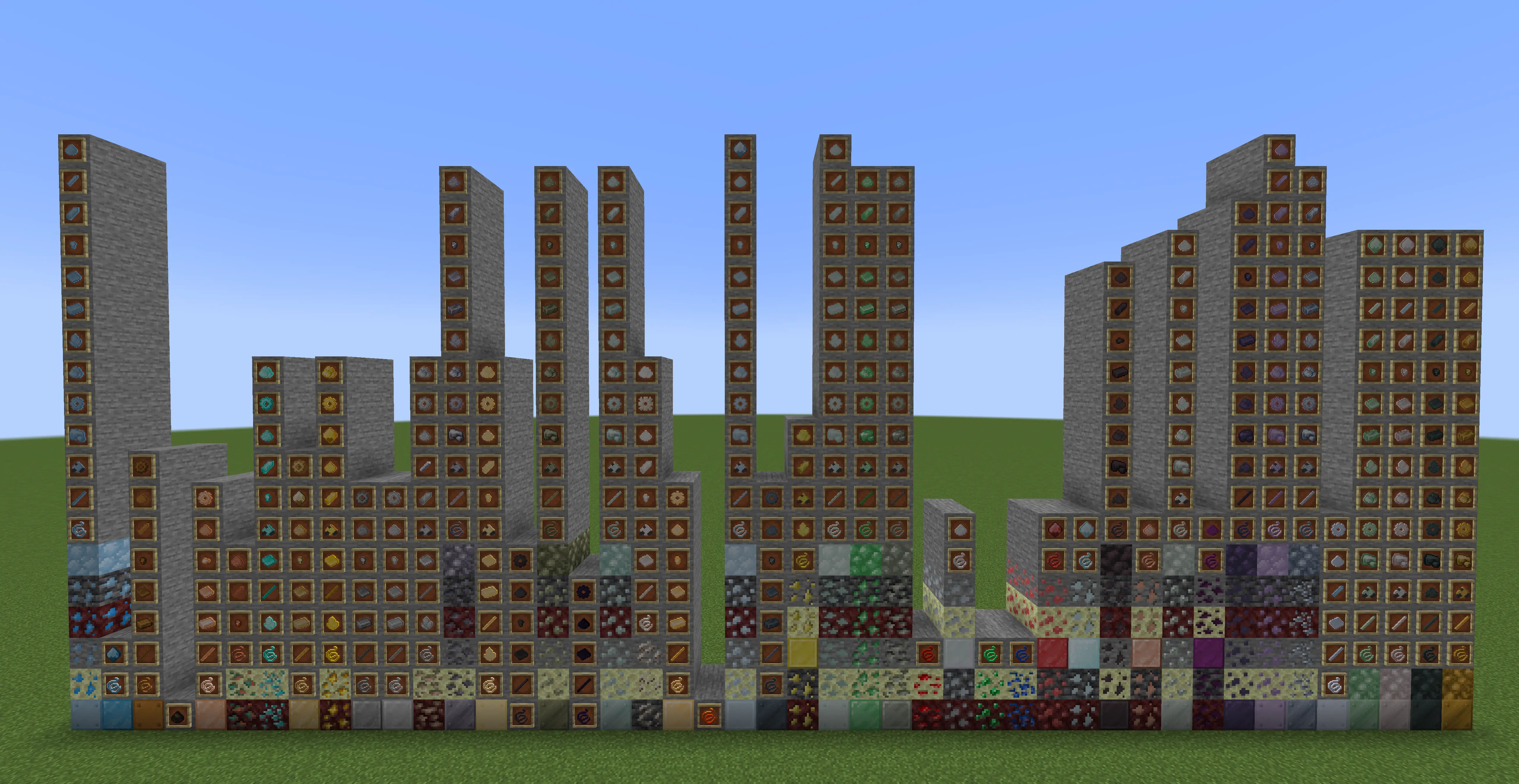
FTB Materials is our home-grown resources mod that attempts to provide a wide range of resources from a wide range of mods. It's designed to provide a unified set of resources and recipes to simplify resource unification in Modpack.
Our mod is likened to mods like Emendatus Enigmatica, All the Ores, etc but differs in a few ways. Primarily, it's designed to hold all resources, not just the ones we need, this is intended for mods like KubeJS to remove anything that is not needed. We do not require addons to provide additional resources, and we're un-opinionated on world gen allowing modpacks to unify mods ore gen to our resources.
Features
- Basic recipes for all resources, smelting, ingots to nuggets, nuggets to ingots, blocks of X, X to blocks of, etc
- Tags for all our resources
- All the Resources!…
- The list is literally two long but here are the current supported base resources. Please note, some materials listed are vanilla but this is to provide extra resources for the vanilla variants.
- Aluminum
- Apatite
- Bronze
- Charcoal
- Constantan
- Copper
- Diamond
- Electrum
- Gold
- Graphite
- Invar
- Iron
- Lead
- Lumium
- Netherite
- Nickel
- Obsidian
- Osmium
- Quartz
- Refined glowstone
- Signalum
- Silver
- Steel
- Sulfur
- Tin
- Uranium
- Zinc
- Redstone
- Fluorite
- Emerald
- Lapis lazuli
- Resonating ore
- Dimensional shard
- Antimony
- Bauxite
- Iridium
- Monazite
- Tungsten
- Titanium
- Platinum
- Stainless steel
- Plutonium
- Chromium
- Silicon
- All of the above resources have the possibility of having the following forms
MaterialOre- Deepslate
MaterialOre - Endstone
MaterialOre - Nether
MaterialOre - Block of
Material MaterialIngot- Raw
Material - Block of Raw
Material MaterialNuggetMaterialDustMaterialPlateMaterialGearMaterialRodMaterialGemMaterialCrystalMaterialWireMaterialShardMaterialClumpMaterialDirty DustMaterialBlade
Modpack Notes
Our mod is designed to work with mods like Almost Unified to provide the unification systems as we acknowledge that attempting to home-bake, first-class mod support, unification is a large undertaking and others have already done it very well. We also recommend using mods like KubeJS to remove any resources that are not needed in your modpack.
We aim to avoid changing resource Id's as much as possible to avoid breaking modpacks / mods over time.
Support
If you have any issues with this mod, please report them on our Issue Tracker. We also accept feature requests on our issue tracker as well 🎉.
Contributing
Although this mod is not a 'true' open source mod, we do still accept contributions as long as you are willing to sign a contributor agreement. The contributor agreement is a simple agreement that provides FTB ownership over the code you have contributed. This is to ensure that we can continue to provide this code in a 'visible-source' state, as well as holding the rights to change the licence in the future freely.
The contributor agreement is provided upon creating a pull request. If you have any questions, please contact us on our Discord Server or via our email at admin(at)feed-the-beast(dot)com
Licence
All rights reserved. We provide this source code in an 'as-is', 'visible-source' state for transparency and educational purposes. You may not use this code in any way, shape or form without our explicit permission.
Support
- For Modpack issues, please go here: https://go.ftb.team/support-modpack
- For Mod issues, please go here: https://go.ftb.team/support-mod-issues
- Just got a question? Check out our Discord: https://go.ftb.team/discord
Keep up to date


Project description from CurseForge.
Pick your setup
FTB Materials by Minecraft version and loader
Choose the version and loader you play, then open the matching release.
Minecraft version
1.21.1
2 loader buildsMinecraft version
1.20.1
2 loader buildsCheck the dependencies, then try the file in a copied instance before changing a world you care about.
Recent files
FTB Materials versions and loaders
[NEOFORGE] FTB Materials 26.1.2.6
ftb-materials-26.1.2.6.jar
7 Oct 2026
Client Source doesn’t say Server Source doesn’t say Dependencies No extras listed Listed on Release listing
Check the 26.1.2 · NeoForge setup NeoForge26.1.2 release
[NEOFORGE] FTB Materials 26.1.2.5
ftb-materials-26.1.2.5.jar
24 Jul 2026
Client Source doesn’t say Server Source doesn’t say Dependencies No extras listed Listed on Release listing
Check the 26.1.2 · NeoForge setup NeoForge26.1.2 release
[NEOFORGE] FTB Materials 21.1.4
ftb-materials-21.1.4.jar
9 Jul 2026
Client Source doesn’t say Server Source doesn’t say Dependencies No extras listed Listed on Release listing
Check the 1.21.1 · NeoForge setup 1.21.1NeoForge release
[NEOFORGE] FTB Materials 26.1.2.4
ftb-materials-26.1.2.4.jar
14 May 2026
Client Source doesn’t say Server Source doesn’t say Dependencies No extras listed Listed on Release listing
Check the 26.1.2 · NeoForge setup NeoForge26.1.2 beta
[NEOFORGE] FTB Materials 26.1.2.3
ftb-materials-26.1.2.3.jar
29 Apr 2026
Client Source doesn’t say Server Source doesn’t say Dependencies No extras listed Listed on Release listing
Check the 26.1.2 · NeoForge setup NeoForge26.1.2 beta
[NEOFORGE] FTB Materials 26.1.2.2
ftb-materials-26.1.2.2.jar
24 Apr 2026
Client Source doesn’t say Server Source doesn’t say Dependencies No extras listed Listed on Release listing
Check the 26.1.2 · NeoForge setup NeoForge26.1.2 beta
[NEOFORGE] FTB Materials 26.1.2.1
ftb-materials-26.1.2.1.jar
21 Apr 2026
Client Source doesn’t say Server Source doesn’t say Dependencies No extras listed Listed on Release listing
Check the 26.1.2 · NeoForge setup NeoForge26.1.2 beta
[FORGE] FTB Materials 20.1.1
ftbmaterials-forge-20.1.1.jar
7 Dec 2025
Client Source doesn’t say Server Source doesn’t say Dependencies 1 required · 1 unchecked Listed on Release listing
Check the 1.20.1 · Forge setup 1.20.1Forge release
[FABRIC] FTB Materials 20.1.1
ftbmaterials-fabric-20.1.1.jar
7 Dec 2025
Client Source doesn’t say Server Source doesn’t say Dependencies 2 required · 2 unchecked Listed on Release listing
Check the 1.20.1 · Fabric setup Fabric1.20.1 release
[FORGE] FTB Materials 20.1.0
ftbmaterials-forge-20.1.0.jar
31 Jul 2025
Client Source doesn’t say Server Source doesn’t say Dependencies 1 required · 1 unchecked Listed on Release listing
Check the 1.20.1 · Forge setup 1.20.1Forge release
[FABRIC] FTB Materials 20.1.0
ftbmaterials-fabric-20.1.0.jar
31 Jul 2025
Client Source doesn’t say Server Source doesn’t say Dependencies 2 required · 2 unchecked Listed on Release listing
Check the 1.20.1 · Fabric setup Fabric1.20.1 release
[FABRIC] FTB Materials 21.1.3
ftb-materials-fabric-21.1.3.jar
31 Jul 2025
Client Source doesn’t say Server Source doesn’t say Dependencies 2 required · 2 unchecked Listed on Release listing
Check the 1.21.1 · Fabric setup Fabric1.21.1 release
Looking for an older file? The official CurseForge project page is in Resources.
 mod
mod CurseForge + Modrinth · Minecraft
Alive | Dynamic Dirt & Physics
Adds the ability for the natural landscape of your world to change over time.
 mod
mod CurseForge · Minecraft
Star Worm Lighting
Adds glowing vanilla building blocks to add light without adding ugly!
 mod
mod CurseForge + Modrinth · Minecraft
Alive | Dynamic Monsters
Make the monsters of your world do interesting things!