Minecraft version
Back to mods 
CurseForge · Minecraft mod
QuickTransfer
This mod adds a button to quickly transfer all items between chests and the player's inventory.
Choose a version Pick your version below, then grab the matching file.
Quick answer
Which QuickTransfer release matches 1.19.4 Forge?
Best match for your filters quicktransfer-1.0.1.jar
Game version 1.19.3, 1.19.4, 1.19.2
Loader Forge
quicktransfer-1.0.1.jar targets 1.19.3, 1.19.4, 1.19.2 with Forge. The project page does not say whether this file belongs on the client, dedicated server, or both. No extra mods listed for this file.
Where it goes
Is QuickTransfer required on the client, server, or both?
The project page does not say whether this file belongs on the client, dedicated server, or both.
Client Source doesn’t say
Dedicated server Source doesn’t say
Loader for this release Forge
Required install it here Optional supported, not mandatory Not supported do not install here Source doesn’t say do not assume
The source does not explicitly classify this release as client-only or server-only.
What else does quicktransfer-1.0.1.jar need?
quicktransfer-1.0.1.jar on 1.19.4 Forge. Every mod below is checked against that same setup.
This file does not list any required mods. Do not add a library just because a different file uses it.
This file does not list any required or optional mods.
Before you install it
Add QuickTransfer without breaking your instance.
Built for quicktransfer-1.0.1.jar on 1.19.4 Forge. Pick another file and the loader, install side or required mods may change.
- 01
Stick to this file
Use quicktransfer-1.0.1.jar. It targets 1.19.3, 1.19.4, 1.19.2 with Forge; another release may have different loader, side or dependency requirements.
- 02
Bring the mods it needs
This file does not list any required mods. Do not add a library just because a different file uses it.
- 03
Put it on the correct side
The project page does not say whether this file belongs on the client, dedicated server, or both.
- 04
Pick the file you checked
Use the “Get this file” button beside quicktransfer-1.0.1.jar. It opens that exact file at the source.
About this project
What does QuickTransfer add?
Quick Transfer - Effortless Inventory Management with Chest Locator!
Description: Quick Transfer is a Minecraft mod designed to enhance your gameplay by offering fast inventory transfers and an intuitive chest-finding feature. With a single key press, you can transfer all items between your inventory and any container or locate nearby chests, helping you manage resources quickly and easily.
Key Features:
- Quick Transfer: Instantly moves all items between your inventory and any open container with the press of the X key.
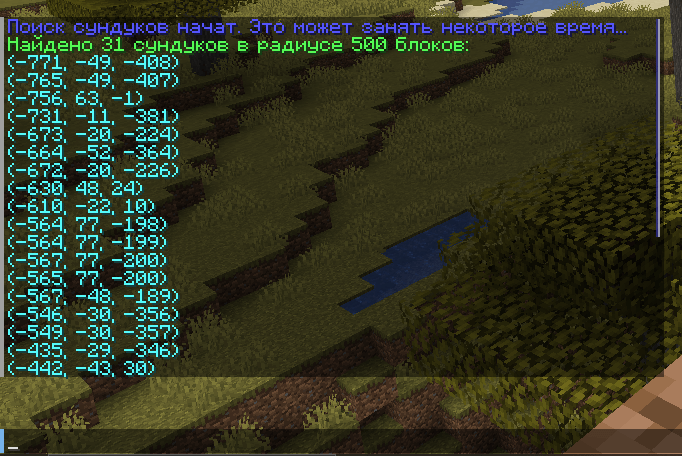
- Chest Locator Hotkey: Use the G key to instantly search for nearby chests in a 500-block radius, displaying the coordinates of all found chests.
- Full compatibility with all Minecraft containers, including chests, furnaces, and more, integrating smoothly into Minecraft’s UI for a seamless experience.
How to Use:
- Quick Transfer: Open any container, such as a chest or furnace, then press the X key to instantly transfer all items.
- Chest Locator: Press the G key to locate all chests within a 500-block radius.
Compatibility:
- Minecraft Versions: Compatible with Minecraft 1.19.2 and newer versions.
- Requirements: Requires Forge version 43.4.0 or higher.
Installation:
- Download the Quick Transfer mod.
- Place the
quicktransfer-1.0.1.jarfile into your Minecraftmodsfolder. - Launch Minecraft through Forge and enjoy efficient inventory management and easy chest locating with the new hotkey!
Authors: Mod developed by Zenoyui.
Thanks: A big thank you to the Minecraft modding community for the support and inspiration. Enjoy Quick Transfer's updated functionality in v1.0.1!
Project description from CurseForge.
Pick your setup
QuickTransfer by Minecraft version and loader
Choose the version and loader you play, then open the matching release.
Minecraft version
1.19.4
1 loader buildMinecraft version
1.19.3
1 loader buildMinecraft version
1.19.2
1 loader buildCheck the dependencies, then try the file in a copied instance before changing a world you care about.
Recent files
QuickTransfer versions and loaders
quicktransfer-1.0.1.jar
26 Oct 2024
Client Source doesn’t say Server Source doesn’t say Dependencies No extras listed Listed on Release listing
Check the 1.19.4 · Forge setup 1.19.31.19.41.19.2Forge release
quicktransfer-1.0.0.jar
26 Oct 2024
Client Source doesn’t say Server Source doesn’t say Dependencies No extras listed Listed on Release listing
Check the 1.19.4 · Forge setup 1.19.31.19.41.19.2Forge release
Looking for an older file? The official CurseForge project page is in Resources.