CraftTweaker Optional for Backpack Display [Forge] 2.0.1-mc1.20.1
optionalMatching file found Matched file: CraftTweaker-forge-1.20.1-14.0.60.jar
CurseForge · Minecraft mod
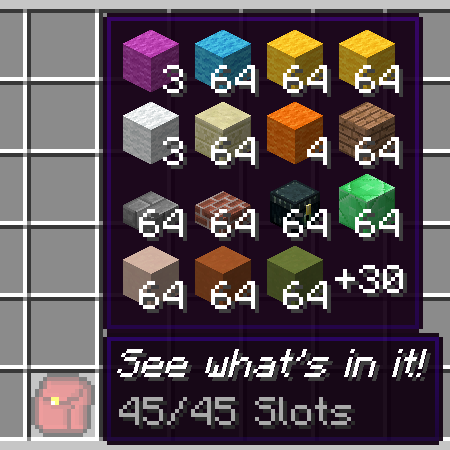
A mod to show what's in your backpacks, drawers, or any similar containers
Quick answer
Backpack Display [Forge] 2.0.1-mc1.20.1 targets 1.20.1 with Forge. The project page does not say whether this file belongs on the client, dedicated server, or both. No extra mods listed for this file.
Where it goes
The project page does not say whether this file belongs on the client, dedicated server, or both.
The source does not explicitly classify this release as client-only or server-only.
[Forge] 2.0.1-mc1.20.1 on 1.20.1 Forge. Every mod below is checked against that same setup.
This file does not list any required mods. Do not add a library just because a different file uses it.
We only count dependency files that match this setup. A file for another loader does not fill the gap.
Before you install it
Built for Backpack Display [Forge] 2.0.1-mc1.20.1 on 1.20.1 Forge. Pick another file and the loader, install side or required mods may change.
Use [Forge] 2.0.1-mc1.20.1. It targets 1.20.1 with Forge; another release may have different loader, side or dependency requirements.
This file does not list any required mods. Do not add a library just because a different file uses it.
The project page does not say whether this file belongs on the client, dedicated server, or both.
Use the “Get this file” button beside [Forge] 2.0.1-mc1.20.1. It opens that exact file at the source.
About this project
Adds a tooltip to show what's in your backpack, shulker box or other container item.
Configurable of how to get contents for the container item.
The mod has out-of-the-box support for vanilla shulker boxes, storage drawers drawers, and forestry backpacks. You can add support to more items by writing custom rules in the mod's config.

Configurable options(See the mod's config):
displayRules is the main config of the mod. It lets you to add new container items to display the backpack tooltip, with the following format:
Format: <modID>:<itemID>[:meta]#<rule type>#<rule definition>
meta is a comma-separated list for meta-values to match.
For example,1,2,5-8 allows tooltip to show on the item with metadata 1,2,5,6,7,8.
When meta is absent, tooltip to show on the item ignoring meta.
Rule definition is according to the rule type selected.
Path is commonly used in the rules, and have a format like path.to.the.item.
For example, in this NBT structure:
{"list":[{"key1":"value"},{"key2":"item"}]}
The path list.1.key2 will get the tag "item" from it.
Rule type: list
In this rule, items are all under a NBTTagList or a NBTTagCompound.
Rule definition:path.to.the.list[;path.to.the.itemstack[;path.to.the.counts]]
The last 2 paths is relative to the tag item in the list. If the counts is absent, the count in the itemstack is used instead.
Example: Show contents when hovering a purple shulker box
minecraft:purple_shulker_box#list#BlockEntityTag.Items
Rule type: single
In this rule, an item is under a fixed path, with an optional external count value.
Rule definition:path.to.the.itemstack[;path.to.the.counts[;calculations for the counts]]
If the counts is absent, the count in the itemstack is used instead.
Example: Show content for every basic drawers in storage drawers mod
storagedrawers:basicdrawers:0#single#BlockEntityTag.Drawers.0.Item;BlockEntityTag.Drawers.0.Count
storagedrawers:basicdrawers:1,3#single#BlockEntityTag.Drawers.0.Item;BlockEntityTag.Drawers.0.Count
storagedrawers:basicdrawers:1,3#single#BlockEntityTag.Drawers.1.Item;BlockEntityTag.Drawers.1.Count
storagedrawers:basicdrawers:2,4#single#BlockEntityTag.Drawers.0.Item;BlockEntityTag.Drawers.0.Count
storagedrawers:basicdrawers:2,4#single#BlockEntityTag.Drawers.1.Item;BlockEntityTag.Drawers.1.Count
storagedrawers:basicdrawers:2,4#single#BlockEntityTag.Drawers.2.Item;BlockEntityTag.Drawers.2.Count
storagedrawers:basicdrawers:2,4#single#BlockEntityTag.Drawers.3.Item;BlockEntityTag.Drawers.3.Count
This rule supports further calculation to get the real item count if it's not in the tag directly but can be calculated from the values in the tag.
Calculations are a string starting with a operator in +-*/^% and followed by a path. The order of calculation is like that on a basic calculator that cannot input expressions.
All calculations is done in integer.
Example: Show content for compact drawers in storage drawers mod
storagedrawers:compdrawers#single#BlockEntityTag.Drawers.Items.0.Item;BlockEntityTag.Drawers.Count;/BlockEntityTag.Drawers.Items.0.Conv
storagedrawers:compdrawers#single#BlockEntityTag.Drawers.Items.1.Item;BlockEntityTag.Drawers.Count;/BlockEntityTag.Drawers.Items.1.Conv
storagedrawers:compdrawers#single#BlockEntityTag.Drawers.Items.2.Item;BlockEntityTag.Drawers.Count;/BlockEntityTag.Drawers.Items.2.Conv
Starting from v1.3, crafttweaker is supported to add custom functions to get what items to display.
It's suggested to only write entries in a script with #sideonly client Preprocessor. Otherwise it will cause errors on dedicated server, because this mod is client only.
import mods.backpackdisplay.BackpackDisplay; // IIngredient to match items to add the tooltip, function to return an array of items from a given itemstack BackpackDisplay.addBackDisplay( IIngredient, (IItemStack) -> IItemStack[] );
Example: show a crafting table and the crafting result for every wood log in <ore:logWood>
#sideonly client
import mods.backpackdisplay.BackpackDisplay;
import crafttweaker.item.IItemStack;
BackpackDisplay.addBackDisplay(<ore:logWood>,function(item){
    var items = [<minecraft:crafting_table>,recipes.craft([[item]])] as IItemStack[];
    return items;
});
With both crafttweaker rules and normal rules present on an item, items from crafttweaker support will appear before items from normal rules.
Project description from CurseForge.
Pick your setup
Choose the version and loader you play, then open the matching release.
Check the dependencies, then try the file in a copied instance before changing a world you care about.
Recent files
backpackdisplay-2.0.1.jar
11 May 2025
backpackdisplay-2.0.0.jar
19 Jan 2025
backpackdisplay-2.0.0.jar
18 Jan 2025
Looking for an older file? The official CurseForge project page is in Resources.
 mod
Adds rafts for all the wood types.
 mod
Feel the power of orbital strike cannons ready to send TNT raining down and your command just like Wemmbu from the unstable SMP
 mod
Distant Horizons addon: generates distant terrain from the world noise several times faster, with real trees and structures.