Curios API Optional for epicfight tkkepic tkkepic-1.0.3.jar
optionalMatching file found Matched file: curios-forge-5.14.1+1.20.1.jar

CurseForge · Minecraft mod
EpicFightMod expands to provide custom skill services
Quick answer
epicfight tkkepic tkkepic-1.0.3.jar targets 1.20.1 with Forge. The project page does not say whether this file belongs on the client, dedicated server, or both. All 1 required mods have matching files.
Where it goes
The project page does not say whether this file belongs on the client, dedicated server, or both.
The source does not explicitly classify this release as client-only or server-only.
tkkepic-1.0.3.jar. Change the file and its required mods may change too.
Install Epic Fight first. We found matching files for this game-version and loader setup.
We only count dependency files that match this setup. A file for another loader does not fill the gap.
Before you install it
Built for epicfight tkkepic tkkepic-1.0.3.jar. Pick another file and the loader, install side or required mods may change.
Use tkkepic-1.0.3.jar. It targets 1.20.1 with Forge; another release may have different loader, side or dependency requirements.
Install Epic Fight first. We found matching files for this game-version and loader setup.
The project page does not say whether this file belongs on the client, dedicated server, or both.
Use the “Get this file” button beside tkkepic-1.0.3.jar. It opens that exact file at the source.
About this project
Added 8 active skill slots and 8 passive skill slots, allowing you to create unique skills using JS and customize some animation properties in EpicFightMod
Trail、particleTrail、damage、armorNegation、stunType、impact、stateSpectrum、attackSpeed、coord
more example js PraiseSuffering/tkkepic_js_example
A simple example skills, create a file "test.js" and deposit ".minecraft/TkkEpicNpc/CustomJsSkills/"
//The first line of the file was not read because of some bugs I wrote
var RandomSkillItem=Java.type("tkk.epic.item.RandomSkillItem")
var AnimationManager=Java.type("yesman.epicfight.api.animation.AnimationManager").getInstance()
var TkkEpic=Java.type("tkk.epic.TkkEpic")
var Consumer=Java.type("java.util.function.Consumer")
var AnimationTemplateFunction=Java.type("tkk.epic.capability.epicAdd.animationTemplate.AnimationTemplateFunction")
var AnimationTemplate=Java.type("tkk.epic.capability.epicAdd.animationTemplate.AnimationTemplate")
var icon='minecraft:textures/item/blaze_powder.png'
var skillId='test'
var cooldown=80;
var animations=[]
function init(jsContainer){
RandomSkillItem.regRandomSkill(getSkillId(),1)
animations[0]=new AnimationTemplate(AnimationManager.byKeyOrThrow("epicfight:biped/skill/battojutsu"),-0.65);
AnimationTemplateFunction.customTrail_addTrail(animations[0],0,0,-1,0,0,-3.75,"Tool_R",0.0,2.7,2.95,255,0,0,4,3,"",true,false)
AnimationTemplateFunction.customTrail_addParticleTrail(animations[0],0,0,-1,0,0,-3.75,"Tool_R",0.0,2.7,2.75,4,3,true,false,"minecraft:dust"," 1.3 0.1 0 1",1,0.03,0.1,1)
AnimationTemplateFunction.customTrail_addParticleTrail(animations[0],0,0,-3.75,0,0,-4.0,"Tool_R",0.0,2.7,2.75,4,3,true,false,"minecraft:flame","",1,0.03,0.1,4)
AnimationTemplateFunction.customDamage_damage(animations[0],15.0,0,1)
AnimationTemplateFunction.customPotion_addBreak(animations[0],"minecraft:regeneration",40,4,true)
AnimationTemplateFunction.customStateSpectrum_add(animations[0],0,10,"canBasicAttack",false)
AnimationTemplateFunction.customCoord_add(animations[0],0,0,0,0)
AnimationTemplateFunction.customCoord_add(animations[0],0.4,0,0,2)
animations[0].postEndFN.normal.add(
new Consumer({accept:function(args){
var template=args[0]
var entity=args[1]
var isBreak=args[2]
var entityTempdata=template.getEntityData(entity)
if(!isBreak){
animations[1].play(entity)
}
}})
)
animations[0].onAttackFN.normal.add(
new Consumer({accept:function(args){
var template=args[0]
var entity=args[1]
var event=args[2]
var entityTempdata=template.getEntityData(entity)
event.getEntity().m_7311_(80)
}})
)
animations[1]=new AnimationTemplate(AnimationManager.byKeyOrThrow("epicfight:biped/combat/mob_greatsword1"),0.0);
AnimationTemplateFunction.customAttackSpeed_anticipation(animations[1],1.2,0,1.0)
AnimationTemplateFunction.customAttackSpeed_attacking(animations[1],0.2,0,1.0)
AnimationTemplateFunction.customAttackSpeed_recovery(animations[1],0.2,0,1.0)
AnimationTemplateFunction.customTrail_addParticleTrail(animations[1],0,0,-1,0,0,-3.75,"Tool_R",0.0,1.6,1.95,4,3,true,false,"minecraft:soul_fire_flame","",1,0.03,0.1,1)
AnimationTemplateFunction.customPotion_addHitTarget(animations[1],"minecraft:mining_fatigue",800,1,true)
AnimationTemplateFunction.customPotion_addBreak(animations[1],"minecraft:regeneration",40,4,true)
animations[1].onAttackFN.normal.add(
new Consumer({accept:function(args){
var template=args[0]
var entity=args[1]
var event=args[2]
var entityTempdata=template.getEntityData(entity)
event.getEntity().m_7311_(800)
}})
)
}
function getSkillId(){
return skillId
}
function loadSelf(container){
container.doRender=true;
container.isEnable=false;
container.isDisable=false;
container.spell_textures=icon;
container.maxCooldow=cooldown;
container.maxMana=0;
container.cooldown=Math.min(container.cooldown,0);
container.mana=0;
container.tempdata.clear()
container.needUpdate=true;
}
function pressKeySelf(container){
if(container.cooldown!=0){return}
var player=container.player
container.cooldown=container.maxCooldow
container.needUpdate=true;
animations[0].play(player)
}
https://www.bilibili.com/video/BV1FpiBYgE5F
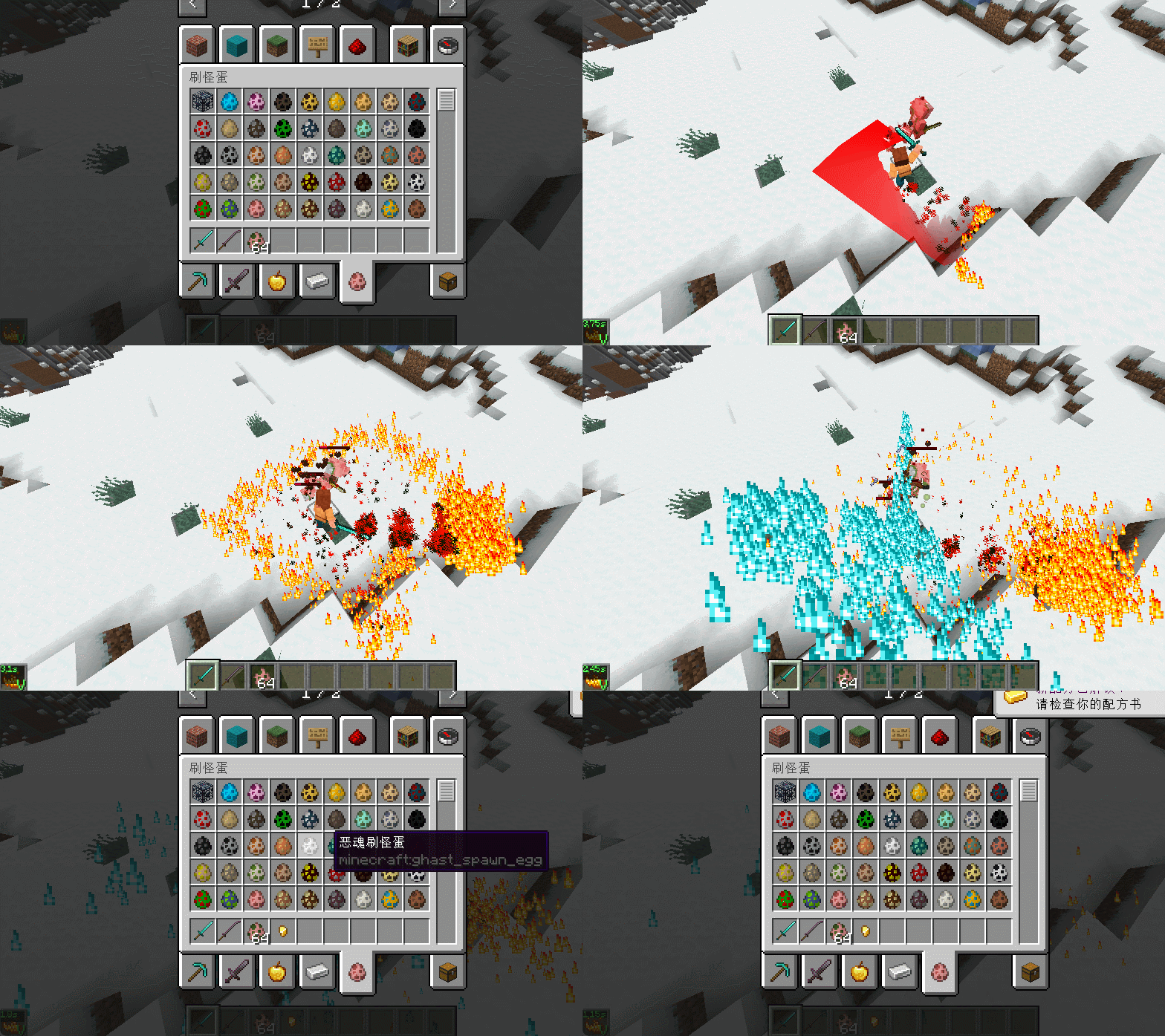
Project description from CurseForge.
Pick your setup
Choose the version and loader you play, then open the matching release.
Check the dependencies, then try the file in a copied instance before changing a world you care about.
Recent files
27 Jan 2025
6 Dec 2024
16 Nov 2024
Looking for an older file? The official CurseForge project page is in Resources.
 mod
A fully featured Library designed around loading highly configurable, agile developed. modular mods. Zeta Woven is an unofficial Fabric port of Zeta by Vazkii and contributors, made for Quark Woven; it is not affiliated with or endorsed by the Zeta team.
 mod
Real mirrors for shader packs: see yourself, mobs and the world behind you in water and glass. Comes with ABZA Shader.
 mod
Enhances vanilla wolves with unique personalities (Aggressive, Pacifist, Normal), smarter AI, safety behaviors, and combat improvements.