Minecraft version
Back to mods 
CurseForge · Minecraft mod
Mobs Banner
Add decorative banners for almost all mobs
Choose a version Pick your version below, then grab the matching file.
Quick answer
Which Mobs Banner release should I use?
Latest stable file MobsBanner-1.1.1.jar
Game version 1.20.1
Loader Fabric
Mobs Banner MobsBanner-1.1.1.jar targets 1.20.1 with Fabric. The project page does not say whether this file belongs on the client, dedicated server, or both. No extra mods listed for this file.
Where it goes
Is Mobs Banner required on the client, server, or both?
The project page does not say whether this file belongs on the client, dedicated server, or both.
Client Source doesn’t say
Dedicated server Source doesn’t say
Loader for this release Fabric
Required install it here Optional supported, not mandatory Not supported do not install here Source doesn’t say do not assume
The source does not explicitly classify this release as client-only or server-only.
What else does Mobs Banner MobsBanner-1.1.1.jar need?
MobsBanner-1.1.1.jar. Change the file and its required mods may change too.
This file does not list any required mods. Do not add a library just because a different file uses it.
This file does not list any required or optional mods.
Before you install it
Add Mobs Banner without breaking your instance.
Built for Mobs Banner MobsBanner-1.1.1.jar. Pick another file and the loader, install side or required mods may change.
- 01
Stick to this file
Use MobsBanner-1.1.1.jar. It targets 1.20.1 with Fabric; another release may have different loader, side or dependency requirements.
- 02
Bring the mods it needs
This file does not list any required mods. Do not add a library just because a different file uses it.
- 03
Put it on the correct side
The project page does not say whether this file belongs on the client, dedicated server, or both.
- 04
Pick the file you checked
Use the “Get this file” button beside MobsBanner-1.1.1.jar. It opens that exact file at the source.
About this project
What does Mobs Banner add?
Mobs Banner
This is a mod add various mobs banners for decoration purpose. You can also use them on shield.
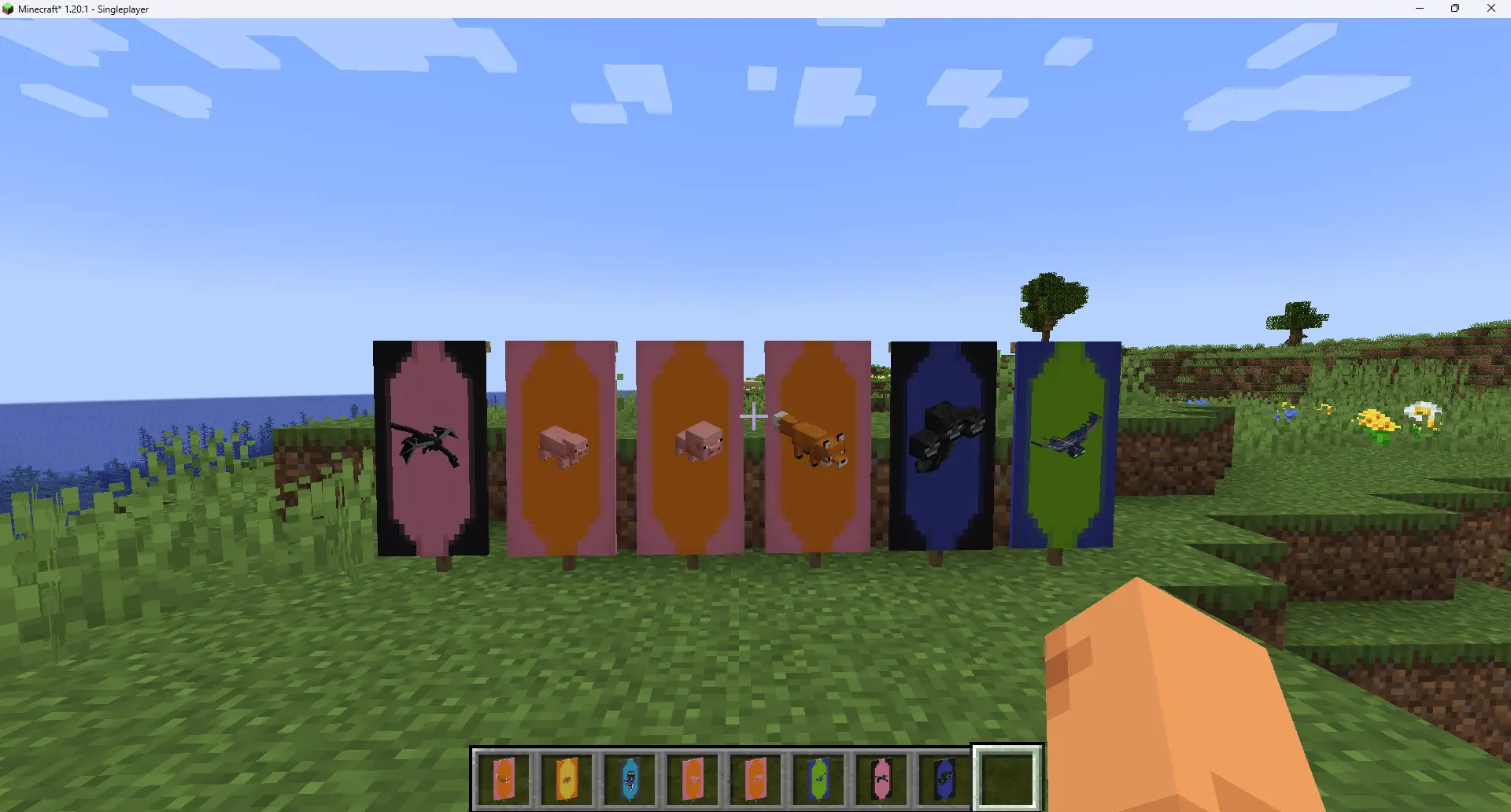
How to use
Obtain
- Mob Drop: There is a chance to drop banner when a mob is killed(Include players). The chance can be set with
/gamerule mobs_banner:drop_chance. Also, this kind of banner will keep the mob's NBT. - Creative Tab: There is a tab contains all available banners.
- Command:
/mob_banner <players> <entity type>for mob banners./mob_banner <players> player <banner_item> <name> <uuid>for player banners.
Banner Configure
Sometimes the mobs may have a wrong rotation, unfit scale or just always changing variants. You need to make some configurations. These configurations are powered by client resource pack system.
Firstly, create file assets/<entity mod id>/default_banner/<entity id>.json. Then write the contents below:
{
  //All keys are optional
  "data": [
    //IMPORTANT: These are only for creative tab! If you change things here they will only refresh after relaunch game!
    //Leave empty for default one.
    {},
    {
      //Leave blank for default spawn egg color
      "primary": -1,
      //Leave blank for default spawn egg color
      "secondary": -1,
      "nbt": {
        //Default NBT, will directly send to entity
      },
      "transform": {
        "scale": 1,
        //Y rotation
        "yaw": 0
      }
    }
    //You can add more for variants
  ],
  //Global transform
  "transform": {
    "scale": 1,
    "yaw": 0
  }
}
FAQ
I cannot find the banner I want?
Only mobs with a spawn egg (or player) have their banner.
The player banner don't render skin?
Fill both name and uuid field.
Any Questions?
Join our Discord: https://discord.gg/NDzz2upqAk
Project description from CurseForge.
Pick your setup
Mobs Banner by Minecraft version and loader
Choose the version and loader you play, then open the matching release.
Check the dependencies, then try the file in a copied instance before changing a world you care about.
Recent files
Mobs Banner versions and loaders
MobsBanner-1.1.1.jar
22 Nov 2024
Client Source doesn’t say Server Source doesn’t say Dependencies No extras listed Listed on Release listing
Check the 1.20.1 · Fabric setup Fabric1.20.1 release
MobsBanner-1.1.jar
20 Nov 2024
Client Source doesn’t say Server Source doesn’t say Dependencies No extras listed Listed on Release listing
Check the 1.20.1 · Fabric setup Fabric1.20.1 release
MobsBanner-1.0.0.jar
19 Nov 2024
Client Source doesn’t say Server Source doesn’t say Dependencies No extras listed Listed on Release listing
Check the 1.20.1 · Fabric setup Fabric1.20.1 release
Looking for an older file? The official CurseForge project page is in Resources.
 mod
CurseForge · Minecraft
TerraTree - Terralith Woods, Palms & Biome Trees
Terralith addon: swaps Terralith's vanilla-block trees for 20+ new woods (logs, planks, doors, boats, signs, leaves with fixed colours) without touching terrain.
 mod
CurseForge + Modrinth · Minecraft
VanillaHUD
A mod that modifies various vanilla HUD elements, such as the bossbar, action bar, sidebar / scoreboard, hotbar, title / subtitle, and more. By Polyfrost, best with OneClient.
 mod
CurseForge · Minecraft
RebalancedCraft
A Mod Patches Item Value