


Minecraft version
Back to mods 
CurseForge · Minecraft mod
Health Bar Indicator
Adds Health Bar to all the mobs around you!
Choose a version Pick your version below, then grab the matching file.
Quick answer
Which Health Bar Indicator release should I use?
Latest stable file health-bar-0.3.jar
Game version 1.21.4, 1.21.5-Snapshot, 1.21.3
Loader Fabric, NeoForge, Forge
Health Bar Indicator health-bar-0.3.jar targets 1.21.4, 1.21.5-Snapshot, 1.21.3 with Fabric, NeoForge, Forge. The project page does not say whether this file belongs on the client, dedicated server, or both. No extra mods listed for this file.
Where it goes
Is Health Bar Indicator required on the client, server, or both?
The project page does not say whether this file belongs on the client, dedicated server, or both.
Client Source doesn’t say
Dedicated server Source doesn’t say
Loader for this release Fabric, NeoForge, Forge
Required install it here Optional supported, not mandatory Not supported do not install here Source doesn’t say do not assume
The source does not explicitly classify this release as client-only or server-only.
What else does Health Bar Indicator health-bar-0.3.jar need?
health-bar-0.3.jar. Change the file and its required mods may change too.
This file does not list any required mods. Do not add a library just because a different file uses it.
This file does not list any required or optional mods.
Before you install it
Add Health Bar Indicator without breaking your instance.
Built for Health Bar Indicator health-bar-0.3.jar. Pick another file and the loader, install side or required mods may change.
- 01
Stick to this file
Use health-bar-0.3.jar. It targets 1.21.4, 1.21.5-Snapshot, 1.21.3 with Fabric, NeoForge, Forge; another release may have different loader, side or dependency requirements.
- 02
Bring the mods it needs
This file does not list any required mods. Do not add a library just because a different file uses it.
- 03
Put it on the correct side
The project page does not say whether this file belongs on the client, dedicated server, or both.
- 04
Pick the file you checked
Use the “Get this file” button beside health-bar-0.3.jar. It opens that exact file at the source.
About this project
What does Health Bar Indicator add?

Have you ever stared into a zombie’s eyes (or, well, at least in its direction) and thought, “How close am I to taking it down?
With Health Bar Data Pack / Mod, you’ll finally get an answer! Now, every entity – from the friendly village to the stubborn creeper – will show how much health they have left.
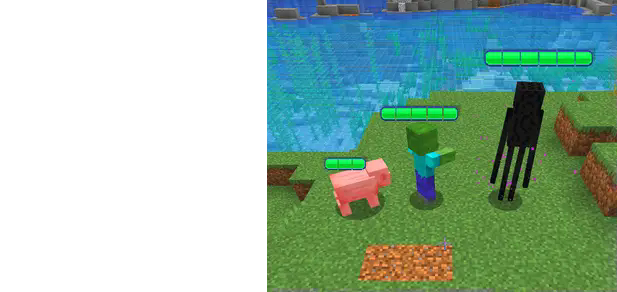

Visible health bar above entities' heads.
- No more guessing: you’ll always know their health.
- Compatible with all Minecraft entities.
- The Bar will be longer or shorter, it depends on the max health the entity have.
No more uncertain battles or hopeful strikes without knowing the impact. Every hit counts, and now you’ll know exactly how much it counts.
Website
If you have any questions, need assistance, or simply want to share your thoughts or feedback, feel free to reach out. We're always here to help and would love to hear from you – whether you're looking for answers, suggestions, or just want to let us know how we're doing.

Other links
⚠️ THE DATAPACK REQUIRE THE RESOURCE PACK.
Project description from CurseForge.
Pick your setup
Health Bar Indicator by Minecraft version and loader
Choose the version and loader you play, then open the matching release.
Minecraft version
1.21.4-Snapshot
4 loader buildsMinecraft version
1.21.4
4 loader buildsMinecraft version
1.21.3
4 loader buildsMinecraft version
1.21.2-Snapshot
4 loader buildsMinecraft version
1.21.2
4 loader buildsMinecraft version
1.21.1-Snapshot
4 loader buildsMinecraft version
1.21.1
4 loader buildsMinecraft version
1.21-Snapshot
4 loader buildsMinecraft version
1.21
4 loader buildsCheck the dependencies, then try the file in a copied instance before changing a world you care about.
Recent files
Health Bar Indicator versions and loaders
health-bar-0.3.jar
7 Mar 2025
Client Source doesn’t say Server Source doesn’t say Dependencies No extras listed Listed on Release listing
Check the 1.21.5-Snapshot · Fabric setup Fabric1.21.41.21.5-SnapshotNeoForge release
health-bar-0.3.jar
7 Mar 2025
Client Source doesn’t say Server Source doesn’t say Dependencies No extras listed Listed on Release listing
Check the 1.21.2-Snapshot · Fabric setup 1.21.2-Snapshot1.21Fabric1.21.1-Snapshot release
health-bar-0.2.jar
23 Jan 2025
Client Source doesn’t say Server Source doesn’t say Dependencies No extras listed Listed on Release listing
Check the 1.21.5-Snapshot · Fabric setup Fabric1.21.41.21.5-SnapshotNeoForge release
health-bar-0.2.jar
10 Jan 2025
Client Source doesn’t say Server Source doesn’t say Dependencies No extras listed Listed on Release listing
Check the 1.21.2-Snapshot · Fabric setup 1.21.2-Snapshot1.21Fabric1.21.1-Snapshot release
health-bar-0.1.jar
27 Nov 2024
Client Source doesn’t say Server Source doesn’t say Dependencies No extras listed Listed on Release listing
Check the 1.21.4-Snapshot · Fabric setup FabricNeoForgeForge1.21.3 release
health-bar-0.1.jar
26 Nov 2024
Client Source doesn’t say Server Source doesn’t say Dependencies No extras listed Listed on Release listing
Check the 1.21.2-Snapshot · Fabric setup 1.21.2-Snapshot1.21Fabric1.21.1-Snapshot release
Looking for an older file? The official CurseForge project page is in Resources.
 mod
CurseForge + Modrinth · Minecraft
Kinetic Minecart
This mod increases damage to moving minecarts; the faster they move, the higher the damage, with virtually no damage limit!
 mod
CurseForge · Minecraft
Create: Microcreate
Compress a real, working Create machine into a single block.
 mod
CurseForge · Minecraft
Jade: Botany Pot Progress | Botany Pots Growth Timer
See live crop growth, time until harvest, and blocked hopper output for Botany Pots directly in the Jade tooltip.