Minecraft version
Back to mods 
CurseForge · Minecraft mod
Harvest Level Config
Configure/edit harvest levels for blocks and tools
Choose a version Pick your version below, then grab the matching file.
Quick answer
Which Harvest Level Config release should I use?
Latest stable file [1.7.10] Harvest Level Config 1.0
Game version 1.7.10
Loader Forge
Harvest Level Config [1.7.10] Harvest Level Config 1.0 targets 1.7.10 with Forge. The project page does not say whether this file belongs on the client, dedicated server, or both. No extra mods listed for this file.
Where it goes
Is Harvest Level Config required on the client, server, or both?
The project page does not say whether this file belongs on the client, dedicated server, or both.
Client Source doesn’t say
Dedicated server Source doesn’t say
Loader for this release Forge
Required install it here Optional supported, not mandatory Not supported do not install here Source doesn’t say do not assume
The source does not explicitly classify this release as client-only or server-only.
What else does Harvest Level Config [1.7.10] Harvest Level Config 1.0 need?
[1.7.10] Harvest Level Config 1.0. Change the file and its required mods may change too.
This file does not list any required mods. Do not add a library just because a different file uses it.
This file does not list any required or optional mods.
Before you install it
Add Harvest Level Config without breaking your instance.
Built for Harvest Level Config [1.7.10] Harvest Level Config 1.0. Pick another file and the loader, install side or required mods may change.
- 01
Stick to this file
Use [1.7.10] Harvest Level Config 1.0. It targets 1.7.10 with Forge; another release may have different loader, side or dependency requirements.
- 02
Bring the mods it needs
This file does not list any required mods. Do not add a library just because a different file uses it.
- 03
Put it on the correct side
The project page does not say whether this file belongs on the client, dedicated server, or both.
- 04
Pick the file you checked
Use the “Get this file” button beside [1.7.10] Harvest Level Config 1.0. It opens that exact file at the source.
About this project
What does Harvest Level Config add?
The only 1.7 mod to change the harvestability of blocks and tools
This 1.7.10 mod is mainly designed for modders and modpackers. It allows you to modify the the tools and conditions required to harvest blocks in a simple json located at "config/HarvestLevelConfig/harvest_levels.json" - The documentation will be updated. The mod must be on server and client.
Compatible with WAILA. (see screenshots)
How the json works (JSON)
For each block entry you have:
name: The block's registry name (modid:block_name).metadata: Block metadata(-1for ALL meta variants)tools: A map of tool types (pickaxe,axe......) to required harvest levels.
JSON
{
    "blocks": [
        {
            "name": "minecraft:stone",
            "metadata": -1,
            "tools": {
                "pickaxe": 3
            }
        },
        {
            "name": "minecraft:diamond_ore",
            "metadata": -1,
            "tools": {
                "pickaxe": 0,
                "axe": 0
            }
        }
    ]
}
This makes stone require a level 3 pickaxe(diamond) to harvest. And this also makes diamond harvestable by any pickaxe/axe. *Blocks not defined fall back to default behavior. Ensure the JSON structure follows the provided example!
Comptability with WAILA
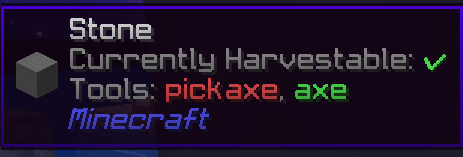
If you configured "Stone" in the json, it will show you all the tools that can harvest the "Stone" node. In green it it's currently selected. If you didn't configure "Stone" in the json, it will just show the tool that can harvest the "Stone" node, handled by minecraft.
*It is not a copy of WailaHarvestability mod ! If you use both mod, it will add the informations you can see in the picture. This mod is meant to work with the configured json and provide less details than WailaHarvestability and works better with WAILA only.
Refresh command
This mod also includes a /hlc refresh command (requires level 3 OP). It reloads the JSON file ingame, so you don't have to restart the game to have the changes!

Project description from CurseForge.
Pick your setup
Harvest Level Config by Minecraft version and loader
Choose the version and loader you play, then open the matching release.
Check the dependencies, then try the file in a copied instance before changing a world you care about.
Recent files
Harvest Level Config versions and loaders
[1.7.10] Harvest Level Config 1.0
[1.7.10] Harvest Level Config-1.0.jar
27 Nov 2024
Client Source doesn’t say Server Source doesn’t say Dependencies No extras listed Listed on Release listing
Check the 1.7.10 · Forge setup Forge1.7.10 release
Looking for an older file? The official CurseForge project page is in Resources.