Nirvana Library Needed by Loot Beams: Refork Loot Beams Refork-fabric-1.21.8-3.4.7.jar
requiredMatching file found Matched file: Nirvana Lib-fabric-1.21.8-2.2.0.jar
CurseForge · Minecraft mod
Loot items, guided by light!
Quick answer
Loot Beams: Refork Loot Beams Refork-fabric-1.21.8-3.4.7.jar targets 1.21.8 with Fabric. The project page does not say whether this file belongs on the client, dedicated server, or both. All 5 required mods have matching files.
Where it goes
The project page does not say whether this file belongs on the client, dedicated server, or both.
The source does not explicitly classify this release as client-only or server-only.
Loot Beams Refork-fabric-1.21.8-3.4.7.jar. Change the file and its required mods may change too.
Install Nirvana Library, Common Network, Fzzy Config, Fabric API and 1 more first. We found matching files for this game-version and loader setup. 4 come through another mod in the chain.
4 extra mods were pulled in by other dependencies. Indented rows show who needs each one. We only count dependency files that match this setup. A file for another loader does not fill the gap.
Before you install it
Built for Loot Beams: Refork Loot Beams Refork-fabric-1.21.8-3.4.7.jar. Pick another file and the loader, install side or required mods may change.
Use Loot Beams Refork-fabric-1.21.8-3.4.7.jar. It targets 1.21.8 with Fabric; another release may have different loader, side or dependency requirements.
Install Nirvana Library, Common Network, Fzzy Config, Fabric API and 1 more first. We found matching files for this game-version and loader setup. 4 come through another mod in the chain.
The project page does not say whether this file belongs on the client, dedicated server, or both.
Use the “Get this file” button beside Loot Beams Refork-fabric-1.21.8-3.4.7.jar. It opens that exact file at the source.
About this project
A client-side mod that adds a beam of light effect to items dropped in the world, making them more noticeable and guiding players to loot with ease.
This mod is a fork of Loot Beams: Relooted!. but its code has been overwritten totally. The aim of rewriting the code is to provide more compatibility and extension possibilities.
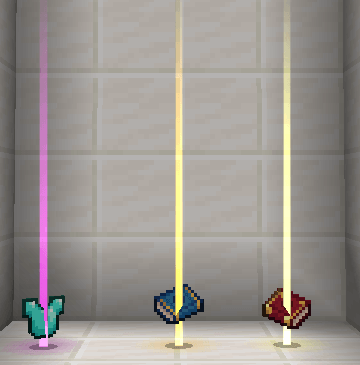
This mod provides a light beam effect to show the position of the drop item. In this case, the color of the beam is decided by the item's rarity.
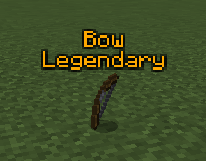
This mod will show the drop item's name and rarity (or tooltips).
This mod internally provide custom rarity support for other mods. If you encounter any rarity support issue, you can use the config to set rarity for the non-supported items.
Photon compat allows every player to design their beam effect in its in-game Unity-like GUI by adding FX to the current light beam. This system is heavily basing on the config, so don't forget to check the config if you want to use it!
Current Mod Compatibility:
Feel free to contact me on GitHub if you find any mod that needs special compatibility!
Project description from CurseForge.
Pick your setup
Choose the version and loader you play, then open the matching release.
Check the dependencies, then try the file in a copied instance before changing a world you care about.
Recent files
2 Jul 2026
2 Jul 2026
2 Jul 2026
2 Jul 2026
2 Jul 2026
2 Jul 2026
2 Jul 2026
2 Jul 2026
2 Jul 2026
2 Jul 2026
2 Jul 2026
2 Jul 2026
Looking for an older file? The official CurseForge project page is in Resources.
 mod
modIn-game advancement editing and improvements to the advancement screen!
 mod
modA lightweight utility for completely removing items via simple JSON configuration.
 mod
modA growing collection of quality-of-life tweaks, bug fixes, and cross-mod integrations for modpack creators!