Minecraft version
Back to mods 
CurseForge · Minecraft mod
Big Sign Writer
Easily write large, multi-line characters and symbols on signs!
Choose a version Pick your version below, then grab the matching file.
Quick answer
Which Big Sign Writer release should I use?
Latest stable file bigsignwriter-3.1.1+26.3.jar
Game version 26.3
Loader Fabric, NeoForge
Big Sign Writer bigsignwriter-3.1.1+26.3.jar targets 26.3 with Fabric, NeoForge. The project page does not say whether this file belongs on the client, dedicated server, or both. No extra mods listed for this file.
Where it goes
Is Big Sign Writer required on the client, server, or both?
The project page does not say whether this file belongs on the client, dedicated server, or both.
Client Source doesn’t say
Dedicated server Source doesn’t say
Loader for this release Fabric, NeoForge
Required install it here Optional supported, not mandatory Not supported do not install here Source doesn’t say do not assume
The source does not explicitly classify this release as client-only or server-only.
What else does Big Sign Writer bigsignwriter-3.1.1+26.3.jar need?
bigsignwriter-3.1.1+26.3.jar. Change the file and its required mods may change too.
This file does not list any required mods. Do not add a library just because a different file uses it.
This file does not list any required or optional mods.
Before you install it
Add Big Sign Writer without breaking your instance.
Built for Big Sign Writer bigsignwriter-3.1.1+26.3.jar. Pick another file and the loader, install side or required mods may change.
- 01
Stick to this file
Use bigsignwriter-3.1.1+26.3.jar. It targets 26.3 with Fabric, NeoForge; another release may have different loader, side or dependency requirements.
- 02
Bring the mods it needs
This file does not list any required mods. Do not add a library just because a different file uses it.
- 03
Put it on the correct side
The project page does not say whether this file belongs on the client, dedicated server, or both.
- 04
Pick the file you checked
Use the “Get this file” button beside bigsignwriter-3.1.1+26.3.jar. It opens that exact file at the source.
About this project
What does Big Sign Writer add?
A client-side utility mod that lets you easily add large, multi-line characters and symbols to your signs! Each of the mod's characters/symbols are made up of regular Unicode characters from the vanilla Minecraft font, allowing this mod to work on most servers and be seen by most players, even without the mod!
Certain resource packs may cause issues.
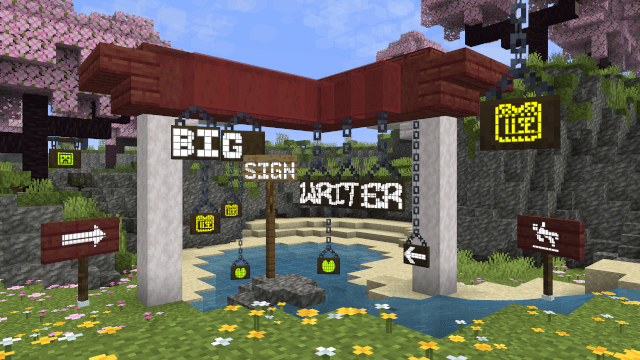
Big Sign Writer adds plenty of fonts and hundreds of symbols ready for use, easily accessible from vanilla Minecraft's sign edit screen.
The mod is highly configurable, with an in-game config screen accessible by default through the sign edit screen, or Mod Menu on Fabric and NeoForge's mod list.
For more information, check out the wiki!
Project description from CurseForge.
Pick your setup
Big Sign Writer by Minecraft version and loader
Choose the version and loader you play, then open the matching release.
Minecraft version
26.1.2
2 loader buildsMinecraft version
26.1.1
2 loader buildsMinecraft version
26.1-rc-3
1 loader buildMinecraft version
26.1-rc-2
1 loader buildMinecraft version
26.1
2 loader buildsMinecraft version
1.21.11
2 loader buildsMinecraft version
1.21.10
2 loader buildsMinecraft version
1.21.9
2 loader buildsMinecraft version
1.21.8
2 loader buildsMinecraft version
1.21.7
2 loader buildsMinecraft version
1.21.6
2 loader buildsShowing the newest 12 of 18 game versions. Older files are in the list below.
Check the dependencies, then try the file in a copied instance before changing a world you care about.
Recent files
Big Sign Writer versions and loaders
bigsignwriter-3.1.1+26.3.jar
3 Oct 2026
Client Source doesn’t say Server Source doesn’t say Dependencies No extras listed Listed on Release listing
Check the 26.3 · Fabric setup FabricNeoForge26.3 release
bigsignwriter-3.1.1+26.1.jar
3 Oct 2026
Client Source doesn’t say Server Source doesn’t say Dependencies No extras listed Listed on Release listing
Check the 26.1.2 · Fabric setup FabricNeoForge26.126.1.1 release
bigsignwriter-3.1.1+1.21.11-neoforge.jar
3 Oct 2026
Client Source doesn’t say Server Source doesn’t say Dependencies No extras listed Listed on Release listing
Check the 1.21.11 · NeoForge setup NeoForge1.21.11 release
bigsignwriter-3.1.1+1.21.11-fabric.jar
3 Oct 2026
Client Source doesn’t say Server Source doesn’t say Dependencies No extras listed Listed on Release listing
Check the 1.21.11 · Fabric setup Fabric1.21.11 release
bigsignwriter-3.1.1+1.21.10-neoforge.jar
3 Oct 2026
Client Source doesn’t say Server Source doesn’t say Dependencies No extras listed Listed on Release listing
Check the 1.21.10 · NeoForge setup NeoForge1.21.10 release
bigsignwriter-3.1.1+1.21.10-fabric.jar
3 Oct 2026
Client Source doesn’t say Server Source doesn’t say Dependencies No extras listed Listed on Release listing
Check the 1.21.10 · Fabric setup Fabric1.21.91.21.10 release
bigsignwriter-3.1.0+26.3.jar
24 Sept 2026
Client Source doesn’t say Server Source doesn’t say Dependencies No extras listed Listed on Release listing
Check the 26.3 · Fabric setup FabricNeoForge26.3 release
bigsignwriter-3.1.0+26.1.jar
24 Sept 2026
Client Source doesn’t say Server Source doesn’t say Dependencies No extras listed Listed on Release listing
Check the 26.1.2 · Fabric setup FabricNeoForge26.126.1.1 release
bigsignwriter-3.1.0+1.21.11-neoforge.jar
24 Sept 2026
Client Source doesn’t say Server Source doesn’t say Dependencies No extras listed Listed on Release listing
Check the 1.21.11 · NeoForge setup NeoForge1.21.11 release
bigsignwriter-3.1.0+1.21.11-fabric.jar
24 Sept 2026
Client Source doesn’t say Server Source doesn’t say Dependencies No extras listed Listed on Release listing
Check the 1.21.11 · Fabric setup Fabric1.21.11 release
bigsignwriter-3.1.0+1.21.10-neoforge.jar
24 Sept 2026
Client Source doesn’t say Server Source doesn’t say Dependencies No extras listed Listed on Release listing
Check the 1.21.10 · NeoForge setup NeoForge1.21.10 release
bigsignwriter-3.1.0+1.21.10-fabric.jar
24 Sept 2026
Client Source doesn’t say Server Source doesn’t say Dependencies No extras listed Listed on Release listing
Check the 1.21.10 · Fabric setup Fabric1.21.91.21.10 release
Looking for an older file? The official CurseForge project page is in Resources.
 mod
mod CurseForge + Modrinth · Minecraft
Diorama
A minimap and world map drawn at an angle, like a model of your world on a table. Towers stand up, cliffs have faces and trees cast shadows.
 mod
mod CurseForge · Minecraft
ReCased
Adds Lucky Cases to your Game
 mod
mod CurseForge · Minecraft
Whyzard
Look at a block and see why it isn't working, and how to fix it