Minecraft version
Back to mods 
CurseForge · Minecraft mod
Multitools Enhanced
Combines all of the tools (pickaxe, axe, shovel and hoe) in one item to save inventory space.
Choose a version Pick your version below, then grab the matching file.
Quick answer
Which Multitools Enhanced release should I use?
Latest stable file Multitools Enhanced 2.0.1 for NeoForge 1.21.1
Game version 1.21.1
Loader NeoForge
Multitools Enhanced 2.0.1 for NeoForge 1.21.1 targets 1.21.1 with NeoForge. The project page does not say whether this file belongs on the client, dedicated server, or both. No extra mods listed for this file.
Where it goes
Is Multitools Enhanced required on the client, server, or both?
The project page does not say whether this file belongs on the client, dedicated server, or both.
Client Source doesn’t say
Dedicated server Source doesn’t say
Loader for this release NeoForge
Required install it here Optional supported, not mandatory Not supported do not install here Source doesn’t say do not assume
The source does not explicitly classify this release as client-only or server-only.
What else does Multitools Enhanced 2.0.1 for NeoForge 1.21.1 need?
Multitools Enhanced 2.0.1 for NeoForge 1.21.1. Change the file and its required mods may change too.
This file does not list any required mods. Do not add a library just because a different file uses it.
This file does not list any required or optional mods.
Before you install it
Add Multitools Enhanced without breaking your instance.
Built for Multitools Enhanced 2.0.1 for NeoForge 1.21.1. Pick another file and the loader, install side or required mods may change.
- 01
Stick to this file
Use Multitools Enhanced 2.0.1 for NeoForge 1.21.1. It targets 1.21.1 with NeoForge; another release may have different loader, side or dependency requirements.
- 02
Bring the mods it needs
This file does not list any required mods. Do not add a library just because a different file uses it.
- 03
Put it on the correct side
The project page does not say whether this file belongs on the client, dedicated server, or both.
- 04
Pick the file you checked
Use the “Get this file” button beside Multitools Enhanced 2.0.1 for NeoForge 1.21.1. It opens that exact file at the source.
About this project
What does Multitools Enhanced add?
Multitools, done right for the newer versions!

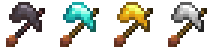
Multitools are a new tool type that combines all primary tools (pickaxe, axe, shovel, hoe) into one item to save up on inventory space. To balance this out, multitools have half the durability of all combined tools (configurable). They come in 4 materials: Netherite, Diamond, Gold, Iron.
Crafting
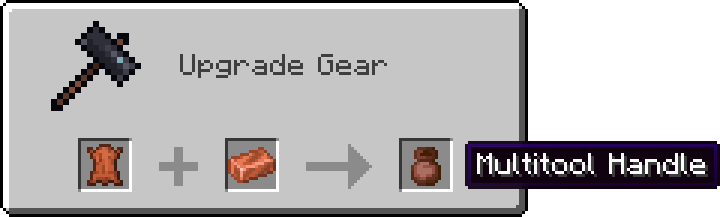
First step of crafting a multitool is smithing the handle first. Applying a copper ingot to leather in a smithing table will result in a Multitool Handle!
NOTE: For versions 1.20+ use the crafting table instead of the smithing table.
And lastly combining the handle with all the tools or a block of desired material will result in a Multitool!

or
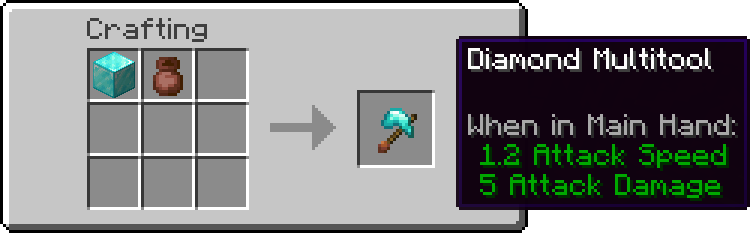
and upgrading from Diamond to Netherite:
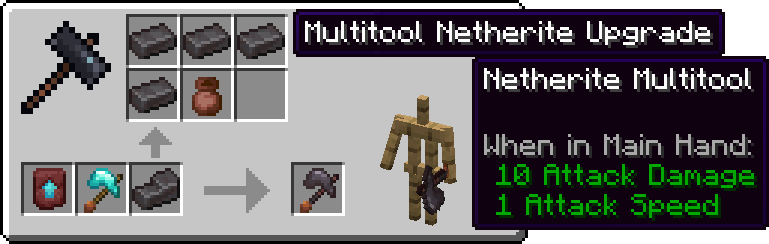
Stripping, Deoxidizing, Unwaxing, Pathing and Tilling
Axe right click actions (stripping, deoxidizing and unwaxing) all work with the multitool. Simply right click a log or a copper block to see it in action!
While stading, right clicking a variant of dirt block will use the shovel, creating a path. To till the ground instead, hold shift (or your crouching button) and then right click.
Project description from CurseForge.
Pick your setup
Multitools Enhanced by Minecraft version and loader
Choose the version and loader you play, then open the matching release.
Minecraft version
1.21.1
3 loader buildsMinecraft version
1.20.6
1 loader buildMinecraft version
1.20.1
4 loader buildsForge Multitools Enhanced 2.0.1 for Forge 1.20.1 2
stable files
· 2 total · 24 Jun 2025Fabric Multitools Enhanced 2.0.1 for Fabric 1.20.1.jar 3
stable files
· 3 total · 24 Jun 2025Quilt Multitools Enhanced 2.0.1 for Fabric 1.20.1.jar 3
stable files
· 3 total · 24 Jun 2025NeoForge Multitools Enhanced 2.0.1 for Forge 1.20.1 2
stable files
· 2 total · 24 Jun 2025
Minecraft version
1.19.4
1 loader buildMinecraft version
1.18.2
1 loader buildCheck the dependencies, then try the file in a copied instance before changing a world you care about.
Recent files
Multitools Enhanced versions and loaders
Multitools Enhanced 2.0.1 for NeoForge 1.21.1
multitools-neoforge-1.21.1-2.0.1.jar
26 Apr 2026
Client Source doesn’t say Server Source doesn’t say Dependencies No extras listed Listed on Release listing
Check the 1.21.1 · NeoForge setup 1.21.1NeoForge release
Multitools Enhanced 2.0.1 for Fabric 1.21.1
multitools-fabric-1.21.1-2.0.1.jar
26 Apr 2026
Client Source doesn’t say Server Source doesn’t say Dependencies No extras listed Listed on Release listing
Check the 1.21.1 · Fabric setup Fabric1.21.1Quilt release
Multitools Enhanced 2.0.1 for Fabric 1.20.1.jar
multitools-fabric-1.20.1-2.0.1.jar
24 Jun 2025
Client Source doesn’t say Server Source doesn’t say Dependencies No extras listed Listed on Release listing
Check the 1.20.1 · Fabric setup Fabric1.20.1Quilt release
Multitools Enhanced 2.0.1 for Forge 1.20.1
multitools-forge-1.20.1-2.0.1.jar
24 Jun 2025
Client Source doesn’t say Server Source doesn’t say Dependencies No extras listed Listed on Release listing
Check the 1.20.1 · NeoForge setup NeoForge1.20.1Forge release
Multitools 2.0.0 for Forge 1.20.1.jar
multitools-forge-1.20.1-2.0.0.jar
1 Apr 2025
Client Source doesn’t say Server Source doesn’t say Dependencies No extras listed Listed on Release listing
Check the 1.20.1 · NeoForge setup NeoForge1.20.1Forge release
Multitools 2.0.0 for Fabric 1.20.1.jar
multitools-fabric-1.20.1-2.0.0.jar
1 Apr 2025
Client Source doesn’t say Server Source doesn’t say Dependencies No extras listed Listed on Release listing
Check the 1.20.1 · Fabric setup Fabric1.20.1Quilt release
Multitools-Enhanced-1.2.0-1.20.1.jar
Multitools-Enhanced-1.2.0+1.20.1.jar
5 Mar 2025
Client Source doesn’t say Server Source doesn’t say Dependencies No extras listed Listed on Release listing
Check the 1.20.1 · Fabric setup Fabric1.20.1Quilt release
Multitools Enhanced 1.1.0 for MC 1.18.2.jar
multitools-enhanced-1.1.0-1.18.2.jar
12 Dec 2024
Client Source doesn’t say Server Source doesn’t say Dependencies No extras listed Listed on Release listing
Check the 1.18.2 · Fabric setup Fabric1.18.2 release
Multitools Enhanced 1.1.0 for MC 1.21.4.jar
multitools-enhanced-1.1.0-1.21.4.jar
12 Dec 2024
Client Source doesn’t say Server Source doesn’t say Dependencies No extras listed Listed on Release listing
Check the 1.21.4 · Fabric setup Fabric1.21.4 release
Multitools Enhanced 1.0.3 for MC 1.21.4
multitools-enhanced-1.0.3-1.21.4.jar
8 Dec 2024
Client Source doesn’t say Server Source doesn’t say Dependencies No extras listed Listed on Release listing
Check the 1.21.4 · Fabric setup Fabric1.21.4 release
Multitools Enhanced 1.0.2 for MC 1.20.6.jar
Multitools-Enhanced-1.0.2-1.20.6.jar
8 Dec 2024
Client Source doesn’t say Server Source doesn’t say Dependencies No extras listed Listed on Release listing
Check the 1.20.6 · Fabric setup Fabric1.20.6 release
Multitool Enhanced 1.0.2 for MC 1.19.4.jar
Multitool-Enhanced-1.0.2-1.19.4.jar
8 Dec 2024
Client Source doesn’t say Server Source doesn’t say Dependencies No extras listed Listed on Release listing
Check the 1.19.4 · Fabric setup 1.19.4Fabric release
Looking for an older file? The official CurseForge project page is in Resources.
 mod
CurseForge + Modrinth · Minecraft
Quick Skin
Sick of wasting time with Minecraft’s slow launcher just to change your skin? Quick Skin lets you swap skins instantly even on “offline” servers and gives you access to every official Minecraft cape.
 mod
CurseForge + Modrinth · Minecraft
Minecontrollers
More red add-on for programmable logical redstone controllers
 mod
CurseForge + Modrinth · Minecraft
Roundabout: The JoJo Mod
A Jojo's Bizarre Adventure mod that interprets the world and power system of the anime into the world of Minecraft. ( JJBA )