Minecraft version
Back to mods 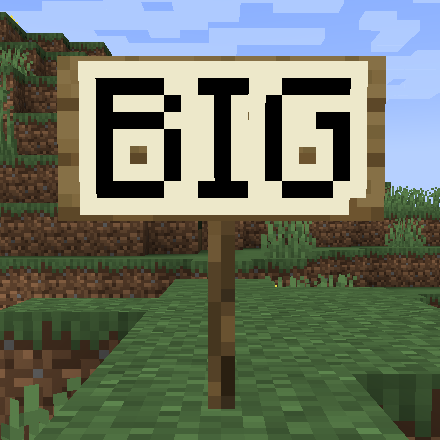
CurseForge · Minecraft mod
Big Signs
Adds Signs with BIGGER TEXT to Minecraft! More to come in the future!
Choose a version Pick your version below, then grab the matching file.
Quick answer
Which Big Signs release should I use?
Latest stable file Version 1.1 - Forge/NeoForge 1.20.1
Game version 1.20.1, 1.20.2, 1.20.3
Loader Forge, NeoForge
Big Signs Version 1.1 - Forge/NeoForge 1.20.1 targets 1.20.1, 1.20.2, 1.20.3 with Forge, NeoForge. The project page does not say whether this file belongs on the client, dedicated server, or both. No extra mods listed for this file.
Where it goes
Is Big Signs required on the client, server, or both?
The project page does not say whether this file belongs on the client, dedicated server, or both.
Client Source doesn’t say
Dedicated server Source doesn’t say
Loader for this release Forge, NeoForge
Required install it here Optional supported, not mandatory Not supported do not install here Source doesn’t say do not assume
The source does not explicitly classify this release as client-only or server-only.
What else does Big Signs Version 1.1 - Forge/NeoForge 1.20.1 need?
Version 1.1 - Forge/NeoForge 1.20.1. Change the file and its required mods may change too.
This file does not list any required mods. Do not add a library just because a different file uses it.
This file does not list any required or optional mods.
Before you install it
Add Big Signs without breaking your instance.
Built for Big Signs Version 1.1 - Forge/NeoForge 1.20.1. Pick another file and the loader, install side or required mods may change.
- 01
Stick to this file
Use Version 1.1 - Forge/NeoForge 1.20.1. It targets 1.20.1, 1.20.2, 1.20.3 with Forge, NeoForge; another release may have different loader, side or dependency requirements.
- 02
Bring the mods it needs
This file does not list any required mods. Do not add a library just because a different file uses it.
- 03
Put it on the correct side
The project page does not say whether this file belongs on the client, dedicated server, or both.
- 04
Pick the file you checked
Use the “Get this file” button beside Version 1.1 - Forge/NeoForge 1.20.1. It opens that exact file at the source.
About this project
What does Big Signs add?
Overview
Big Signs is a new mod which adds Signs with Bigger Text to Minecraft. At the moment, there are two new varieties of sign:
- One-Line Signs
- One-Line Hanging Signs
These new signs come in every vanilla wood type, as well as 20 colours of metal. They display much larger text than vanilla signs. The sign's model stays the same, so there is only One Line of text, with room for only a few characters.
The 20 available colours are inspired by the Metal Blocks in my main mod Better Tools and Armor
^Resource Pack in Images: Vanilla Tweaks - Smoother Font^ 

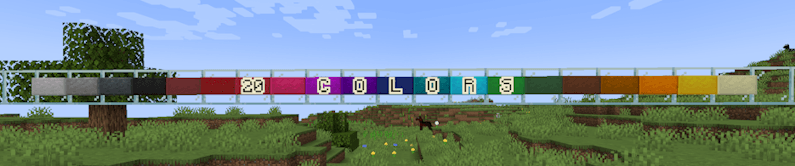
One-Line Signs are perfect for displaying large numbers in your world. Say goodbye to typing out large Block characters on each line of a vanilla sign - now you can simply type the number into a One-Line Sign, which will display it much more clearly! This is great for train-related builds in the Create mod (as shown below)

One-Line Signs are also a much more elegant solution than Letter tile blocks, found in some mods. Now, you can fit more than one large letter in the space of one block!

Crafting
Wooden One-Line Signs are crafted using 1-to-1 recipes with the vanilla signs. 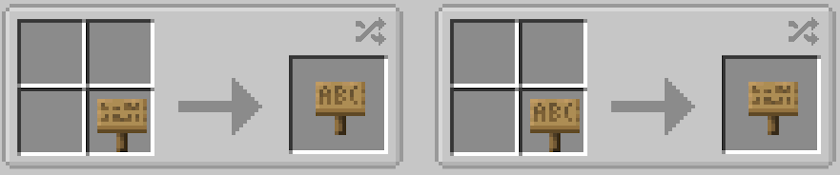
Metal One-Line Signs can be dyed into any colour variant, from any other colour. The white variants can be crafted in a 3x3 crafting grid using Iron. 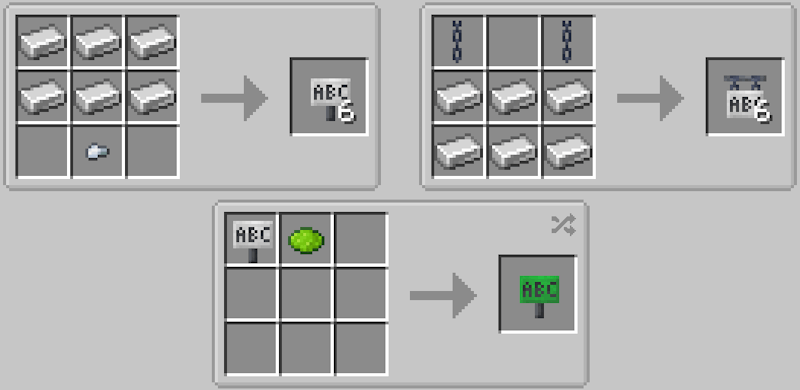
Download and Install
Big Signs is available for Minecraft 1.20.1 on Forge or NeoForge. There are no required dependencies - No other mods are needed to use this mod! Simply place it in your .minecraft/mods folder, and you're good to go.
1.12 Port
The mod has been remade from the ground up for 1.12.2, with a limited set of features.
1.12 Features:
- One-Line Sign, which is exactly the same as the 1.20 Oak variant.
- No more wood variants or hanging variants, as these did not exist in 1.12
- Recipe for the One-Line Sign which is one-to-one with the vanilla Sign.
- The ability to edit any vanilla or One-Line sign, by shift-right clicking with an empty hand.
Planned Features
I have many more features planned for the Big Signs mod, including physically bigger signs of course!
Thin Signs
- A type of One-Line Sign, but with the vanilla text size and a physically thinner body.
- Can be placed on either the top, middle or bottom part of a block.
Directional Signs
- Allowing any sign to be pointed on either end, to act as an arrow sign.
- For Thin Signs, this would be very similar to Way Signs from the Supplementaries mod.
Billboard Blocks
- A type of sign which uses a full block of space. Acts similar to the Framed Wall Board from Framed Blocks.
- Can be placed on either the Back, Middle or Front of a block.
- When placed next to each other (in a rectangle shape), they form a larger sign which takes up the whole area.
- This would allow for long bodies of text to be displayed in the world, or for large advertisements, for instance.
Improved Text GUI
- Eventually, I plan to overhaul the vanilla text-editing GUI for signs. This includes:
- Options for Bold, Underlined and Italic text
- Text size and colour options, allowing for different text size on each line, or a different colour per character.
- Text alignment options - Left, Centred or Right.
- In Creative Mode, there would be the option to add a command to execute when the sign is right-clicked in the world.
Project description from CurseForge.
Pick your setup
Big Signs by Minecraft version and loader
Choose the version and loader you play, then open the matching release.
Minecraft version
1.20.5
2 loader buildsMinecraft version
1.20.4
2 loader buildsMinecraft version
1.20.3
2 loader buildsMinecraft version
1.20.2
2 loader buildsMinecraft version
1.20.1
2 loader buildsMinecraft version
1.12.2
1 loader buildCheck the dependencies, then try the file in a copied instance before changing a world you care about.
Recent files
Big Signs versions and loaders
Big Signs 1.12.2 Port
big_signs_v1.2-forge_1.12.2.jar
5 May 2026
Client Source doesn’t say Server Source doesn’t say Dependencies No extras listed Listed on Release listing
Check the 1.12.2 · Forge setup Forge1.12.2 beta
Version 1.1 - Forge/NeoForge 1.20.1
big_signs_v1.1-forge_1.20.1.jar
30 Dec 2024
Client Source doesn’t say Server Source doesn’t say Dependencies No extras listed Listed on Release listing
Check the 1.20.6 · Forge setup 1.20.1ForgeNeoForge1.20.2 release
Version 1.0.1 - Forge/NeoForge 1.20.1
big_signs_mod_v1.0.1-forge_1.20.1.jar
12 Dec 2024
Client Source doesn’t say Server Source doesn’t say Dependencies No extras listed Listed on Release listing
Check the 1.20.1 · NeoForge setup NeoForge1.20.1Forge release
Looking for an older file? The official CurseForge project page is in Resources.
 mod
CurseForge + Modrinth · Minecraft
Personal Space
Adds personal customizable dimensions with superflat-style presets.
 mod
CurseForge + Modrinth · Minecraft
PPE Essentials
A lightweight mod that adds useful commands (like /tpa /repeat) and tweaks
 mod
CurseForge · Minecraft
Create Offroad: Narrow Roads
Compact cars have never been easier to make!