Minecraft version
Back to mods 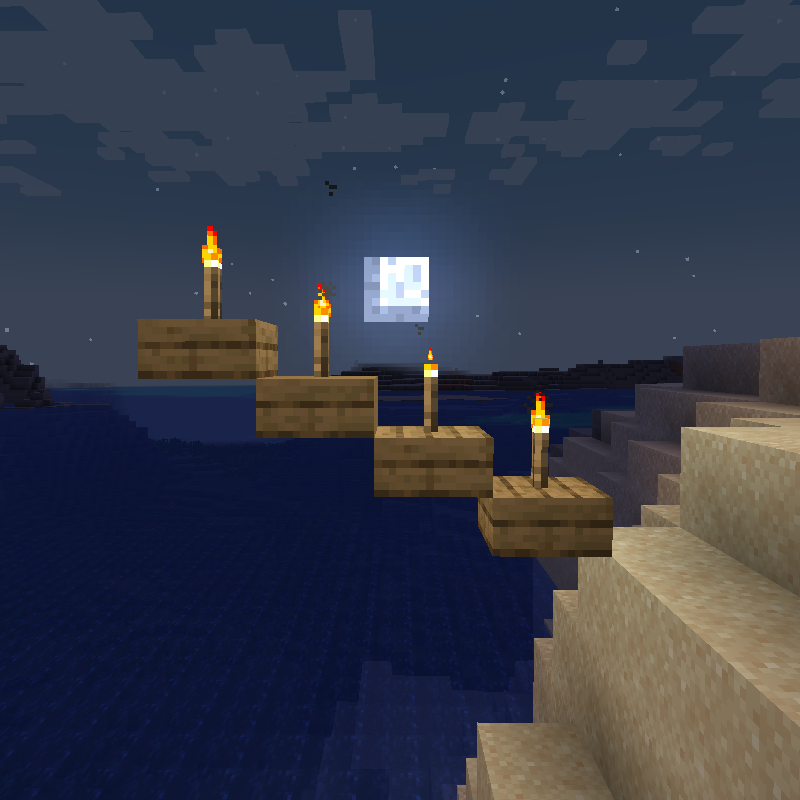
CurseForge · Minecraft mod
Torch Slabs Renewed
llows Torches; Lanterns to be placed on top and the side of half slab blocks
Choose a version Pick your version below, then grab the matching file.
Quick answer
Which Torch Slabs Renewed release should I use?
Latest stable file TorchSlabsRenewed-1.21.1-2.0.3
Game version 1.21.1
Loader NeoForge
Torch Slabs Renewed TorchSlabsRenewed-1.21.1-2.0.3 targets 1.21.1 with NeoForge. The project page does not say whether this file belongs on the client, dedicated server, or both. No extra mods listed for this file.
Where it goes
Is Torch Slabs Renewed required on the client, server, or both?
The project page does not say whether this file belongs on the client, dedicated server, or both.
Client Source doesn’t say
Dedicated server Source doesn’t say
Loader for this release NeoForge
Required install it here Optional supported, not mandatory Not supported do not install here Source doesn’t say do not assume
The source does not explicitly classify this release as client-only or server-only.
What else does Torch Slabs Renewed TorchSlabsRenewed-1.21.1-2.0.3 need?
TorchSlabsRenewed-1.21.1-2.0.3. Change the file and its required mods may change too.
This file does not list any required mods. Do not add a library just because a different file uses it.
This file does not list any required or optional mods.
Before you install it
Add Torch Slabs Renewed without breaking your instance.
Built for Torch Slabs Renewed TorchSlabsRenewed-1.21.1-2.0.3. Pick another file and the loader, install side or required mods may change.
- 01
Stick to this file
Use TorchSlabsRenewed-1.21.1-2.0.3. It targets 1.21.1 with NeoForge; another release may have different loader, side or dependency requirements.
- 02
Bring the mods it needs
This file does not list any required mods. Do not add a library just because a different file uses it.
- 03
Put it on the correct side
The project page does not say whether this file belongs on the client, dedicated server, or both.
- 04
Pick the file you checked
Use the “Get this file” button beside TorchSlabsRenewed-1.21.1-2.0.3. It opens that exact file at the source.
About this project
What does Torch Slabs Renewed add?
Torch Slabs Renewed
A maintained, updated port of the original Torch Slabs Mod for Minecraft 1.20.1+ (Forge).
Vanilla torches, lanterns, candles and more were never meant to sit on slabs, hang under ledges or rest on lily pads — until now. This mod lets you place your existing vanilla light items in dozens of spots the base game won't allow, with no new items to craft: just right-click with the vanilla item.
✨ What you can do
Torches & Soul Torches
- Stand them on top of bottom slabs and stairs.
- Hang them under the underside of slabs (both top and bottom slabs), pointing down like a ceiling torch. (New!)
- Place them on the sides of slabs and stairs, snapping to the top or bottom half depending on where you're aiming.
- Place them on lily pads.
Lanterns & Soul Lanterns
- Sit them on top of bottom slabs and stairs, or hang them under top slabs/stairs.
- Place them on the sides of solid blocks, slabs, stairs, fences and walls. (Walls are new!)
- On block sides they snap to the upper or lower half based on where you look.
- Place them on lily pads.
Candles (all 17 dye colors)
- Place them on top of bottom slabs, stairs and lily pads, and stack up to 4 like vanilla candles.
End Rods
- Place them on slabs, standing up or hanging down, and stack them into pillars.
Chains
- Run them on top of, under and through slabs, hanging and linking together. (Now enabled!)
⚙️ Configuration
A server config (torchslabs-server.toml) lets you fine-tune everything:
- Toggle lanterns on block sides and on the lower half of blocks.
- Toggle torches on the upper half of wall blocks.
- Disable hanging torches under slabs/stairs entirely. (New!)
- Interactive-block list — blocks (crafting table, furnace, doors, shulker boxes, etc.) that require sneak-clicking so you don't open their GUI by accident. Fully customizable.
🔗 Mod compatibility
- Any modded slabs, stairs, walls and fences work automatically, as long as they extend vanilla
SlabBlock/StairBlock/WallBlock/FenceBlock. - Amendments — Torch Slabs steps aside for lanterns so Amendments' lantern physics keep working. Toggleable in the config.
- Supplementaries — Torch Slabs steps aside for lanterns; Supplementaries' own lights (candle holders, sconces) already place on and under slabs natively. Toggleable in the config.
📌 Notes
- Soul Torches and Soul Lanterns share every ability with their normal counterparts.
- This build targets Forge 1.20.1+. For older versions, use the original mod.
- No new items or recipes — everything uses the vanilla items you already have.
Project description from CurseForge.
Pick your setup
Torch Slabs Renewed by Minecraft version and loader
Choose the version and loader you play, then open the matching release.
Minecraft version
1.20.1
1 loader buildCheck the dependencies, then try the file in a copied instance before changing a world you care about.
Recent files
Torch Slabs Renewed versions and loaders
TorchSlabsRenewed-1.21.1-2.0.3
TorchSlabsRenewed-1.21.1-2.0.3.jar
29 Jul 2026
Client Source doesn’t say Server Source doesn’t say Dependencies No extras listed Listed on Release listing
Check the 1.21.1 · NeoForge setup 1.21.1NeoForge release
TorchSlabsRenewed-1.20.1-2.0.3
TorchSlabsRenewed-1.20.1-2.0.3.jar
14 Jul 2026
Client Source doesn’t say Server Source doesn’t say Dependencies No extras listed Listed on Release listing
Check the 1.20.1 · Forge setup 1.20.1Forge release
TorchSlabsRenewed-1.20.1-2.0.2
TorchSlabsRenewed-1.20.1-2.0.2.jar
14 Jul 2026
Client Source doesn’t say Server Source doesn’t say Dependencies No extras listed Listed on Release listing
Check the 1.20.1 · Forge setup 1.20.1Forge release
TorchSlabsRenewed-1.20.1-2.0.0
TorchSlabsRenewed-1.20.1-2.0.0.jar
13 Jul 2026
Client Source doesn’t say Server Source doesn’t say Dependencies No extras listed Listed on Release listing
Check the 1.20.1 · Forge setup 1.20.1Forge release
torchslabmod-renewed-1.20.1-1.0.0
torchslabmod-renewed-1.20.1-1.0.0.jar
13 Dec 2024
Client Source doesn’t say Server Source doesn’t say Dependencies No extras listed Listed on Release listing
Check the 1.20.1 · Forge setup 1.20.1Forge release
Looking for an older file? The official CurseForge project page is in Resources.