Minecraft version
Back to mods 
CurseForge · Minecraft mod
Delivery!
Fun multiplayer addition that allows you to send mail to other players to communicate, may the be online or not. You can include items in your packages, send postcards with your own custom background images, and more!
Choose a version Pick your version below, then grab the matching file.
Quick answer
Which Delivery! release should I use?
Latest stable file delivery-1.0.2-1.20.1.jar
Game version 1.20.1
Loader Forge
Delivery! delivery-1.0.2-1.20.1.jar targets 1.20.1 with Forge. The project page does not say whether this file belongs on the client, dedicated server, or both. No extra mods listed for this file.
Where it goes
Is Delivery! required on the client, server, or both?
The project page does not say whether this file belongs on the client, dedicated server, or both.
Client Source doesn’t say
Dedicated server Source doesn’t say
Loader for this release Forge
Required install it here Optional supported, not mandatory Not supported do not install here Source doesn’t say do not assume
The source does not explicitly classify this release as client-only or server-only.
What else does Delivery! delivery-1.0.2-1.20.1.jar need?
delivery-1.0.2-1.20.1.jar. Change the file and its required mods may change too.
This file does not list any required mods. Do not add a library just because a different file uses it.
This file does not list any required or optional mods.
Before you install it
Add Delivery! without breaking your instance.
Built for Delivery! delivery-1.0.2-1.20.1.jar. Pick another file and the loader, install side or required mods may change.
- 01
Stick to this file
Use delivery-1.0.2-1.20.1.jar. It targets 1.20.1 with Forge; another release may have different loader, side or dependency requirements.
- 02
Bring the mods it needs
This file does not list any required mods. Do not add a library just because a different file uses it.
- 03
Put it on the correct side
The project page does not say whether this file belongs on the client, dedicated server, or both.
- 04
Pick the file you checked
Use the “Get this file” button beside delivery-1.0.2-1.20.1.jar. It opens that exact file at the source.
About this project
What does Delivery! add?
Description:

Mail Delivery is fun simplistic multiplayer addition that expands communication between players in Minecraft.
🔥Overview🔥
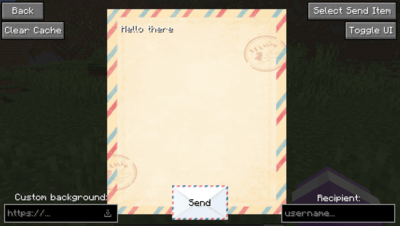
- Communicate to others with letters / postcards
- Customize your mail by adding your own background images
- Mail arrives in real time, independant of game ticks
- Use the packaging system to quickly transfer items to other players
- Do a little trolling with TNT... or some fun fireworks with the surprise system
🎥Release Showcase Video🎥
📧Features📧
- Edit and send your mail using the Postal Service Bin
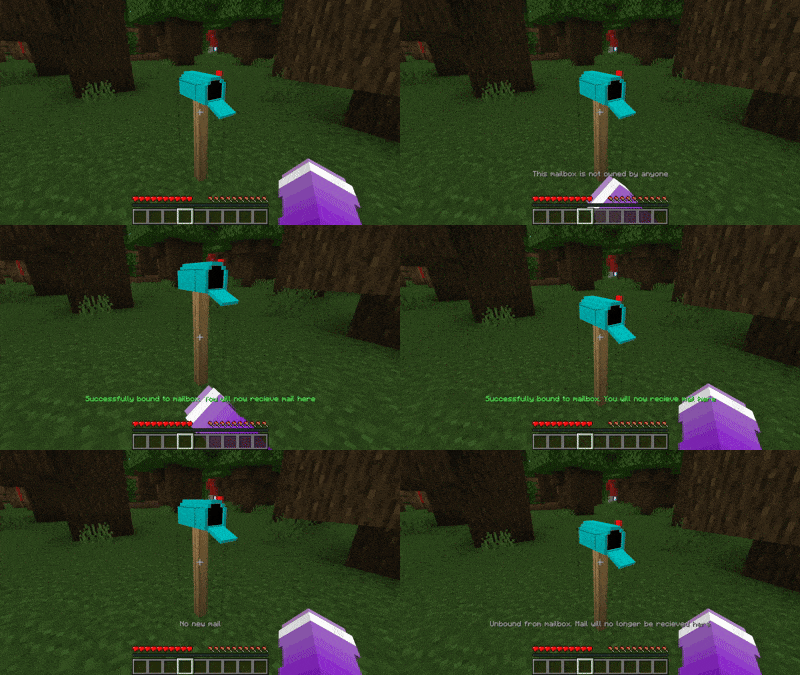
- Bind to your mailbox to own it so it can't be taken. To do bind actions, shift+right click, to do check actions (grab your mail) just right click
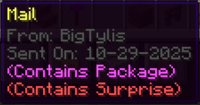
- Check the the mail sent date, author, and packaging information by hovering your mouse over the item
- Chat with the mailman

⚙️Configuration⚙️
Client configuration can be found at config/delivery-client.properties
Enable or disable mail arriving sound effect that plays when receiving mail and standing near your mailbox
mailArrivalSoundEffectEnabled=true
The distance you must be within of your mailbox to here the you've got mail sound effect (in blocks)
mailArrivalSoundEffectDistance=15.0
The date format for the mail item's 'sent date' that shows when hovering your mouse over it
mailDateFormat=MM-dd-yyyy
The distance the mailman must be within for him to speak to you (in blocks)
Values <= 0 will disable this feature.
mailmanTalkDistance=5.5
Control if you want the JEI overlay bug message to show when you join the game (only if you have JEI)
jeiOverlayWarningEnabled=true
Server configuration can be found at serverconfig/maildelivery-server.toml
#Can players send package items through mail
packageSendingEnabled = true
#Can players send TNT surprise type through mail
tntSurpriseSendingEnabled = true
#Can players send Firework surprise type through mail
fireworkSurpriseSendingEnabled = true
#Delay (in seconds) until sent mail should arrive in the receivers mailbox. Set to 0 for no delays. Only supports whole numbers
#Range: > 0
mailArrivalDelay = 10
#Controls the delay (in seconds) between each firework that comes out of mail with the firework surprise type
#Range: 0.0 ~ 10000.0
fireworkSurpriseDelay = 0.25
#Should the mailman appear to deliver your mail (visual only)
mailmanEnabled = true
#This is for debugging purposes but you can use it if you want
canSendMailToSelf = false
📗Integration Features📗
Mail Delivery also includes a new command that can be used generate mail. This means you can use things like RCON (Minecraft Remote Console) or Content Creator Integration mod to manage in game mail from external applications!
(While this mod does not directly have Twitch integration it is easily possible using the command)
💻Commands💻
/sendmail
- Allows you to generate mail
Usage:
/sendmail [recipient] [author] [backgroundImageLink] [packageItem] [surpriseItem] [message]
OR
/sendmail [recipient] [author] [packageItem] [surpriseItem] [message]
/clearmediacache
- (Client Only) Clears your image cache for custom backgrounds. You can use this or the "Clear Cache" button in the Post Bin
🚧Known Incompatibilities/Issues🚧
• JEI (Just Enough Items):
Minor inconvenience; The JEI container overlay likes to render itself on top of the postal bin's GUI because of the type that the menu was built on. If it's in your way you can press Control + O to toggle JEIs overlay visibility on or off (Control + O being the default keybind of course). You will recieve an in game hint about this upon joining if enabled in the config.
🔨Version Support Info🔨
Until I make the decision the mod will be explicitly for the Forge modloader. Please refrain from making Version Support tickets on the issues tracker about porting to other modloaders.
📑Additional Info📑
• License: All Rights Reserved
You may not modify or reupload this content without explicit permission from me. However it is always free to use in any modpack no credit needed :)
• Issue Tracker/Feedback:
https://github.com/BigTylis/delivery-issue-tracker
• Support me:

Feedback is much appriciated! Thank you ♥
Project description from CurseForge.
Pick your setup
Delivery! by Minecraft version and loader
Choose the version and loader you play, then open the matching release.
Minecraft version
1.20
1 loader buildCheck the dependencies, then try the file in a copied instance before changing a world you care about.
Recent files
Delivery! versions and loaders
delivery-1.0.2-1.20.1.jar
22 Feb 2026
Client Source doesn’t say Server Source doesn’t say Dependencies No extras listed Listed on Release listing
Check the 1.20.1 · Forge setup 1.20.1Forge release
delivery-1.0.2-1.20.jar
22 Feb 2026
Client Source doesn’t say Server Source doesn’t say Dependencies No extras listed Listed on Release listing
Check the 1.20 · Forge setup Forge1.20 release
delivery-1.0.1-1.20.jar
16 Dec 2025
Client Source doesn’t say Server Source doesn’t say Dependencies No extras listed Listed on Release listing
Check the 1.20 · Forge setup Forge1.20 release
delivery-1.0.1-1.20.1.jar
16 Dec 2025
Client Source doesn’t say Server Source doesn’t say Dependencies No extras listed Listed on Release listing
Check the 1.20.1 · Forge setup 1.20.1Forge release
delivery-1.0.0-1.20.jar
30 Oct 2025
Client Source doesn’t say Server Source doesn’t say Dependencies No extras listed Listed on Release listing
Check the 1.20 · Forge setup Forge1.20 release
delivery-1.0.0-1.20.1.jar
30 Oct 2025
Client Source doesn’t say Server Source doesn’t say Dependencies No extras listed Listed on Release listing
Check the 1.20.1 · Forge setup 1.20.1Forge release
Looking for an older file? The official CurseForge project page is in Resources.
 mod
mod CurseForge + Modrinth · Minecraft
LDLib
LDLib is a libarary mod for custom rendering, modular gui.
 mod
mod CurseForge + Modrinth · Minecraft
Anything but Fish
Reel in creepers, diamonds, and more! This fishing rod catches ANYTHING—except fish.
 mod
mod CurseForge + Modrinth · Minecraft
Sophisticated Item Actions
Highlight nearby inventories containing an item, and restock items from or deposit items to them directly from your inventory.