CurseForge · Minecraft mod
ClickVillagers
Click to pick up villagers, reset their trades, change their biomes, claim them and much more!
Quick answer
Which ClickVillagers release matches 1.21.4 Fabric?
ClickVillagers 1.6.4 for Fabric targets 1.21.4 with Fabric. The project page does not say whether this file belongs on the client, dedicated server, or both. 1 required mod needs a matching file.
Where it goes
Is ClickVillagers required on the client, server, or both?
The project page does not say whether this file belongs on the client, dedicated server, or both.
The source does not explicitly classify this release as client-only or server-only.
What else does ClickVillagers 1.6.4 for Fabric need?
ClickVillagers 1.6.4 for Fabric on 1.21.4 Fabric. Every mod below is checked against that same setup.
Install Fabric API first, but 1 required mod has no matching file for this setup. Do not mix loader builds to force a match.
We only count dependency files that match this setup. A file for another loader does not fill the gap.
Before you install it
Add ClickVillagers without breaking your instance.
Built for ClickVillagers 1.6.4 for Fabric on 1.21.4 Fabric. Pick another file and the loader, install side or required mods may change.
- 01
Stick to this file
Use ClickVillagers 1.6.4 for Fabric. It targets 1.21.4 with Fabric; another release may have different loader, side or dependency requirements.
- 02
Bring the mods it needs
Install Fabric API first, but 1 required mod has no matching file for this setup. Do not mix loader builds to force a match.
- 03
Put it on the correct side
The project page does not say whether this file belongs on the client, dedicated server, or both.
- 04
Pick the file you checked
Use the “Get this file” button beside ClickVillagers 1.6.4 for Fabric. It opens that exact file at the source.
About this project
What does ClickVillagers add?

ClickVillagers
ClickVillagers is a simple quality of life plugin/mod that makes working with villagers much easier by allowing you to pick villagers up into your inventory, claim and protect them, change their biomes, and much more!
- 🎥 Trailer: https://youtu.be/19qup8i3IyU
Features & How to Use
- Pick villagers up into your inventory by shift + right clicking them.
- Place them back by placing the villager head.
- You can place villagers directly into boats, minecarts, etc.
- Use dispensers to place villagers back automatically. (On Paper/Spigot 1.21+)
- Clean messages, sound effects and particle effects.
- Language support: German & English (Paper/Spigot only)
See Trades at a Glance
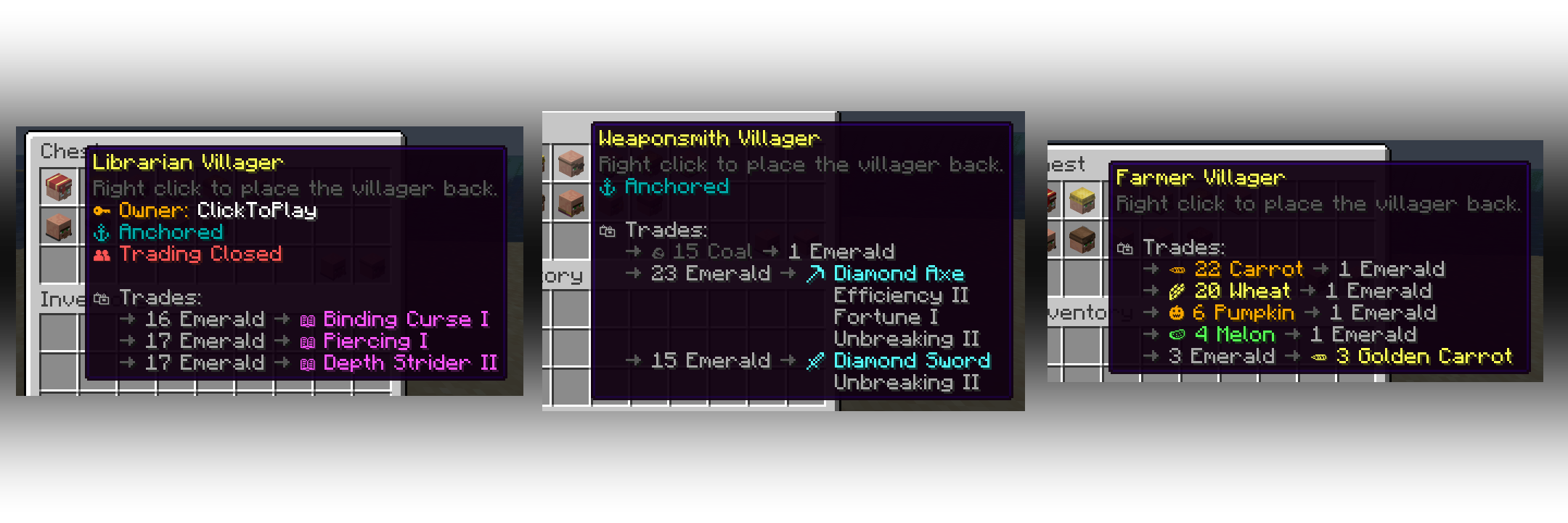
- See picked up villagers' trades in their description!
- For each profession, only relevant trades will be shown. (i.E: only enchanted books for librarians)
- Relevant trades will be formatted with colors and emojis.
- The villager's owner, trade status and anchor status will also be shown.

Anchor Villagers
- Anchor villagers by shift + right clicking with SHEARS.
- Anchored villagers cannot move on their own, but you can still push them around.
Claim & Protect Villagers
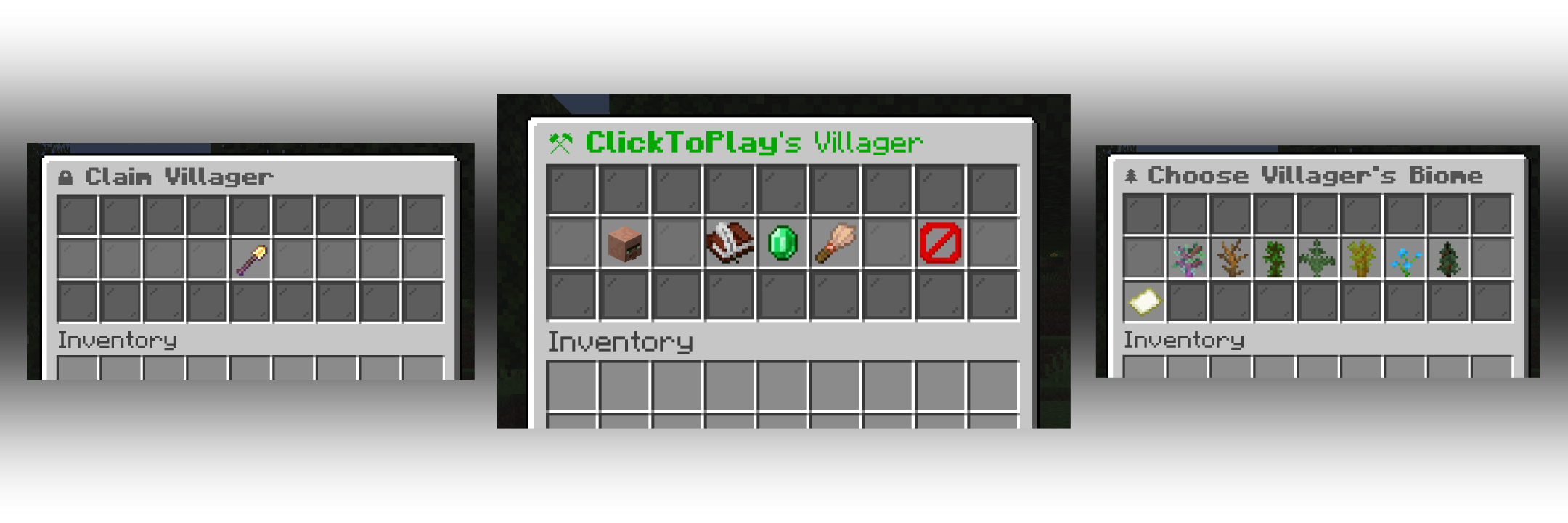
- Claim villagers by shift + right clicking with ANY SHOVEL.
- Claimed villagers won't take any damage by default.
- After claiming, access their menu by shift + right clicking with or without a shovel.
- Change a claimed villager's biomes.
- Open/close a claimed villager's trading.
- Add trading partners and only let your trading partners trade with your villagers.

Villager Hoppers
- Use Villager Hoppers to pick up villagers automatically.
- Baby villagers and claimed villagers won't be picked up by default.
- For Paper/Spigot, craft a villager hopper by combining 1 Hopper and 1 Emerald
- For Fabric, regular hoppers will pick up villagers instead, there is no custom item/recipe.
- Especially useful for villager farms.
Configuration
- For Paper/Spigot, you will find the configuration file at "plugins/ClickVillagers/config.yml".
- For Fabric, you will find the configuration file at ".minecraft/config/clickvillagers.json".
- WARNING: If you are using another client (i.E. Modrinth App), the config file will be located at the installation directory instead.
- Make sure you save the config file after making changes and do the following:
- For Paper/Spigot, reload/restart your server or use the command "/clickvillagers reload".
- For Fabric, restart your game or server fully.
Licensing
- This project is licensed under the GPLv3 license.
Project description from CurseForge.
Pick your setup
ClickVillagers by Minecraft version and loader
Choose the version and loader you play, then open the matching release.
26.2
2 loader builds26.1.2
2 loader builds26.1.1
2 loader builds26.1
2 loader builds1.21.11
3 loader builds1.21.10
3 loader builds1.21.9
3 loader builds1.21.8
3 loader builds1.21.7
3 loader builds1.21.6
3 loader builds1.21.5
3 loader builds1.21.4
3 loader buildsShowing the newest 12 of 23 game versions. Older files are in the list below.
Check the dependencies, then try the file in a copied instance before changing a world you care about.
Recent files
ClickVillagers versions and loaders
ClickVillagers 1.6.4 for Fabric
ClickVillagers-1.6.4+1.21.4-fabric.jar
25 Feb 2026
1.6.3+1.21.4-fabric
ClickVillagers-1.6.3+1.21.4-fabric.jar
27 Jan 2026
ClickVillagers 1.6.2 for Fabric
ClickVillagers-1.6.2+1.21.4-fabric.jar
11 Jan 2026
ClickVillagers 1.6.1 for Fabric
ClickVillagers-fabric-1.6.1+1.21.4.jar
8 Jan 2026
ClickVillagers 1.6 for Fabric
ClickVillagers-fabric-1.6+1.21.4.jar
3 Jan 2026
fabric-1.5.1+1.21.4
ClickVillagers-fabric-1.5.1+1.21.4.jar
15 Dec 2025
fabric-1.5+1.21.4
ClickVillagers-fabric-1.5+1.21.4.jar
28 Nov 2025
fabric-1.4.2+1.21.4
ClickVillagers-fabric-1.4.2+1.21.4.jar
24 Aug 2025
fabric-1.4.1+1.21.4
ClickVillagers-fabric-1.4.1+1.21.4.jar
30 Jul 2025
Looking for an older file? The official CurseForge project page is in Resources.