Minecraft version
Back to mods 
CurseForge · Minecraft mod
The Backrooms - Cubliminal
Infinitely generated dimensions, noclip, custom entities, blocks, items and more!
Choose a version Pick your version below, then grab the matching file.
Quick answer
Which The Backrooms - Cubliminal release should I use?
Latest stable file Cubliminal 1.0
Game version 1.21.3
Loader Fabric
The Backrooms - Cubliminal Cubliminal 1.0 targets 1.21.3 with Fabric. The project page does not say whether this file belongs on the client, dedicated server, or both. No extra mods listed for this file.
Where it goes
Is The Backrooms - Cubliminal required on the client, server, or both?
The project page does not say whether this file belongs on the client, dedicated server, or both.
Client Source doesn’t say
Dedicated server Source doesn’t say
Loader for this release Fabric
Required install it here Optional supported, not mandatory Not supported do not install here Source doesn’t say do not assume
The source does not explicitly classify this release as client-only or server-only.
What else does The Backrooms - Cubliminal Cubliminal 1.0 need?
Cubliminal 1.0. Change the file and its required mods may change too.
This file does not list any required mods. Do not add a library just because a different file uses it.
This file does not list any required or optional mods.
Before you install it
Add The Backrooms - Cubliminal without breaking your instance.
Built for The Backrooms - Cubliminal Cubliminal 1.0. Pick another file and the loader, install side or required mods may change.
- 01
Stick to this file
Use Cubliminal 1.0. It targets 1.21.3 with Fabric; another release may have different loader, side or dependency requirements.
- 02
Bring the mods it needs
This file does not list any required mods. Do not add a library just because a different file uses it.
- 03
Put it on the correct side
The project page does not say whether this file belongs on the client, dedicated server, or both.
- 04
Pick the file you checked
Use the “Get this file” button beside Cubliminal 1.0. It opens that exact file at the source.
About this project
What does The Backrooms - Cubliminal add?
Cubliminal
Discord: https://discord.gg/EnzupkrK7m
This mod aims to be a faithful representation of backrooms lore! It adds a bunch of dimensions, structures and features that make up a story with a logical progress inside of the parallel reality of the backrooms
Is the mod going to be continued?
Yes. I will update it periodically and add new content as long as it is possible for me. For more information, join the Discord Server
Video
Recommendations and tips
Personally, I would suggest setting the brightness to 'moody'. On top of that, Iris shaders can be used, however some renderers won't work well: use them under your own responsability, I recommend testing them before all. Most optimization mods are guaranteed to work, feel free to use them.
So, what does this mod add?
- Custom blocks such as wallpapers and its variants, miscellaneous decorations, a gateway block...
- Custom items: weapons, almond water, etc.
- Effects, paranoia being currently the only one.
- Backrooms level(s): Level 0, the Redrooms, the Manila Room, and many more yet to come.
- Mechanics: a sanity bar to make it more exciting and a noclip engine.
- As well as many subtle details that enhance this mod! Overlays, shaders, reverb effects, renderers...
How to actually play the mod (mere suggestion)
Cubliminal adds some weird stuff that might be painful to figure out on your own how they work.
Flux capacitor: your ticket to the Backrooms
The flux capacitor block comes from the film Back to the Future, in which appears as the main component of the time machine from the DeLorean. This bad boy accumulates immense amounts of energy provided by an outer source and releases all into the ground, effectively weakening the fabric of reality for a few seconds and making you no-clip through the ground. The way you use it is by placing it on the ground with a lightning rod on top and waiting for a lightning bolt to strike it. The lightning is a very powerful source of energy, as it could be seen in Back to the Future. The flux capacitor is crafted by combining silver and iron ingots, glass and a redstone block:
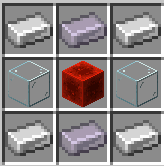
At the same time, silver ingots can be found inside buried treasure chests.
Sanity
Right after your arrival to the backrooms, your sanity will start draining. If your sanity gets too low, you'll get the paranoia status effect, which makes your vision confusing and eventually damages you. Sanity will decrease anyways, but several reasons make it happen faster:
- Staying still
- Being inside dark areas
- Not sleeping for several days
- Difficulty
- The area/level itself (the Redrooms for example drains sanity way faster)
In order to increase your sanity, stay inside of the Manila Room or certain levels, OR drink almond water. Dying will reset your sanity. Or well, you can use the /sanity command.
No-clipping
After visiting the Manila Room (more on that later) you sould run enough time until you experience glitch effects when running against a wall. This means you're ready to no-clip by running against a wall for a couple seconds. After you no-clip, you will fall down to the correct dimension and the 'no-clip timer' will reset. Beware not to die, or else it will as well reset. If you don't wanna go through this whole tedious process, use the builtin /noclip command.
Entering the Manila Room
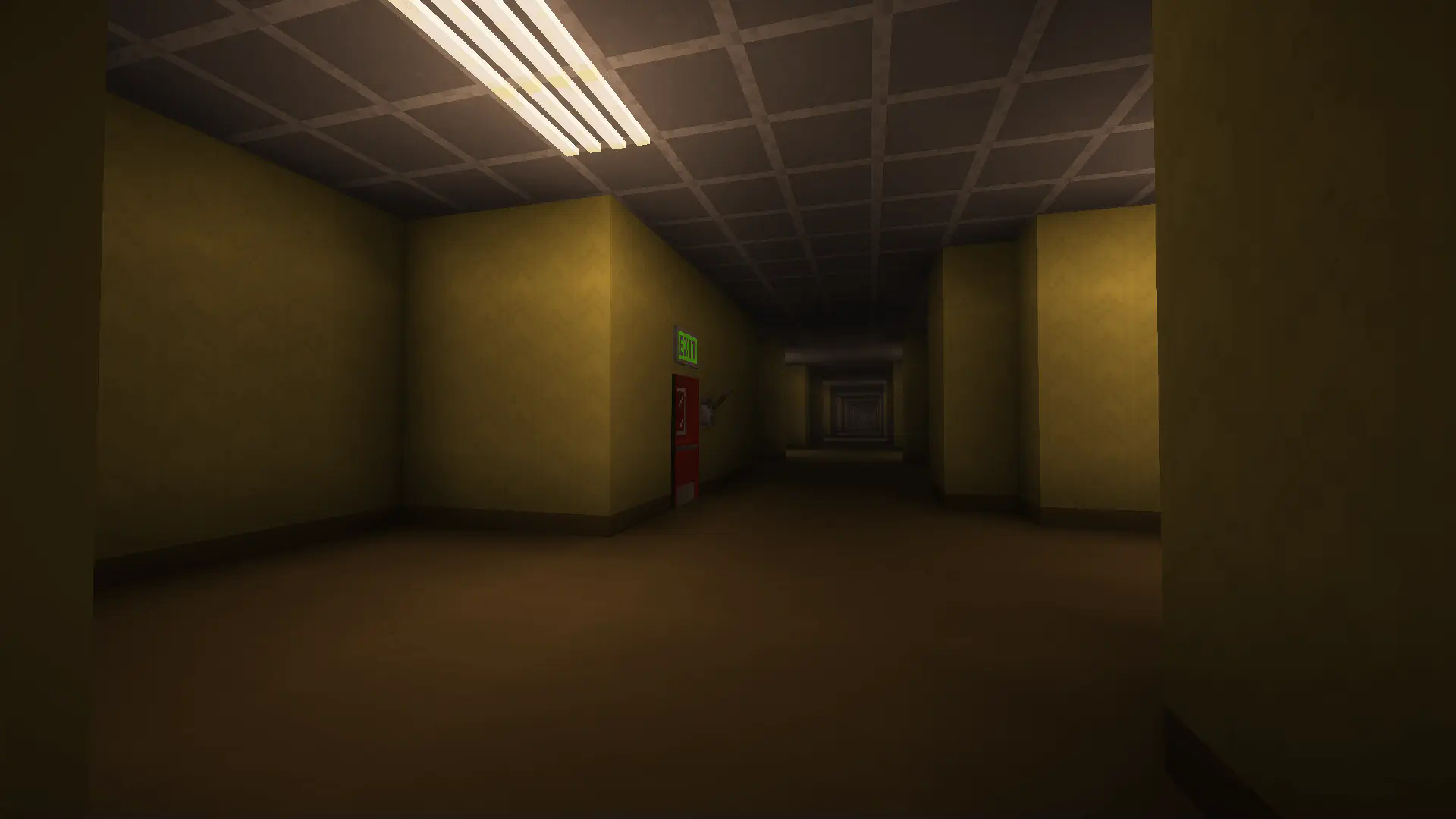
The Manila Room is always at a certain coordinate within Level 0, but it can be entered from any exit door found among the corridors of said level. After entering through the red emergency door, you will notice at the very end of the passage what appears to be a room. This is what you're looking for. Walk towards the room and you'll teleport to the Manila Room. There you can regain the sanity you had lost and learn a few useful tips to survive.
The Redrooms
After walking an indefinite distance in Level 0, you might come across an area with crimson wallpapers instead of the usual yellow ones. You shouldn't walk into this areas under any circumstances.
The Pillar zone
Found similarly to the Redrooms, this area won't be hostile towards wanderers, so they can be safely approached and explored. With enough luck, you'll be able to spot an outpost that contains loot of vital importance if you want to make it in this alternate reality.
Project description from CurseForge.
Pick your setup
The Backrooms - Cubliminal by Minecraft version and loader
Choose the version and loader you play, then open the matching release.
Check the dependencies, then try the file in a copied instance before changing a world you care about.
Recent files
The Backrooms - Cubliminal versions and loaders
Cubliminal 1.0
cubliminal-1.0.jar
21 Dec 2024
Client Source doesn’t say Server Source doesn’t say Dependencies No extras listed Listed on Release listing
Check the 1.21.3 · Fabric setup Fabric1.21.3 release
Looking for an older file? The official CurseForge project page is in Resources.
 mod
CurseForge · Minecraft
The Nédyisvé
Adds a new dimension, end game tools, and a portal link mechanic for end-game fast travel.
 mod
CurseForge · Minecraft
Range's World Gen Customization Mod
Customize your default world generation using a config file, make change biome sizes or turn them off. Lot of other options for world generation. Also adds a few new world types.
 mod
Modrinth · Minecraft
Dangerous Dinner
Let's make monsters more edible! Adds 10+ new foods from monsters.