Minecraft version
Back to mods 
CurseForge · Minecraft mod
Proximity Chat
Proximity Chat adds realistic distance-based chat functionality
Choose a version Pick your version below, then grab the matching file.
Quick answer
Which Proximity Chat release should I use?
Latest stable file proximitychat-1.21.1-NeoForge-1.2.1.jar
Game version 1.21.1
Loader NeoForge
Proximity Chat proximitychat-1.21.1-NeoForge-1.2.1.jar targets 1.21.1 with NeoForge. The project page does not say whether this file belongs on the client, dedicated server, or both. No extra mods listed for this file.
Where it goes
Is Proximity Chat required on the client, server, or both?
The project page does not say whether this file belongs on the client, dedicated server, or both.
Client Source doesn’t say
Dedicated server Source doesn’t say
Loader for this release NeoForge
Required install it here Optional supported, not mandatory Not supported do not install here Source doesn’t say do not assume
The source does not explicitly classify this release as client-only or server-only.
What else does Proximity Chat proximitychat-1.21.1-NeoForge-1.2.1.jar need?
proximitychat-1.21.1-NeoForge-1.2.1.jar. Change the file and its required mods may change too.
This file does not list any required mods. Do not add a library just because a different file uses it.
This file does not list any required or optional mods.
Before you install it
Add Proximity Chat without breaking your instance.
Built for Proximity Chat proximitychat-1.21.1-NeoForge-1.2.1.jar. Pick another file and the loader, install side or required mods may change.
- 01
Stick to this file
Use proximitychat-1.21.1-NeoForge-1.2.1.jar. It targets 1.21.1 with NeoForge; another release may have different loader, side or dependency requirements.
- 02
Bring the mods it needs
This file does not list any required mods. Do not add a library just because a different file uses it.
- 03
Put it on the correct side
The project page does not say whether this file belongs on the client, dedicated server, or both.
- 04
Pick the file you checked
Use the “Get this file” button beside proximitychat-1.21.1-NeoForge-1.2.1.jar. It opens that exact file at the source.
About this project
What does Proximity Chat add?
Proximity Chat
Overview
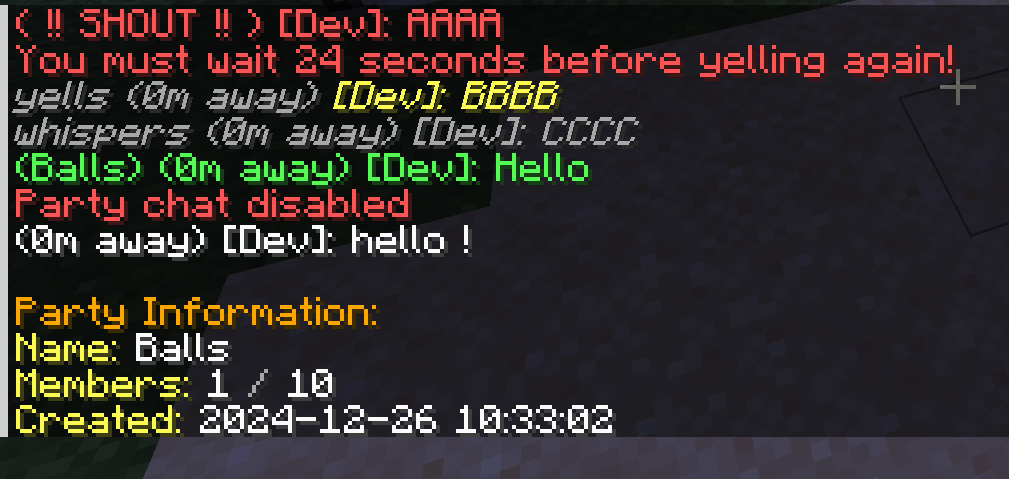
Proximity Chat adds realistic distance-based chat functionality to Minecraft, allowing players to communicate based on their physical proximity in the game world. Chat messages are only visible to players within configurable ranges, making communication more immersive and strategic.
Features
Distance-Based Chat
- Proximity Chat: Messages are only visible to players within a configurable range
- Multiple Chat Modes:
- Normal Chat: Standard proximity-based communication
- Whisper: Shorter range for private conversations
- Yell: Extended range for reaching distant players
- Shout: Server-wide announcements with cooldown
Party System
- Create and manage player parties
- Party-specific chat channel
- Comprehensive party management commands:
- Create/disband parties
- Invite/kick players
- Promote/demote moderators
- Party member listing
- Configurable party sizes
- Optional party persistence across server restarts
Commands
/proximitychat party create <name>- Create a new party/proximitychat party invite <player>- Invite a player to your party/proximitychat party join <name>- Join a party you've been invited to/proximitychat party leave- Leave your current party/proximitychat party list- List party members/proximitychat whisper <message>(or/w) - Send a whispered message/proximitychat yell <message>(or/y) - Send a yelled message/proximitychat shout <message>(or/s) - Send a server-wide shout/proximitychat pc- Toggle party chat mode
Configuration
- Customizable chat ranges for each chat mode
- Configurable colors for different chat types
- Adjustable cooldowns for yell and shout commands
- Customizable maximum party size
- Blacklist for forbidden party names
- Party persistence settings
- Message colors
Mod Integration
- Integration with Fakename mod for roleplay servers
- Support for Chat Heads mod integration.
Support:
- Open an issue on our GitHub repository
- Join our Discord server
If you'd like to support me and the development of my mods, I recommend trying out BisectHosting. Use code "project8gbderam" to get 25% off your first month of a gaming server for new customers. They offer 24/7 support and lightning-fast response times, ensuring you're in great hands and providing exceptional assistance for all your gaming needs. https://www.bisecthosting.com/project8gbderam

Project description from CurseForge.
Pick your setup
Proximity Chat by Minecraft version and loader
Choose the version and loader you play, then open the matching release.
Minecraft version
1.20.1
2 loader buildsMinecraft version
1.19.2
1 loader buildCheck the dependencies, then try the file in a copied instance before changing a world you care about.
Recent files
Proximity Chat versions and loaders
proximitychat-1.21.1-NeoForge-1.2.1.jar
25 Feb 2026
Client Source doesn’t say Server Source doesn’t say Dependencies No extras listed Listed on Release listing
Check the 1.21.1 · NeoForge setup 1.21.1NeoForge release
proximitychat-1.21.1-NeoForge-1.2.0.jar
30 Dec 2024
Client Source doesn’t say Server Source doesn’t say Dependencies No extras listed Listed on Release listing
Check the 1.21.1 · NeoForge setup 1.21.1NeoForge release
proximitychat-1.20.1-Forge-1.2.0.jar
29 Dec 2024
Client Source doesn’t say Server Source doesn’t say Dependencies No extras listed Listed on Release listing
Check the 1.20.1 · NeoForge setup NeoForge1.20.1Forge release
proximitychat-1.19.2-Forge-1.2.0.jar
29 Dec 2024
Client Source doesn’t say Server Source doesn’t say Dependencies No extras listed Listed on Release listing
Check the 1.19.2 · Forge setup 1.19.2Forge release
proximitychat-1.19.2-Forge-1.1.0.jar
27 Dec 2024
Client Source doesn’t say Server Source doesn’t say Dependencies No extras listed Listed on Release listing
Check the 1.19.2 · Forge setup 1.19.2Forge release
Looking for an older file? The official CurseForge project page is in Resources.
 mod
mod CurseForge · Minecraft
MineCoin: Economy & Trade
Complete physical economy system with tiered coins, functional wallets, lottery scratch-offs, and player-to-player auctions.
 mod
mod CurseForge + Modrinth · Minecraft
Neo Vitae
Spill blood for power. Altars that consume life, sigils that bend the world, custom demons in an endless dungeon, sentient armor that drinks souls, a shield that pays your damage in essentia. Datapack-driven from the ground up.
 mod
mod CurseForge · Minecraft
Mob Spawner Tweaks
This is a Minecraft mod designed to control mob spawners' behaviour.