Just Enough Items (JEI) Needed by alchemancy-2.1.3-NeoForge-1.21.1.jar
requiredMatching file found Matched file: 19.70.0.469 for NeoForge 1.21.1
CurseForge · Minecraft mod
Turn everything into anything with the power of Alchemancy!
Quick answer
alchemancy-2.1.3-NeoForge-1.21.1.jar targets 1.21, 1.21.1 with NeoForge. The project page does not say whether this file belongs on the client, dedicated server, or both. All 3 required mods have matching files.
Where it goes
The project page does not say whether this file belongs on the client, dedicated server, or both.
The source does not explicitly classify this release as client-only or server-only.
alchemancy-2.1.3-NeoForge-1.21.1.jar. Change the file and its required mods may change too.
Install Just Enough Items (JEI), Patchouli, MezzConfig first. We found matching files for this game-version and loader setup. 2 come through another mod in the chain.
2 extra mods were pulled in by other dependencies. Indented rows show who needs each one. We only count dependency files that match this setup. A file for another loader does not fill the gap.
Before you install it
Built for alchemancy-2.1.3-NeoForge-1.21.1.jar. Pick another file and the loader, install side or required mods may change.
Use alchemancy-2.1.3-NeoForge-1.21.1.jar. It targets 1.21, 1.21.1 with NeoForge; another release may have different loader, side or dependency requirements.
Install Just Enough Items (JEI), Patchouli, MezzConfig first. We found matching files for this game-version and loader setup. 2 come through another mod in the chain.
The project page does not say whether this file belongs on the client, dedicated server, or both.
Use the “Get this file” button beside alchemancy-2.1.3-NeoForge-1.21.1.jar. It opens that exact file at the source.
About this project

Alchemancy is a mod all about alchemy and artifice. Utilizing the Alchemancy Forge you can take any item and infuse it onto any other item, granting it Infusion Properties based on its functionality, materials, and even appearance! Infuse an Apple onto a block of Cobblestone to make it edible, and apply Blaze Powder to it to make it set you on fire when eaten. Or even make a Bone capable of both mining Obsidian AND shoot arrows at the same time. How about a Mace twice its size that can be thrown and both explode and return to you on impact? With over 200 Infusion Properties added by the mod, anything is possible!
Patchouli can be installed as a soft dependency that provides the Alchemancer's Journal: a guidebook that details every mechanic and recipe, both for crafting and the Alchemancy Forge, introduced by the mod. It is highly recommended you include it if this is your first time playing with the mod, or aren't fully experienced in it yet.
Just Enough Items (JEI) is also recommended as it's currently the only source that covers Infusion Property interactions in great detail.
To get started, you must first venture into The Nether to find the mystical Blazebloom flower growing near lakes and pockets of lava. After gathering a handful of Blazeblooms, they can then be crafted with a book to obtain the Alchemancer's Journal (requires Patchouli to be installed) or brewed at a Brewing Stand with Water Bottles to turn them into Alchemichal Extract.

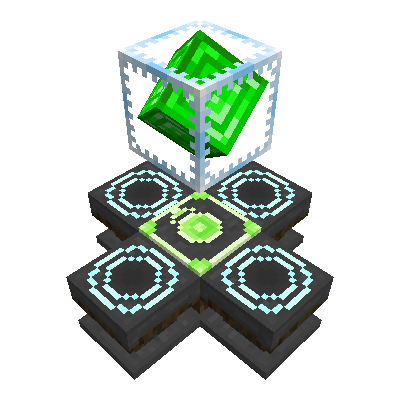
With 4 bottles of extract, 4 logs, and an Ender Pearl, you can make the Alchemancy Forge, a block that when placed down can hold and display items by right-clicking them on it. After placing a Block of Emerald above the Alchemancy Forge with a block of air in between and right-clicking the forge, the emerald block will then turn into an Alchemancy Crystal, a device that shoots a beam of energy directly under itself when right-clicked or powered by redstone, transmuting any compatible item on the forge under it into its counterpart. Turning Gold Ingots into Lead Ingots, Iron into Copper, Honey into Slime, and so much more.

After crafting a couple more Alchemancy Forges, these can be transmuted into Infusion Pedestals, which can be placed around the forge to allow it to perform Item Infusion. By placing the desired item in the center of the forge, any items you'd want to infuse onto it on the sides, and then right-clicking the Alchemancy Crystal, all of the surrounding items will be consumed and their corresponding Infusion Properties will be applied to the item in the middle. Up to 4 Infusion Properties can be applied to an item at a time with a handful of exceptions, Infusion Properties that are purely cosmetic are considered "slotless" and will not count towards this limit. Some items can give multiple Infusion Properties at a time, and a handful of Infusion Properties can react with each other, either canceling out or creating completely new ones, so it is highly recommended to infuse items with great care!

Infused Properties can be removed from an item by infusing it with a Lead Ingot, obtained from transmuting Gold Ingots

The Infusion Codex can be obtained by transmuting a Book at the Alchemancy Forge. It serves as a detailed catalog for every Infusion Property discovered by the player in survival mode across all saves, presenting in great detail the functionality and behavior of each one, as well as any discovered items that the property can be obtained from.

Project description from CurseForge.
Pick your setup
Choose the version and loader you play, then open the matching release.
Check the dependencies, then try the file in a copied instance before changing a world you care about.
Recent files
21 Feb 2026
18 Dec 2025
12 Dec 2025
10 Dec 2025
16 Sept 2025
30 Aug 2025
23 Aug 2025
20 Aug 2025
4 Jun 2025
14 Jan 2025
11 Jan 2025
1 Jan 2025
Looking for an older file? The official CurseForge project page is in Resources.
 mod
this mod adds a simple item into the game which can be used instead of a stick in litematica. (1.17)
 mod
Become a wizard: wands with their own mana, 9 spells from tomes (fireball, frost nova, lightning, meteor...), good and dark wizards, necromancers, and Dark Towers guarded by the Archwarlock boss.
 mod
God Wand adds a multi-modewand with multiple skills