

Back to mods
Tooltips TXF project artwork

CurseForge · Minecraft mod

Tooltips TXF

Additional info on tooltips such as durability, food & more

Choose a version Pick your version below, then grab the matching file.

Quick answer

Which Tooltips TXF release matches Fabric?

Updated yesterday
beta file Tooltips TXF 26.3-1.0.8-fabric
Game version 26.3
Loader Fabric, Quilt

Tooltips TXF 26.3-1.0.8-fabric targets 26.3 with Fabric, Quilt. The project page does not say whether this file belongs on the client, dedicated server, or both. No extra mods listed for this file.

Where it goes

Is Tooltips TXF required on the client, server, or both?

The project page does not say whether this file belongs on the client, dedicated server, or both.

Client Source doesn’t say
Dedicated server Source doesn’t say
Loader for this release Fabric, Quilt
Required install it here Optional supported, not mandatory Not supported do not install here Source doesn’t say do not assume

The source does not explicitly classify this release as client-only or server-only.

What else does Tooltips TXF 26.3-1.0.8-fabric need?

Tooltips TXF 26.3-1.0.8-fabric on Fabric. Every mod below is checked against that same setup.

No extra mods listed for this file

This file does not list any required mods. Do not add a library just because a different file uses it.

This file does not list any required or optional mods.

Before you install it

Add Tooltips TXF without breaking your instance.

Built for Tooltips TXF 26.3-1.0.8-fabric on Fabric. Pick another file and the loader, install side or required mods may change.

  1. 01

    Stick to this file

    Use Tooltips TXF 26.3-1.0.8-fabric. It targets 26.3 with Fabric, Quilt; another release may have different loader, side or dependency requirements.

  2. 02

    Bring the mods it needs

    This file does not list any required mods. Do not add a library just because a different file uses it.

  3. 03

    Put it on the correct side

    The project page does not say whether this file belongs on the client, dedicated server, or both.

  4. 04

    Pick the file you checked

    Use the “Get this file” button beside Tooltips TXF 26.3-1.0.8-fabric. It opens that exact file at the source.

About this project

What does Tooltips TXF add?

Tooltips TXF mod

CurseForge downloads Modrinth downloads

Additional info on tooltips such as durability, food & more
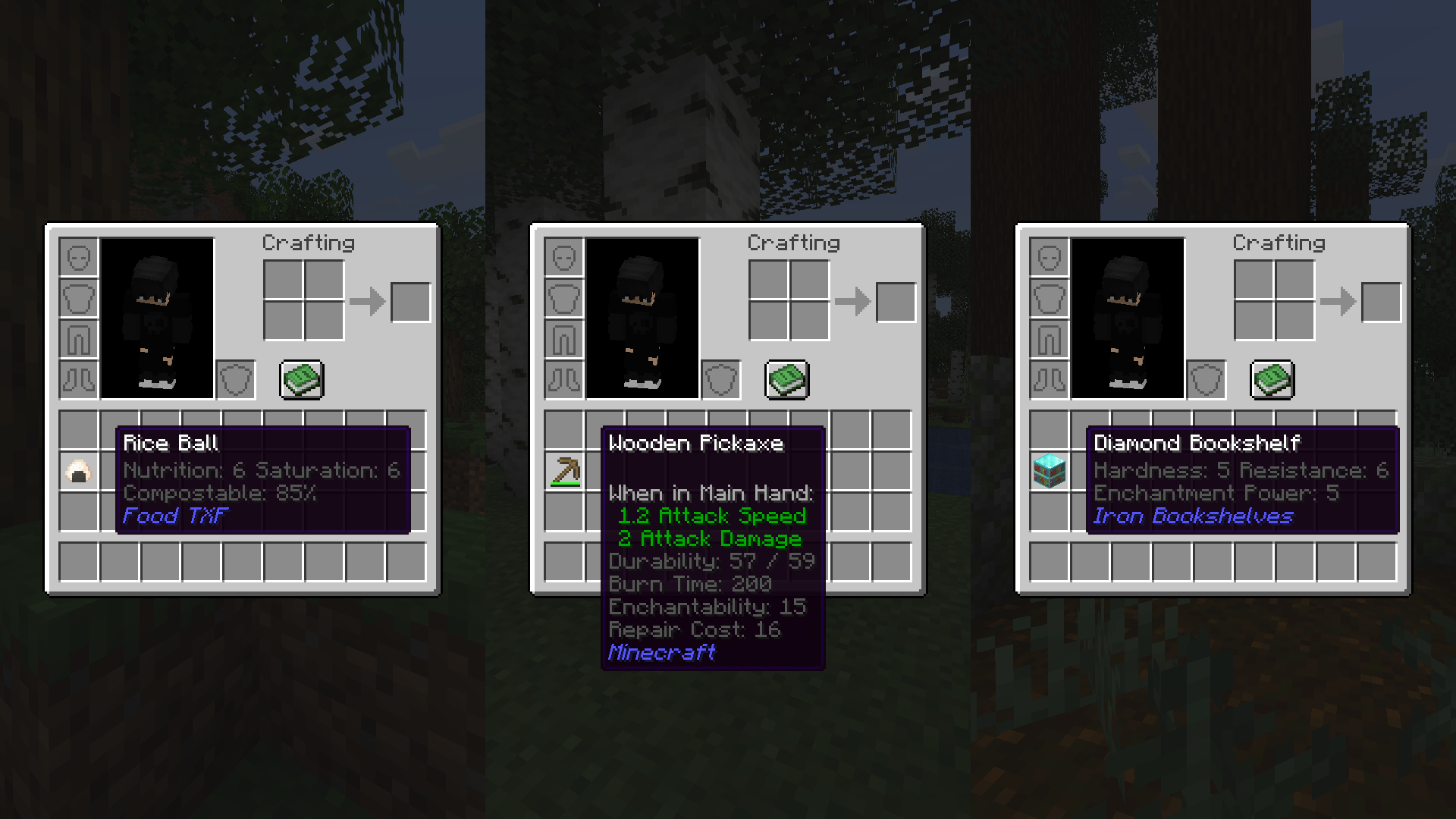
This mod adds:

  • Durability Tooltip => Displays the current and maximum durability of an item
  • Food Values Tooltip => Displays the nutrition and saturation values of food items
  • Compostable Tooltip => Displays the chance of an item being composted in a Composter
  • Burn Time Tooltip => Displays how long an item can burn as fuel, displayed in ticks or seconds
  • Use Cooldown Tooltip => Displays the cooldown time for using an item, displayed in ticks or seconds
  • Enchantability Tooltip => Displays the enchantability level of an item when enchanted on enchanting tables
  • Repair Cost Tooltip => Displays the repair cost of an item when repaired on anvils
  • Strength Tooltip => Displays the hardness (destroy time) and explosion resistance of blocks
  • Enchantment Power Tooltip => Displays the enchantment power bonus a block provides to the enchanting table
  • Mining Level Tooltip => Displays the mining level of a tool
  • Mining Speed Tooltip => Displays the mining speed of a tool
  • Mod Name Tooltip => Displays the name of the mod the item belongs to
  • Tooltips display, colors and other features can be configured in mod config

Fabric/Quilt dependencies:

Project description from CurseForge.

Pick your setup

Tooltips TXF by Minecraft version and loader

Choose the version and loader you play, then open the matching release.

105 available setups

Showing the newest 12 of 28 game versions. Older files are in the list below.

Check the dependencies, then try the file in a copied instance before changing a world you care about.

Recent files

Tooltips TXF versions and loaders

36 of 101 releases match
Clear filters

Looking for an older file? The official CurseForge project page is in Resources.