Minecraft version
Back to mods 
CurseForge · Minecraft mod
Player statistics
Mod to asynchronous synchronize and display player stats from the server on website.
Choose a version Pick your version below, then grab the matching file.
Quick answer
Which Player statistics release should I use?
Latest stable file player-statistics-1.21.4-2.1.1.jar
Game version 1.21.4
Loader Fabric
Player statistics player-statistics-1.21.4-2.1.1.jar targets 1.21.4 with Fabric. The project page does not say whether this file belongs on the client, dedicated server, or both. No extra mods listed for this file.
Where it goes
Is Player statistics required on the client, server, or both?
The project page does not say whether this file belongs on the client, dedicated server, or both.
Client Source doesn’t say
Dedicated server Source doesn’t say
Loader for this release Fabric
Required install it here Optional supported, not mandatory Not supported do not install here Source doesn’t say do not assume
The source does not explicitly classify this release as client-only or server-only.
What else does Player statistics player-statistics-1.21.4-2.1.1.jar need?
player-statistics-1.21.4-2.1.1.jar. Change the file and its required mods may change too.
This file does not list any required mods. Do not add a library just because a different file uses it.
This file does not list any required or optional mods.
Before you install it
Add Player statistics without breaking your instance.
Built for Player statistics player-statistics-1.21.4-2.1.1.jar. Pick another file and the loader, install side or required mods may change.
- 01
Stick to this file
Use player-statistics-1.21.4-2.1.1.jar. It targets 1.21.4 with Fabric; another release may have different loader, side or dependency requirements.
- 02
Bring the mods it needs
This file does not list any required mods. Do not add a library just because a different file uses it.
- 03
Put it on the correct side
The project page does not say whether this file belongs on the client, dedicated server, or both.
- 04
Pick the file you checked
Use the “Get this file” button beside player-statistics-1.21.4-2.1.1.jar. It opens that exact file at the source.
About this project
What does Player statistics add?

The latest version can be found at: Modrinth - Player statistics
Mod provides asynchronous synchronization of player statistics to the local (or external *) database. Thanks to this, these statistics can be easily processed and displayed, for example, on a web page (mod itself contains a website).
Currently the mod can synchronize stats to a local (SQLite) database or to an external (MySQL, MariaDB or PostreSQL) database *. It contains a config file in which you can set how often the stats will be updated, the number of CPU threads on which the processing will run, the website settings and the database settings.
The synchronization will automatically start (if not disabled in the config) 1 minute after the server starts and then every X-minutes, depending on the settings. It is also possible to start synchronization manually with the /pstats sync command, and the current status can be monitored with the /pstats status command (or /pstats help which will show the available commands).
🎉 Now with permissions too!
Mod supports permissions, in order to execute any command from the mod, the user must have pstats permission or permission level 2 or higher (OP works as well). So it's server-safe!
🎉 Now with Bedrock suport too!
Mod also supports Bedrock players from Geyser/Floodgate.
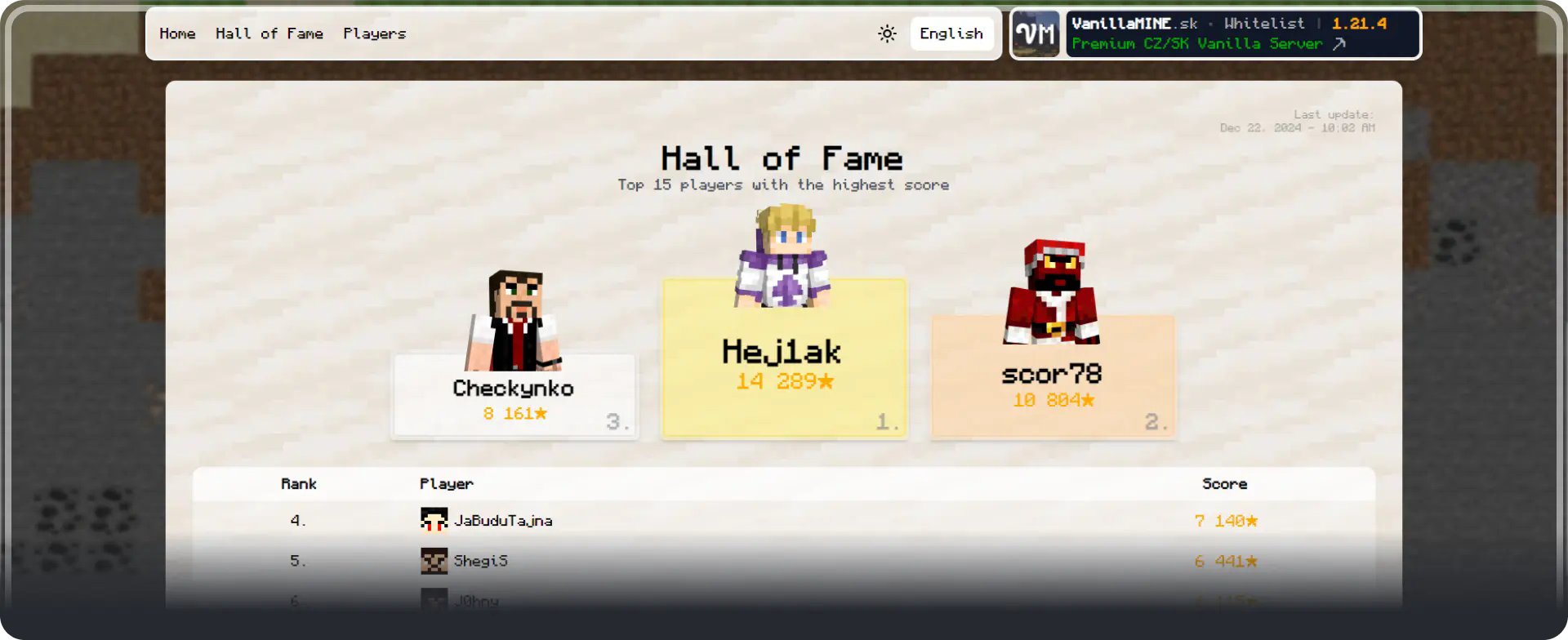
Preview of the website (on mobile too!)
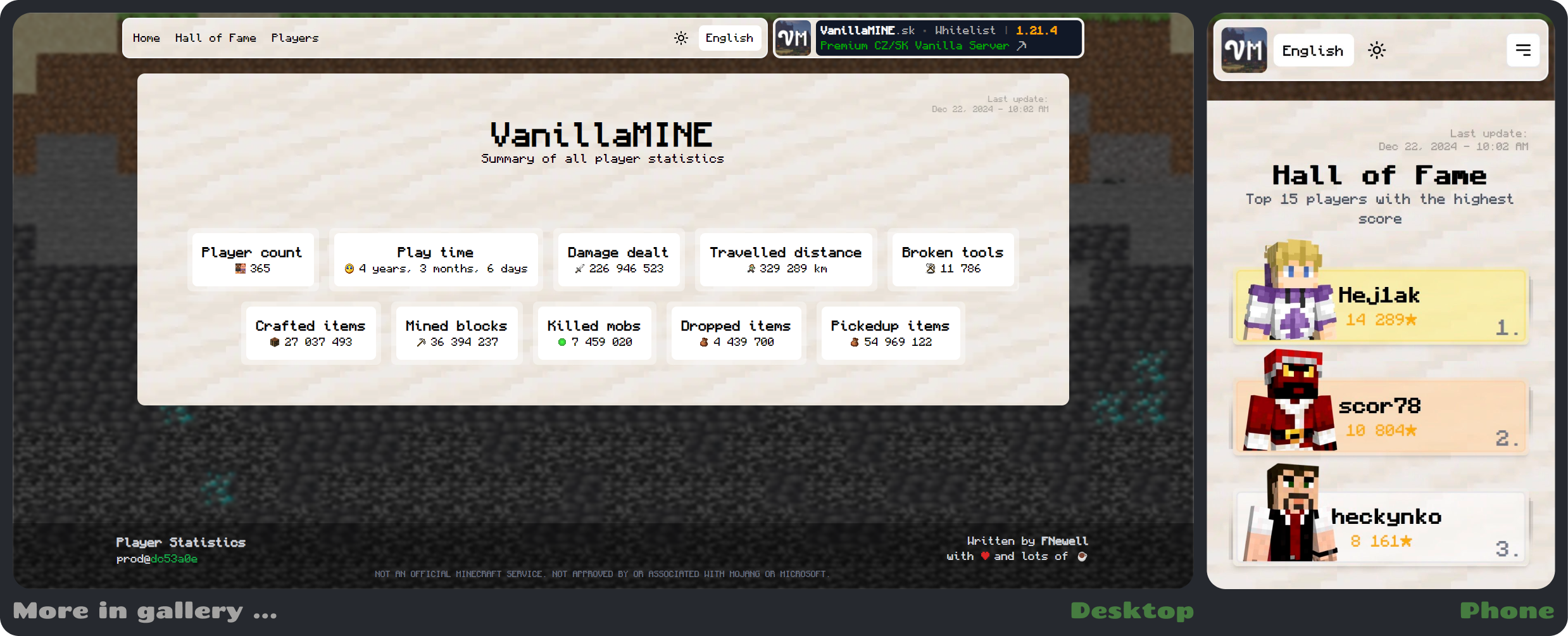
Mod itself includes a simple web page to display the statistics, when using the local database.
The website includes:
- General server statistics (Number of players, Total play time, Total crafted items, …).
- Hall of Fame where you can find TOP 15 players from the server and their points.
- All players with the date when they were last online (+ search and sort).
- Player's page with all available stats, player's ranking, time played, … (+ search and sort).
- The page for the selected stat with the player's ranking (+ search and sort).
- Server icon, description and link to the server page. (The server description is automatically taken from motd and handles minecraft formatting (so
§2will be green,§4red, …).
More info …
- Compatibility - The mod has been tested (and is compatible) with most common server mods such as Ledger, Bluemap, LuckPerms, Worldedit, Essential commands, Banhammer, … If you have any problems, just get in touch on Discord or on Github (Support section).
- Points ⭐ - Each statistic is rated for the TOP 5 players (position 1-5). These points are then summed up and the players with the highest number of points are displayed in the Hall of Fame.
- The first time you run it, the mod will automatically download the necessary drivers for the databases.
TODO (*)
- MOD:
- Synchronization with external databases. (*)
- Reload command.
- Single player functionality. (not a priority)
- Add the ability to view stats (and leaderboard) directly in the game.
- Add support for multiple versions of minecraft (not yet a priority).
- WEBSITE:
- Fix some visual bugs.
- Add dark mode.
- Add other languages (translation page).
- Make page loading more efficient.
- Add live demo website.
 If you want to support the development of this mod, you can contribute any amount on my Ko-fi page or you can share your suggestions and ideas on Discord.
And if you're looking for help or want to report a bug, you can use Discord or Github.
Project description from CurseForge.
Pick your setup
Player statistics by Minecraft version and loader
Choose the version and loader you play, then open the matching release.
Check the dependencies, then try the file in a copied instance before changing a world you care about.
Recent files
Player statistics versions and loaders
player-statistics-1.21.4-2.1.1.jar
16 Jan 2025
Client Source doesn’t say Server Source doesn’t say Dependencies No extras listed Listed on Release listing
Check the 1.21.4 · Fabric setup Fabric1.21.4 release
player-statistics-1.21.4-2.1.0.jar
1 Jan 2025
Client Source doesn’t say Server Source doesn’t say Dependencies No extras listed Listed on Release listing
Check the 1.21.4 · Fabric setup Fabric1.21.4 release
player-statistics-1.21.4-2.0.3.jar
1 Jan 2025
Client Source doesn’t say Server Source doesn’t say Dependencies No extras listed Listed on Release listing
Check the 1.21.4 · Fabric setup Fabric1.21.4 release
player-statistics-1.0.0.jar
1 Jan 2025
Client Source doesn’t say Server Source doesn’t say Dependencies No extras listed Listed on Release listing
Check the 1.21.4 · Fabric setup Fabric1.21.4 alpha
Looking for an older file? The official CurseForge project page is in Resources.
 mod
CurseForge · Minecraft
Pigeon Express
Send letters and item parcels with carrier pigeons, a searchable address book, and personal medieval mailboxes.
 mod
CurseForge · Minecraft
Samurai Dynasty: Legends of Feudal Japan
Feudal Japan RPG: katana combos and parries, ninja parkour, dragon-wing elytra you wear over full armor, sakura forests, shrines and pagodas, and oni, tengu and kitsune to fight or befriend.
 mod
CurseForge · Minecraft
CustomFishing
CustomFishing is a CraftTweaker addon that allows users to add fishing conditions using scripts. For example, you can set a 50% chance of catching an apple when fishing in lava.