Minecraft version
Back to mods 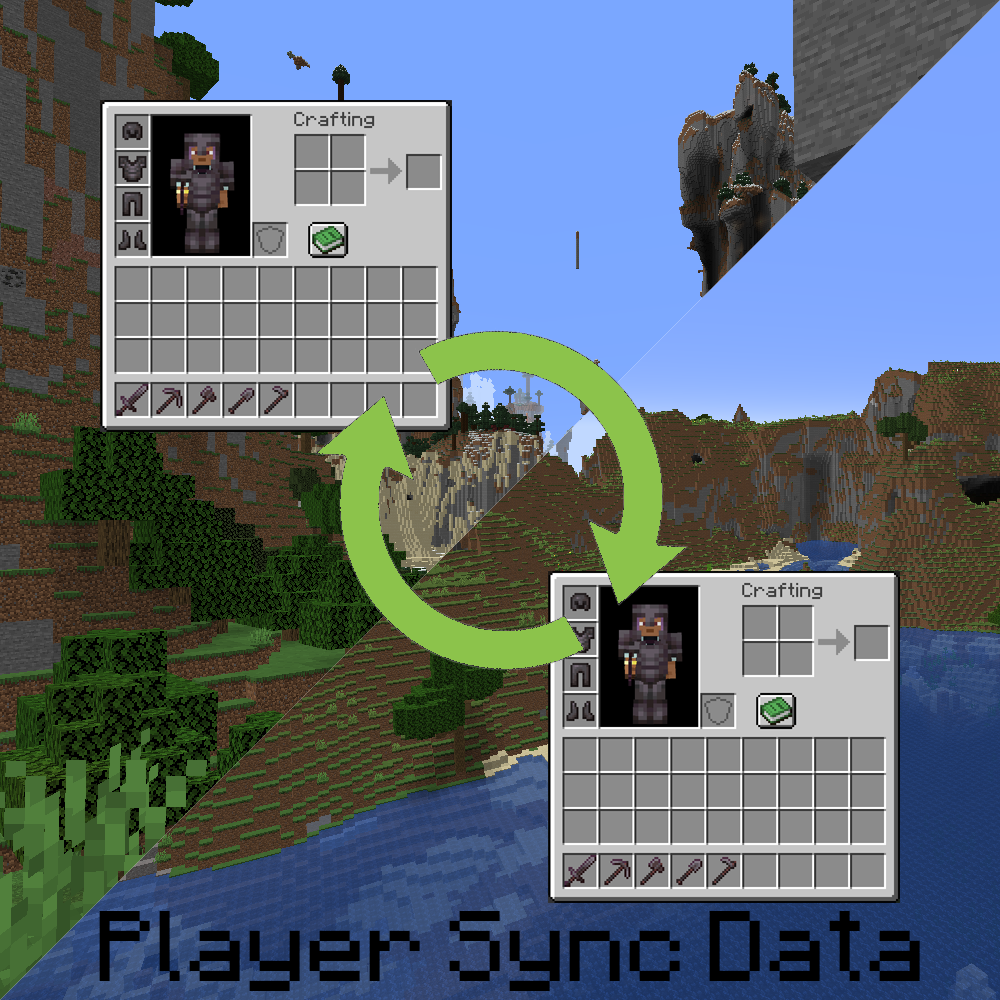
CurseForge · Minecraft mod
Player Sync Data
PlayerSyncData mod allows you to synchronize the inventory of 2 minecraft worlds automatically
Choose a version Pick your version below, then grab the matching file.
Quick answer
Which Player Sync Data release should I use?
Latest stable file PlayerSyncData_1.0.1_1.19.4.jar
Game version 1.19.4
Loader Forge
Player Sync Data PlayerSyncData_1.0.1_1.19.4.jar targets 1.19.4 with Forge. The project page does not say whether this file belongs on the client, dedicated server, or both. No extra mods listed for this file.
Where it goes
Is Player Sync Data required on the client, server, or both?
The project page does not say whether this file belongs on the client, dedicated server, or both.
Client Source doesn’t say
Dedicated server Source doesn’t say
Loader for this release Forge
Required install it here Optional supported, not mandatory Not supported do not install here Source doesn’t say do not assume
The source does not explicitly classify this release as client-only or server-only.
What else does Player Sync Data PlayerSyncData_1.0.1_1.19.4.jar need?
PlayerSyncData_1.0.1_1.19.4.jar. Change the file and its required mods may change too.
This file does not list any required mods. Do not add a library just because a different file uses it.
This file does not list any required or optional mods.
Before you install it
Add Player Sync Data without breaking your instance.
Built for Player Sync Data PlayerSyncData_1.0.1_1.19.4.jar. Pick another file and the loader, install side or required mods may change.
- 01
Stick to this file
Use PlayerSyncData_1.0.1_1.19.4.jar. It targets 1.19.4 with Forge; another release may have different loader, side or dependency requirements.
- 02
Bring the mods it needs
This file does not list any required mods. Do not add a library just because a different file uses it.
- 03
Put it on the correct side
The project page does not say whether this file belongs on the client, dedicated server, or both.
- 04
Pick the file you checked
Use the “Get this file” button beside PlayerSyncData_1.0.1_1.19.4.jar. It opens that exact file at the source.
About this project
What does Player Sync Data add?
PLAYER SYNC INVENTORY The mod "Player Sync Inventory" allows you to synchronize the inventory of players between several minecraft worlds !!!
[EN]
List of examples: - Example 1: Between 2 solo worlds - Example 2: Between 2 minecraft servers - Example 3: Between 1 solo world and a minecraft server
FAQ
Q1: How to install it?
A1: Directly via curseforge with the version of forge indicated on the file name
Q2: Do you have to configure it?
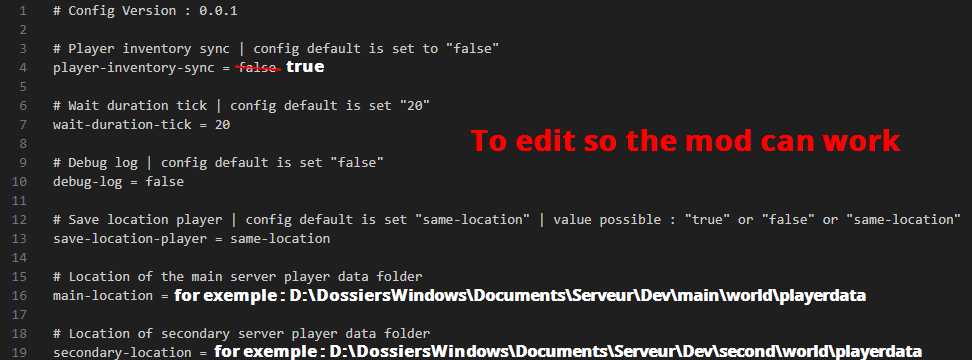
A2: Yes by default in the mod config it is disabled so you have to replace the value "false" with "true" on the line "player-inventory-sync" to enable it BUT you also have to fill in the lines "main-location" and "secondary-location" by directly indicating the location of the "playerdata" folder of the world you wanted to use
Example on my 2 test servers
Location of the player data folder of the main server
main-location = D:\WindowsFolders\Documents\Server\Dev\main\world\playerdata
Location of the player data folder of the secondary server
secondary-location = D:\WindowsFolders\Documents\Server\Dev\second\world\playerdata
Q3: What is the save-location-player option for?
A3: there are 3 ways that the mod manages the player's position between servers
same-location: keep the location in memory of the player's location for each minecraft world
true: synchronizes 100% the locations between each minecraft world [Warning this option is extremely dangerous and risk of death very high !!!]
false: When the player joins the world is teleported to the spawn or their respawn point
Q4: Are modded dimensions supported?
A4: In theory all modded dimensions are supported I tested with the dimension "The Aether"
Q5: Are additional inventories such as Curio Slot or Cosmectic Armor?
A5: Yes I have already added support for this inventory in my mod but hesitated to contact me on the page to tell me about unsynchronized inventories
Q6: I have an error message in the game chat when I join my minecraft world "PlayerSyncData is Disabled
If you had not activated it voluntarily, please ignore the error above
But if it should be activated, make sure to check the "PlayerSyncData" mod config"
A6: As the error message indicates it is because you wanted to activate the mod without filling in the lines of the playerdata file locations and for safety to avoid any crash it is automatically deactivated
[FR]
le mod "Player Sync Inventory" permet de synchroniser l'inventaire des joueurs entre plusieurs monde minecraft ! ! !
List d'exemple :
- Exemple 1 : Entre 2 Monde solo
- Exemple 2 : Entre 2 Serveurs minecraft
- Exemple 3 : Entre 1 Monde Solo et un Serveur minecraft
FAQ
Q1 : Comment l'installer ?
R1 : Directement via curseforge avec la version de forge indiqué sur le nom de fichier
Q2 : Est ce que il faut le configuerer ?
R2 : Oui par defaut dans la config du mod il est désactivé il faut donc remplacé la valeur "false" par "true" sur la ligne "player-inventory-sync" pour l'activé MAIS cependant il faut aussi remplir les lignes "main-location" et "secondary-location" en indiquant directement l'emplacement du dossier "playerdata" du monde que vous voulais utiliser
Exemple sur mes 2 serveur de test
Emplacement du dossier des donnés des joueurs du serveur principale
main-location = D:\DossiersWindows\Documents\Serveur\Dev\main\world\playerdata
Emplacement du dossier des donnés des joueurs du serveur secondaire
secondary-location = D:\DossiersWindows\Documents\Serveur\Dev\second\world\playerdata
Q3 : A quoi sert l'option save-location-player ?
R3 : il y a 3 façon que le mod gère la position du joueur entre les serveurs
same-location : garder l'emplacement en mémoire de l'emplacement du joueur pour chaque monde minecraft
true : a synchronise a 100% les emplacement entre chaque monde minecraft [Attention cet option est extrement dangereux et risque de mort très haut ! ! !]
false : Quand le joueurs rejoind le monde se fait téléporté au spawn ou sont point de réaparision
Q4 : Est ce que les dimensions moddé sont supporté ?
R4 : En Théorie toute les dimensions moddé sont supporté j'ai tester avec la dimensions "The Aether"
Q5 : Est ce que les inventaire supplumentaire comme par exemple Curio Slot ou Cosmectic Armour ?
R5 : Oui j'ai déjà rajouté le support de c'est inventaire dans mon mod mais hésité a me contact sur la page pour m'indiqué des inventaire non synchronisé
Q6 : J'ai un message d'erreur dans le tchat du jeu quand je rejoins mon monde minecraft "PlayerSyncData is Disabled
If you had not activated it voluntarily, please ignore the error above
But if it should be activated, make sure to check the "PlayerSyncData" mod config"
R6 : Comme le message d'erreur indique c'est que vous avait voulu activé le mod sans remplir les lignes des emplacement des ficher playerdata et par sécurité pour évité tout crash il se désactivé automatiquement
Project description from CurseForge.
Pick your setup
Player Sync Data by Minecraft version and loader
Choose the version and loader you play, then open the matching release.
Minecraft version
1.19.4
1 loader buildCheck the dependencies, then try the file in a copied instance before changing a world you care about.
Recent files
Player Sync Data versions and loaders
PlayerSyncData_1.0.1_1.19.4.jar
4 Jan 2025
Client Source doesn’t say Server Source doesn’t say Dependencies No extras listed Listed on Release listing
Check the 1.19.4 · Forge setup 1.19.4Forge release
PlayerSyncData_1.0.1_1.20.1
PlayerSyncData_1.0.1_1.20.1.jar
4 Jan 2025
Client Source doesn’t say Server Source doesn’t say Dependencies No extras listed Listed on Release listing
Check the 1.20.1 · NeoForge setup NeoForge1.20.1Forge release
PlayerSyncData_1.0.0_1.20.1.jar
4 Jan 2025
Client Source doesn’t say Server Source doesn’t say Dependencies No extras listed Listed on Release listing
Check the 1.20.1 · NeoForge setup NeoForge1.20.1Forge release
Looking for an older file? The official CurseForge project page is in Resources.
 mod
CurseForge + Modrinth · Minecraft
Immersive Farming
Addon for immersive engineering focused on agriculture by adding new mechanics and blocks.
 mod
CurseForge · Minecraft
BSP-MOD FIXES
Adjustments to specific mods in the BSP modpack to fix bugs until the author patches them.
 mod
CurseForge · Minecraft
BSP RANKUP
An automatic ranking system designed to work with Luckperms and Forge