Minecraft version
Back to mods 
CurseForge · Minecraft mod
Sushi Craft
Everything From Sushi to Ramen!
Choose a version Pick your version below, then grab the matching file.
Quick answer
Which Sushi Craft release should I use?
Latest stable file Sushi Craft 1.2 (NeoForge)
Game version 1.21.8
Loader NeoForge
Sushi Craft 1.2 (NeoForge) targets 1.21.8 with NeoForge. The project page does not say whether this file belongs on the client, dedicated server, or both. No extra mods listed for this file.
Where it goes
Is Sushi Craft required on the client, server, or both?
The project page does not say whether this file belongs on the client, dedicated server, or both.
Client Source doesn’t say
Dedicated server Source doesn’t say
Loader for this release NeoForge
Required install it here Optional supported, not mandatory Not supported do not install here Source doesn’t say do not assume
The source does not explicitly classify this release as client-only or server-only.
What else does Sushi Craft 1.2 (NeoForge) need?
Sushi Craft 1.2 (NeoForge). Change the file and its required mods may change too.
This file does not list any required mods. Do not add a library just because a different file uses it.
This file does not list any required or optional mods.
Before you install it
Add Sushi Craft without breaking your instance.
Built for Sushi Craft 1.2 (NeoForge). Pick another file and the loader, install side or required mods may change.
- 01
Stick to this file
Use Sushi Craft 1.2 (NeoForge). It targets 1.21.8 with NeoForge; another release may have different loader, side or dependency requirements.
- 02
Bring the mods it needs
This file does not list any required mods. Do not add a library just because a different file uses it.
- 03
Put it on the correct side
The project page does not say whether this file belongs on the client, dedicated server, or both.
- 04
Pick the file you checked
Use the “Get this file” button beside Sushi Craft 1.2 (NeoForge). It opens that exact file at the source.
About this project
What does Sushi Craft add?
SushiCraft is a mod that makes your Minecraft experience significantly more fun by adding sushi, nigiri, ramen, mochi etc. Our mod adds different decorative blocks to make your own sushi restaurant as well!
💡 Key Features:
- New Food (Sushi, Nigiri, Ramen Noodles, Mochi, Rice, Rice Bowl, Egg Fried Rice Bowl, Dango, Sushi Rolls)
- New Blocks (Sushi Meal, Nigiri Meal, Dragon Roll, California Roll, Philadelphia Roll, Futomaki Roll)
- New Decorations (Kanji Banner)
- New Entities (Eel, Shrimp)
- New Effects (Delightful Effect)
📖 Downloading Instructions:
DISCLAIMER! This is a Forge & NeoForge mod, it won't work for Fabric!
- Download the version you prefer.
- Click the windows button on the bottom left hand corner / middle.
- Type %appdata% into the textbox and then click enter.
- Find and open the folder called ".minecraft".
- Open the mods folder and put the mod in there!
📄 Recipes:
Sushi (Food) Recipe:
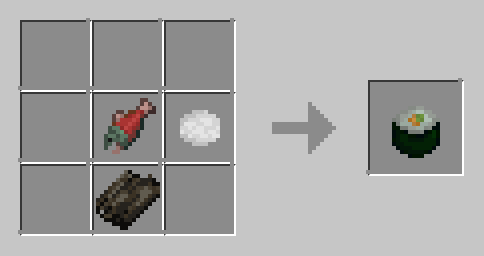
Rice Recipe:
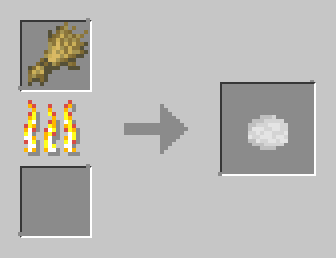
Sushi Meal (Block) Recipe:
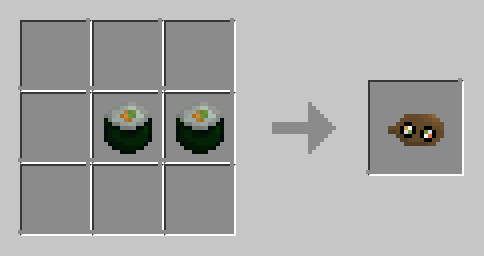
Nigiri (Food) Recipe:
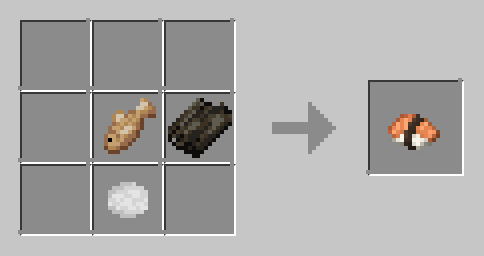
Nigiri Meal (Block) Recipe:
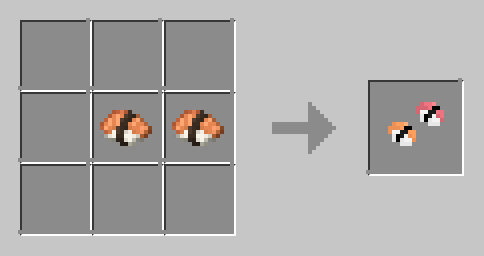
Dragon Roll (Block) Recipe:
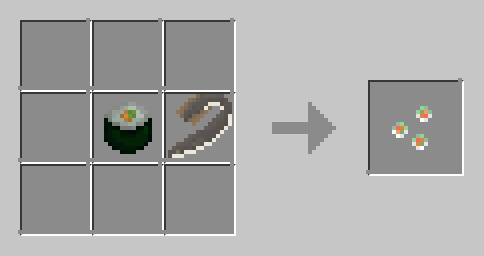
Dragon Roll (Food) Recipe:
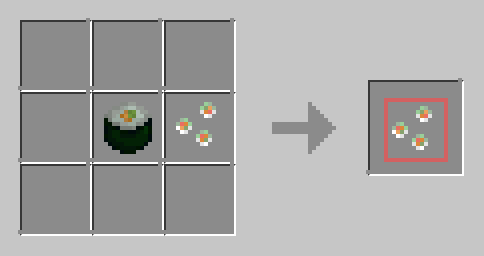
California Roll (Block) Recipe:
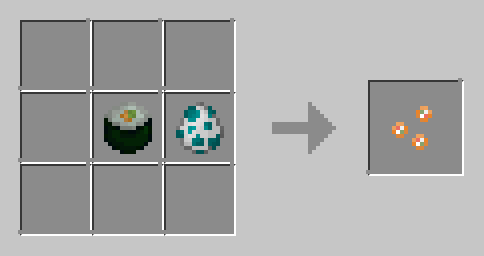
California Roll (Food) Recipe:
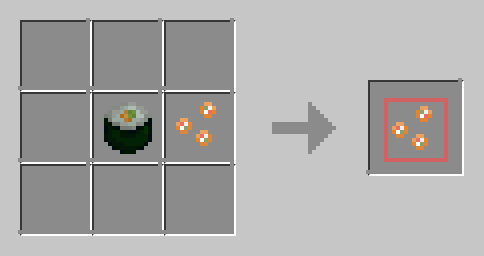
Philadelphia Roll (Block) Recipe:
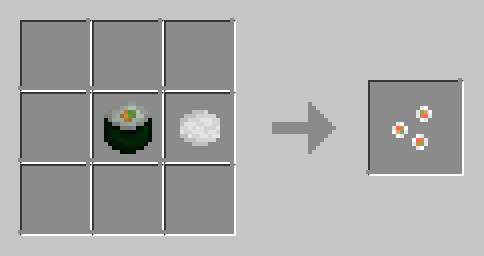
Philadelphia Roll (Food) Recipe:
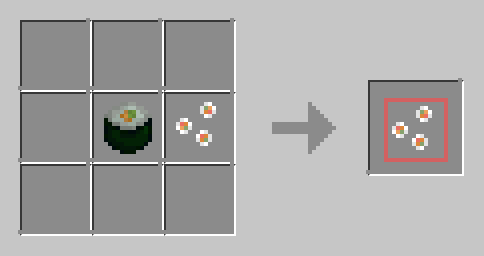
Futomaki Roll (Block) Recipe:
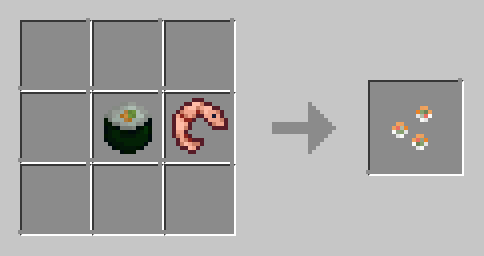
Futomaki Roll (Food) Recipe:
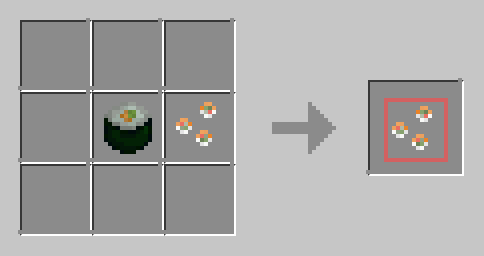
Ramen (Food) Recipe:
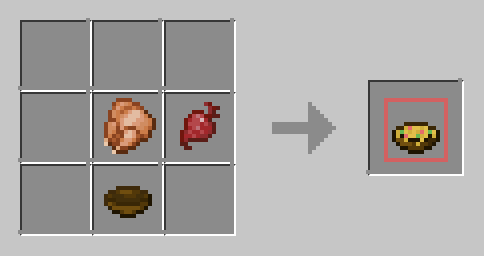
Ramen Noodles (Block) Recipe:
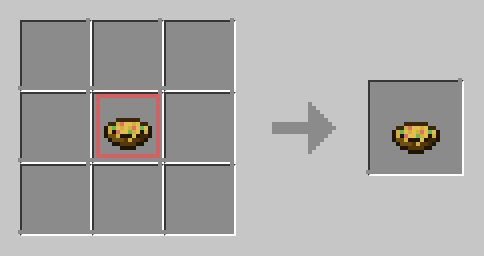
Rice Bowl (Food) Recipe:
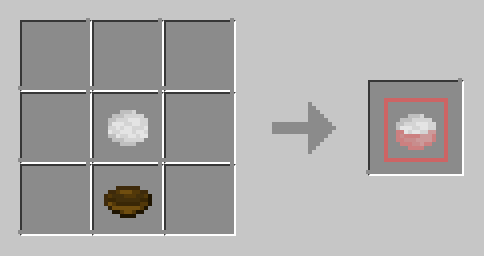
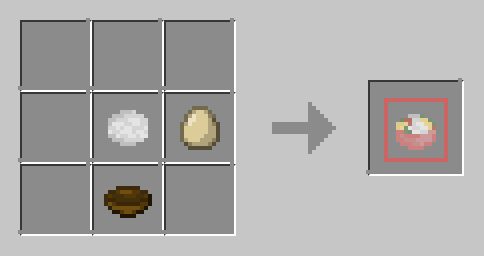
Egg Fried Rice Bowl (Food) Recipe:
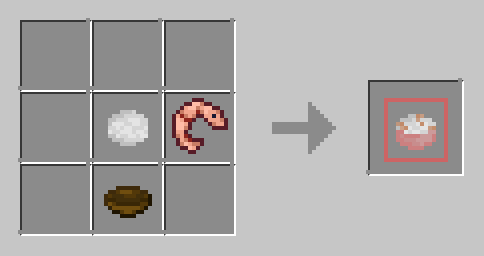
Shrimp Fried Rice (Food) Recipe:
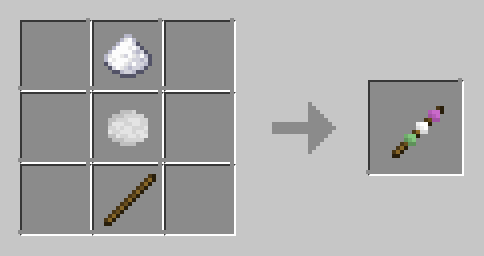
Dango (Food) Recipe:
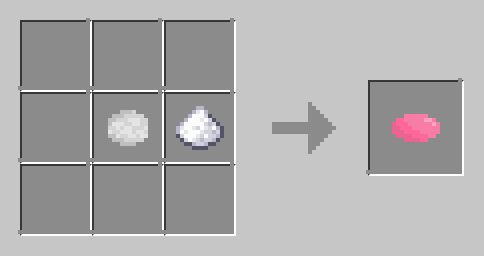
Mochi (Food) Recipe:
Project description from CurseForge.
Pick your setup
Sushi Craft by Minecraft version and loader
Choose the version and loader you play, then open the matching release.
Minecraft version
1.21.4
1 loader buildMinecraft version
1.21.1
1 loader buildMinecraft version
1.20.1
1 loader buildCheck the dependencies, then try the file in a copied instance before changing a world you care about.
Recent files
Sushi Craft versions and loaders
Sushi Craft 1.2 (NeoForge)
sushi_craft-1.2-neoforge-1.21.8.jar
12 Dec 2025
Client Source doesn’t say Server Source doesn’t say Dependencies No extras listed Listed on Release listing
Check the 1.21.8 · NeoForge setup 1.21.8NeoForge release
Sushi Craft 1.2 (Fabric)
sushi_craft-1.2-fabric-1.21.8.jar
12 Dec 2025
Client Source doesn’t say Server Source doesn’t say Dependencies No extras listed Listed on Release listing
Check the 1.21.8 · Fabric setup Fabric1.21.8 release
SushiCraft 1.2 (NeoForge)
sushi_craft-1.2-neoforge-1.21.4.jar
5 Oct 2025
Client Source doesn’t say Server Source doesn’t say Dependencies No extras listed Listed on Release listing
Check the 1.21.4 · NeoForge setup 1.21.4NeoForge release
SushiCraft 1.2 (NeoForge)
sushi_craft-1.2-neoforge-1.21.1.jar
14 Jun 2025
Client Source doesn’t say Server Source doesn’t say Dependencies No extras listed Listed on Release listing
Check the 1.21.1 · NeoForge setup NeoForge1.21.1 release
SushiCraft 1.2 (Forge)
sushi_craft-1.2-forge-1.20.1.jar
14 Jun 2025
Client Source doesn’t say Server Source doesn’t say Dependencies No extras listed Listed on Release listing
Check the 1.20.1 · Forge setup 1.20.1Forge release
SushiCraft Forge 1.20.1
sushi_craft-forge-1.20.1.jar
5 Jan 2025
Client Source doesn’t say Server Source doesn’t say Dependencies No extras listed Listed on Release listing
Check the 1.20.1 · Forge setup 1.20.1Forge release
SushiCraft NeoForge 1.21.1
sushi_craft-neoforge-1.21.1.jar
5 Jan 2025
Client Source doesn’t say Server Source doesn’t say Dependencies No extras listed Listed on Release listing
Check the 1.21.1 · NeoForge setup NeoForge1.21.1 release
Looking for an older file? The official CurseForge project page is in Resources.
 mod
CurseForge · Minecraft
Farmer's Delight: HoE
Farmer's Delight: Heart of Europe – Central European cuisine for Farmer's Delight: goat milk, cheese and more.
 mod
CurseForge · Minecraft
Raw's Food Balance
Incentivizes players to eat more varied food. Changes how fast food restores hp and how fast saturation is dropped.
 mod
CurseForge + Modrinth · Minecraft
Minestuck Compat
A Minestuck addon that provides grist costs and combination recipes for various mods.