Minecraft version
Back to mods 
CurseForge · Minecraft mod
GuideME
A guidebook toolkit for mods and modpack makers alike with comfortable markdown formatting, and live 3d scenes!
Choose a version Pick your version below, then grab the matching file.
Quick answer
Which GuideME release matches 1.20.4 NeoForge?
Best match for your filters GuideME 20.4.6
Game version 1.20.4
Loader NeoForge
GuideME 20.4.6 targets 1.20.4 with NeoForge. The project page does not say whether it belongs on the client. The project page does not say whether it belongs on the dedicated server. No extra mods listed for this file.
Where it goes
Is GuideME required on the client, server, or both?
The project page does not say whether it belongs on the client. The project page does not say whether it belongs on the dedicated server.
Client Source doesn’t say
Dedicated server Source doesn’t say
Loader for this release NeoForge
Required install it here Optional supported, not mandatory Not supported do not install here Source doesn’t say do not assume
The source does not explicitly classify this release as client-only or server-only.
What else does GuideME 20.4.6 need?
GuideME 20.4.6 on 1.20.4 NeoForge. Every mod below is checked against that same setup.
This file does not list any required mods. Do not add a library just because a different file uses it.
This file does not list any required or optional mods.
Before you install it
Add GuideME without breaking your instance.
Built for GuideME 20.4.6 on 1.20.4 NeoForge. Pick another file and the loader, install side or required mods may change.
- 01
Stick to this file
Use GuideME 20.4.6. It targets 1.20.4 with NeoForge; another release may have different loader, side or dependency requirements.
- 02
Bring the mods it needs
This file does not list any required mods. Do not add a library just because a different file uses it.
- 03
Put it on the correct side
The project page does not say whether it belongs on the client. The project page does not say whether it belongs on the dedicated server.
- 04
Pick the file you checked
Use the “Get this file” button beside GuideME 20.4.6. It opens that exact file at the source.
About this project
What does GuideME add?
GuideME
This project offers the foundation for your mods or modpacks guidebook. Based on the technology powering Applied Energistics 2s guidebook, it allows you to write your guide in simple Markdown, while embedding 3d scenes straight from structure files.
For players, guides based on GuideME offer:
- Smooth scrolling goodness
- Content being front and center, with an advanced text layout engine supporting reflow and inline elements
- Interactive 3D scenes with annotations, intuitively illustrating concepts from your mod
- Cross-linking between topics and quick information in link tooltips
- Showing inline-recipes in your guidebook "JEI-Style"
- Offers the ability to "hold G" to quickly jump to the relevant guidebook page in any item tooltip
For modders, it offers a rich extensibility API, allowing you to:
- Add custom inline or block tags to Markdown, backed by a custom Widget system
- Extend the recipe rendering to display your custom recipes in the guide
- Use custom Markdown front-matter to easily add arbitrary information to guidebook pages
- Use custom indices to quickly find pages based on custom attributes
- Allow resource packs or addons to add their own content to your guide
Documentation
Documentation for content authors and modders can be found on our website guideme.appliedenergistics.org, and you can reach out to us directly on the AE2 Discord.
Example
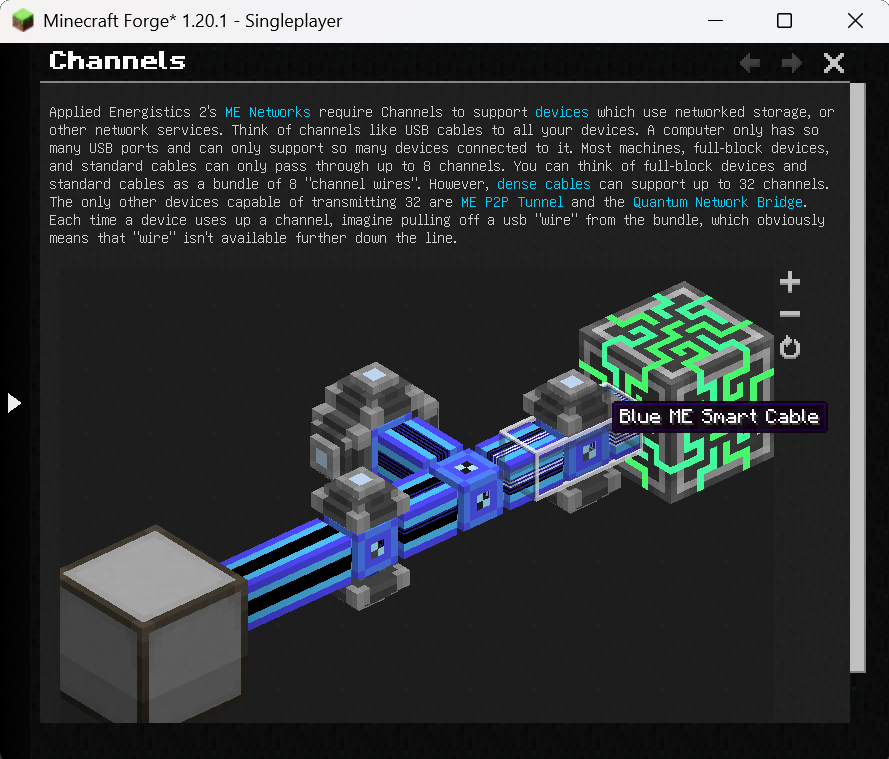
The following is an example page from the AE2 guidebook (source).
---
navigation:
  parent: ae2-mechanics/ae2-mechanics-index.md
  title: Channels
  icon: controller
---

# Channels

Applied Energistics 2's [ME Networks](me-network-connections.md) require
Channels to support [devices](../ae2-mechanics/devices.md) which use networked storage, or other network
services. Think of channels like USB cables to all your devices. A computer only has so many USB ports and can only support
so many devices connected to it. Most machines, full-block devices, and standard cables can only pass through
up to 8 channels. You can think of full-block devices and standard cables as a bundle of 8 "channel wires". However, [dense cables](../items-blocks-machines/cables.md#dense-cable) can support up
to 32 channels. The only other devices capable of transmitting 32 are <ItemLink id="me_p2p_tunnel" />
and the [Quantum Network Bridge](../items-blocks-machines/quantum_bridge.md). Each time a device uses up a channel, imagine pulling off a usb "wire" from
the bundle, which obviously means that "wire" isn't available further down the line.

<GameScene zoom="7" interactive={true}>
  <ImportStructure src="../assets/assemblies/channel_demonstration_1.snbt" />
</GameScene>
Project description from CurseForge.
Pick your setup
GuideME by Minecraft version and loader
Choose the version and loader you play, then open the matching release.
Minecraft version
26.1.1
1 loader buildMinecraft version
26.1-snapshot-1
1 loader buildMinecraft version
26.1-snapshot
1 loader buildMinecraft version
1.21.11
1 loader buildMinecraft version
1.21.10
1 loader buildMinecraft version
1.21.8
1 loader buildMinecraft version
1.21.5
1 loader buildMinecraft version
1.21.1
1 loader buildMinecraft version
1.20.4
1 loader buildMinecraft version
1.20.1
1 loader buildCheck the dependencies, then try the file in a copied instance before changing a world you care about.
Recent files
GuideME versions and loaders
GuideME 20.4.6
guideme-20.4.6.jar
19 Oct 2025
Client Source doesn’t say Server Source doesn’t say Dependencies No extras listed Listed on Release listing
Check the 1.20.4 · NeoForge setup 1.20.4NeoForge release
GuideME 20.4.5
guideme-20.4.5.jar
21 Jun 2025
Client Source doesn’t say Server Source doesn’t say Dependencies No extras listed Listed on Release listing
Check the 1.20.4 · NeoForge setup NeoForge1.20.4 release
GuideME 20.4.4
guideme-20.4.4.jar
19 Jun 2025
Client Source doesn’t say Server Source doesn’t say Dependencies No extras listed Listed on Release listing
Check the 1.20.4 · NeoForge setup NeoForge1.20.4 release
GuideME 20.4.3
guideme-20.4.3.jar
15 Jun 2025
Client Source doesn’t say Server Source doesn’t say Dependencies No extras listed Listed on Release listing
Check the 1.20.4 · NeoForge setup NeoForge1.20.4 release
GuideME 20.4.2
guideme-20.4.2.jar
2 May 2025
Client Source doesn’t say Server Source doesn’t say Dependencies No extras listed Listed on Release listing
Check the 1.20.4 · NeoForge setup NeoForge1.20.4 release
GuideME 20.4.1
guideme-20.4.1.jar
2 May 2025
Client Source doesn’t say Server Source doesn’t say Dependencies No extras listed Listed on Release listing
Check the 1.20.4 · NeoForge setup NeoForge1.20.4 release
Looking for an older file? The official CurseForge project page is in Resources.
 mod
mod CurseForge + Modrinth · Minecraft
Safra
Don’t mess with the server Play Minecraft with your friends in 2 clicks
 mod
mod Modrinth · Minecraft
Ceketrum Enough Items
Ceketrum Enough Items (CEI) is a sleek, highly optimized alternative to traditional recipe viewers, featuring a modern flat dark user interface.
 mod
mod CurseForge · Minecraft
e4steam
e4steam is an e4mc fork that lets you play Minecraft with friends over the Steam network.