Back to mods
F-Tech project artwork

CurseForge · Minecraft mod

F-Tech

Tech mod with useful machines and items that don't break the game balance

Choose a version Pick your version below, then grab the matching file.

Quick answer

Which F-Tech release should I use?

Updated 3 months ago
beta file F-Tech-0.0.21.jar
Game version 1.21.1
Loader NeoForge

F-Tech-0.0.21.jar targets 1.21.1 with NeoForge. The project page does not say whether this file belongs on the client, dedicated server, or both. All 1 required mods have matching files.

Where it goes

Is F-Tech required on the client, server, or both?

The project page does not say whether this file belongs on the client, dedicated server, or both.

Client Source doesn’t say
Dedicated server Source doesn’t say
Loader for this release NeoForge
Required install it here Optional supported, not mandatory Not supported do not install here Source doesn’t say do not assume

The source does not explicitly classify this release as client-only or server-only.

What else does F-Tech-0.0.21.jar need?

F-Tech-0.0.21.jar. Change the file and its required mods may change too.

All 1 required mods have matching files

Install Satako library first. We found matching files for this game-version and loader setup.

Satako library Needed by F-Tech-0.0.21.jar
required
Matching file found Matched file: satako-neoforge-1.21.1-8.0.171.jar
We only count dependency files that match this setup. A file for another loader does not fill the gap.

Before you install it

Add F-Tech without breaking your instance.

Built for F-Tech-0.0.21.jar. Pick another file and the loader, install side or required mods may change.

  1. 01

    Stick to this file

    Use F-Tech-0.0.21.jar. It targets 1.21.1 with NeoForge; another release may have different loader, side or dependency requirements.

  2. 02

    Bring the mods it needs

    Install Satako library first. We found matching files for this game-version and loader setup.

  3. 03

    Put it on the correct side

    The project page does not say whether this file belongs on the client, dedicated server, or both.

  4. 04

    Pick the file you checked

    Use the “Get this file” button beside F-Tech-0.0.21.jar. It opens that exact file at the source.

About this project

What does F-Tech add?

F-Tech is an auxiliary tech mod that adds machines, generators, blocks and items that help in various ways.

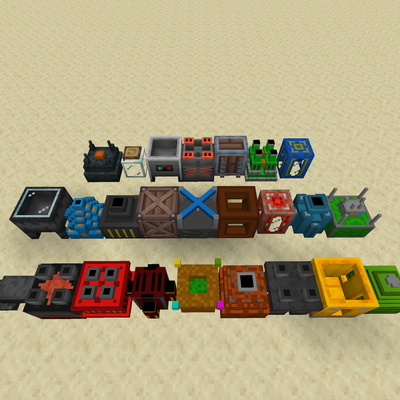
Some of unique blocks and items are highlighted below:

  • Potion station - can brew 3-step potions
  • Trading station - trades with villagers remotely from single GUI
  • Fine crating table - shows craftable items, allows to quickly craft them
  • Drainer - deletes liquids
  • Miner's TNT - breaks all blocks except ores, bigger explosion radius
  • Teleporter - a teleportation solution with public and private channels
  • Redstone cable - has toggleable connections per every side
  • 6 power generators for any taste
  • Spawner transporter
  • Multitools - combined pickaxe, shovel, axe and hoe
  • Step boost - an enchantment that increases the step height, improving navigation

Blocks and machines:

  • Combustion generator
  • Food-based generator
  • Lava-based generator
  • Biofuel-based generator - uses data-driven biofuel
  • Honeycomb-based generator
  • Liquid tank
  • Energy cable
  • Fluid pipe
  • Item pipe
  • Redstone cable - has configurable sides, use wrenches to open setting screen
  • Pump
  • Fluid extractor
  • Item importer - imports items into storage connected with item pipes
  • Furnace heater - accelerates furnaces up to 3 times
  • 3D printer - machine used to make items and blocks from this mod
  • Enchantment extractor
  • Bottle filler
  • Buffer
  • Miner's TNT - bigger explosion size, deletes mundane blocks, doesn't explode ore blocks
  • Accumulator
  • Block breaker
  • Drill - used by drill controller
  • Drill bit - used by drill
  • Drill controller - uses drills to break blocks
  • Box tier 1 - item container with 54 slots with increased explosion resistance
  • Box tier 2 - item container with 72 slots with increased explosion resistance
  • Box tier 3 - item container with 96 slots with increased explosion resistance
  • Teleporter - teleports to other teleporters. Uses energy
  • Experience bank
  • Recycler - breaks down some items into other items
  • Tree harvester - plants saplings and harvests trees. Redstone sensitive
  • Ore refiner - uses gravel to process ores
  • Breeder - breeds animals. Redstone sensitive
  • Chunk keeper - keeps 1 chunk loaded
  • Item exporter - exports designated items from the storage connected with item pipes
  • Crop harvester - harvests and replants crops. Work area is the size of a farm plot. Redstone sensitive
  • Fine crafting table - shows what items the player can craft and allows it

Items:

  1. Drainer - deletes fluids
  2. TNT gun - shoots TNT
  3. Titanium wrench - can rotate blocks, can break blocks of this mod instantly
  4. Box upgrade 1 to 2
  5. Box upgrade 2 to 3
  6. Steel tools and sword
  7. Titanium tools and sword - stand between iron and diamond
  8. Iron, diamond and netherite multitool - a combination of hoe, axe, pickaxe and shovel
  9. Friendly mob container - can be used to transport friendly mobs
  10. Universal mob container - can be used to transport any mob
  11. Spawner transporter - can be used to transport spawners

To obtain most of this mod's items, you will need to use 3D printer. To craft 3D printer, you will need titanium ingots. Titanium production is a complex process - use JEI to see the recipe chain or take a look at the info webpage. 3D printer needs energy, which you can supply via Combustion generator.

Biofuel is defined by file "f_tech/data_maps/item/biofuel". Default items: mushrooms, seeds, leaves, saplings, flowers, cactus, bamboo, cocoa beans, kelp, nether wart, sugar cane.

More info on the website.

If you are looking for integration with other mods, check out https://www.curseforge.com/minecraft/mc-mods/f-tech-mod-integration

Project description from CurseForge.

Pick your setup

F-Tech by Minecraft version and loader

Choose the version and loader you play, then open the matching release.

1 available setups

Check the dependencies, then try the file in a copied instance before changing a world you care about.

Recent files

F-Tech versions and loaders

17 of 17 releases match

Looking for an older file? The official CurseForge project page is in Resources.