Minecraft version
Back to mods 
CurseForge · Minecraft mod
Coordinate HUD
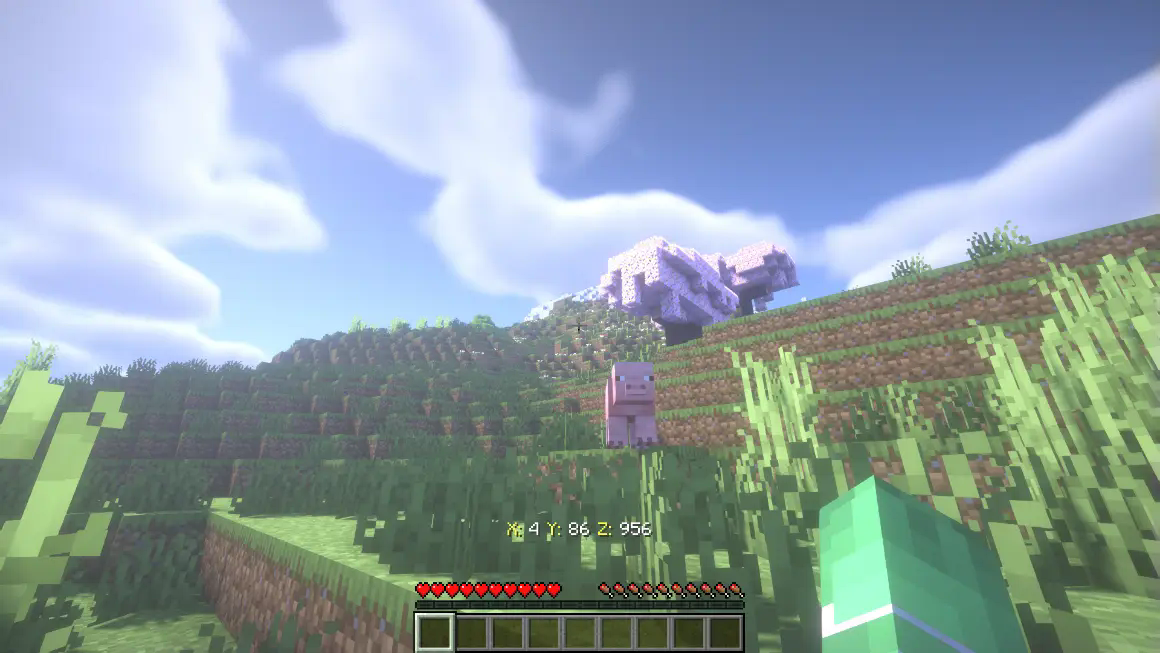
Adds a coordinate HUD to your interface
Choose a version Pick your version below, then grab the matching file.
Quick answer
Which Coordinate HUD release should I use?
Latest stable file coordinates-hud-0.1.jar
Game version 1.21, 1.21.8, 1.21.5
Loader Fabric, Forge, NeoForge
Coordinate HUD coordinates-hud-0.1.jar targets 1.21, 1.21.8, 1.21.5 with Fabric, Forge, NeoForge. The project page does not say whether this file belongs on the client, dedicated server, or both. No extra mods listed for this file.
Where it goes
Is Coordinate HUD required on the client, server, or both?
The project page does not say whether this file belongs on the client, dedicated server, or both.
Client Source doesn’t say
Dedicated server Source doesn’t say
Loader for this release Fabric, Forge, NeoForge
Required install it here Optional supported, not mandatory Not supported do not install here Source doesn’t say do not assume
The source does not explicitly classify this release as client-only or server-only.
What else does Coordinate HUD coordinates-hud-0.1.jar need?
coordinates-hud-0.1.jar. Change the file and its required mods may change too.
This file does not list any required mods. Do not add a library just because a different file uses it.
This file does not list any required or optional mods.
Before you install it
Add Coordinate HUD without breaking your instance.
Built for Coordinate HUD coordinates-hud-0.1.jar. Pick another file and the loader, install side or required mods may change.
- 01
Stick to this file
Use coordinates-hud-0.1.jar. It targets 1.21, 1.21.8, 1.21.5 with Fabric, Forge, NeoForge; another release may have different loader, side or dependency requirements.
- 02
Bring the mods it needs
This file does not list any required mods. Do not add a library just because a different file uses it.
- 03
Put it on the correct side
The project page does not say whether this file belongs on the client, dedicated server, or both.
- 04
Pick the file you checked
Use the “Get this file” button beside coordinates-hud-0.1.jar. It opens that exact file at the source.
About this project
What does Coordinate HUD add?

Compass HUD is a lightweight and highly customizable mod that adds a HUD to constantly display the player's XYZ coordinates on the screen. Perfect for explorers, builders, and adventurers, this mod enhances usability and reduces the need to rely on commands like F3.

Compatibility
Seamlessly integrates with MiniMap mods like:
- JourneyMap;
- Xaero’s Map.
**Performance-**friendly****:
- Perfect for builders: Keep track of exact coordinates for complex projects.
- Essential for survival players: Easily find spawners, portals, or points of interest with precise coordinates.
- Convenient and intuitive: Forget the heavy F3 debug interface.
Download Player Coordinate HUD today and elevate your Minecraft gameplay! Available for all major Minecraft versions.
Success Strategy:
Optimized keywords: Include terms like HUD, coordinates, exploration, and lightweight in the description and tags
Website
If you have any questions, need assistance, or simply want to share your thoughts or feedback, feel free to reach out. We're always here to help and would love to hear from you – whether you're looking for answers, suggestions, or just want to let us know how we're doing.

Project description from CurseForge.
Pick your setup
Coordinate HUD by Minecraft version and loader
Choose the version and loader you play, then open the matching release.
Minecraft version
1.21.9
4 loader buildsMinecraft version
1.21.8
4 loader buildsMinecraft version
1.21.7
4 loader buildsMinecraft version
1.21.6
4 loader buildsMinecraft version
1.21.5
4 loader buildsMinecraft version
1.21.4
4 loader buildsMinecraft version
1.21.3
4 loader buildsMinecraft version
1.21.2
4 loader buildsMinecraft version
1.21.1
4 loader buildsMinecraft version
1.21
4 loader buildsCheck the dependencies, then try the file in a copied instance before changing a world you care about.
Recent files
Coordinate HUD versions and loaders
coordinates-hud-0.1.jar
10 Jan 2025
Client Source doesn’t say Server Source doesn’t say Dependencies No extras listed Listed on Release listing
Check the 1.21.10 · Fabric setup 1.21Fabric1.21.81.21.5 release
Looking for an older file? The official CurseForge project page is in Resources.
 mod
CurseForge + Modrinth · Minecraft
Throwing Disc Backport
Mod that adds the upcoming throwing disc weapon in Minecraft, backporting it to previous versions! Available for Forge / Fabric / Neoforge
 mod
CurseForge + Modrinth · Minecraft
Mob Lootbags
Mobs drop loot bags in six tiers from Common to Mythic, with loot previews, a Bag Opener, a Loot Recycler and risky Cursed, Hourglass and Locked bags.
 mod
CurseForge · Minecraft
Text/item Display Editor
Spawn and edit Text/item Display entities in a snap—then craft your own map with floating text/display entity!